
1. Introduction
The TOZO S3 Smart Watch is a versatile wearable device designed to enhance your daily life with its advanced features. It offers Bluetooth calling capabilities, comprehensive fitness tracking, and various health monitoring functions, all accessible via a vibrant 1.83-inch HD color touch screen. This manual provides detailed instructions to help you set up, operate, maintain, and troubleshoot your TOZO S3 Smart Watch.
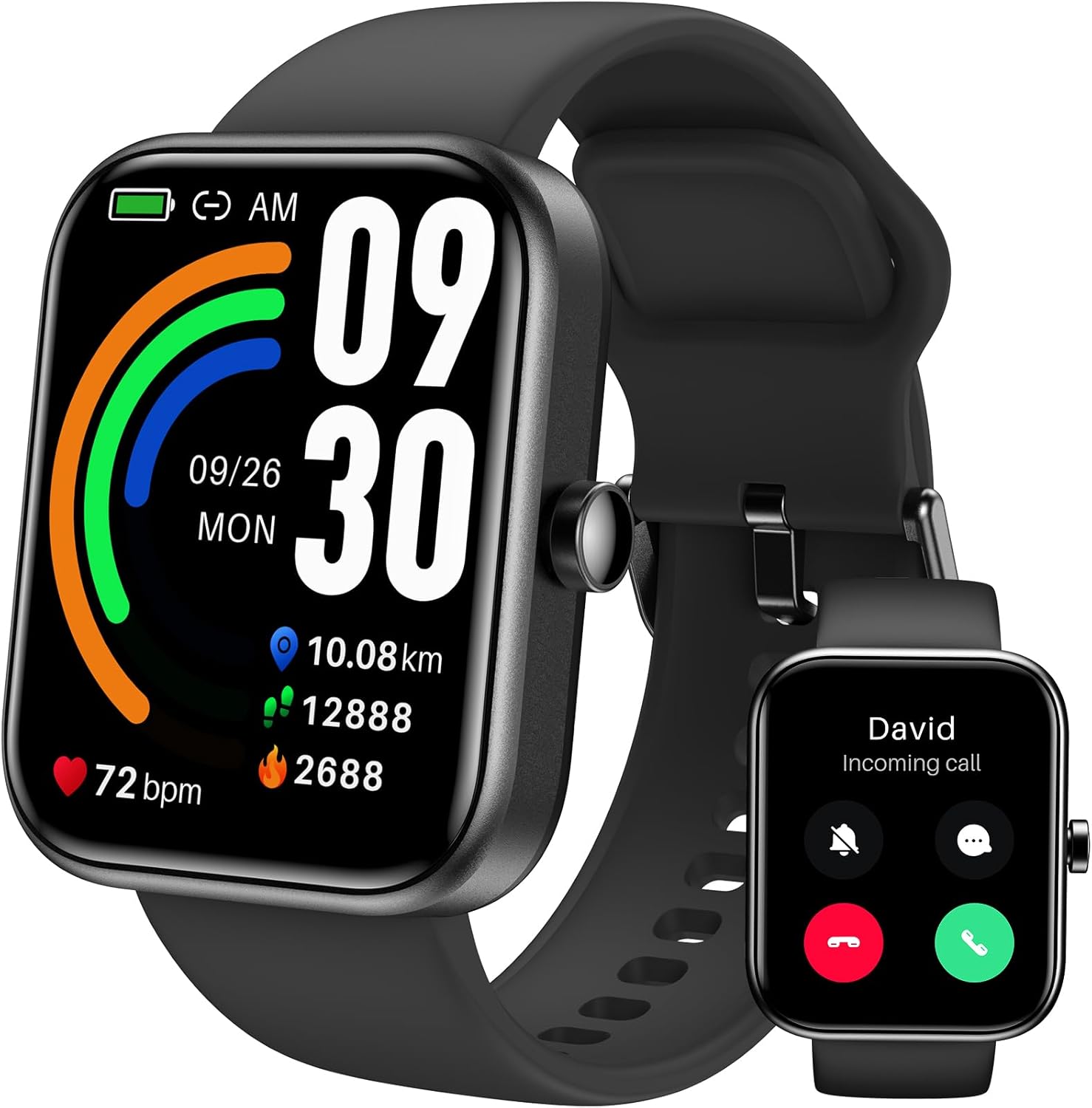
Figure 1.1: The TOZO S3 Smart Watch, showcasing its sleek design and large display.
2. Setup
2.1. Initial Charging
Before first use, fully charge your TOZO S3 Smart Watch. Connect the magnetic charging cable to the charging points on the back of the watch and plug the USB end into a compatible power adapter (not included) or a computer's USB port. A full charge typically takes approximately 2 hours.

Figure 2.1: The TOZO S3 Smart Watch connected to its magnetic charging cable.
2.2. App Download and Pairing
To unlock the full functionality of your TOZO S3 Smart Watch, download the "TOZO Health" app from the App Store (for iOS devices) or Google Play Store (for Android devices). Once installed:
- Enable Bluetooth on your smartphone.
- Open the "TOZO Health" app and follow the on-screen instructions to create an account or log in.
- Tap on "Add Device" or a similar option within the app to search for your TOZO S3.
- Select "TOZO S3" from the list of discovered devices to initiate the pairing process. Confirm the pairing request on both your watch and smartphone if prompted.
3. Operating Instructions
3.1. Display and Navigation
The TOZO S3 features a 1.83-inch HD color touch screen for intuitive navigation. Swipe left, right, up, or down to access different functions and menus. The physical button on the side of the watch typically serves as a home button or a shortcut to the main menu.
3.2. Bluetooth Calling
With its built-in microphone and speaker, the TOZO S3 allows you to make and answer calls directly from your wrist when connected to your smartphone via Bluetooth. Access the call function from the watch's menu to dial numbers or view recent calls.

Figure 3.1: The TOZO S3 Smart Watch displaying an incoming call, allowing for direct answering or rejection.
3.3. Smart Notifications
Receive real-time notifications for text messages, social media alerts, and other app notifications directly on your watch. Ensure notification permissions are enabled in the "TOZO Health" app and your phone's settings.

Figure 3.2: The TOZO S3 Smart Watch displaying various message notifications from connected applications.
3.4. Fitness Tracking
The TOZO S3 automatically tracks your daily steps, distance traveled, and calories burned. It supports over 100 sports modes, allowing you to monitor specific activities and view detailed statistics in the app.

Figure 3.3: A user engaging in outdoor cycling, with the TOZO S3 Smart Watch displaying real-time activity data.
3.5. Health Monitoring
Monitor your well-being with continuous recording of sleep patterns, 24-hour heart rate tracking, and blood oxygen saturation measurement. The watch also provides stress level measurement to help you manage your daily health.

Figure 3.4: The TOZO S3 Smart Watch providing detailed sleep analysis, including deep sleep, light sleep, REM, and wake-up times.
3.6. Customization and Additional Features
Personalize your TOZO S3 with multiple customizable watch faces available through the "TOZO Health" app. The watch also supports music player control, local weather forecasts, and various reminders (e.g., stand reminder, drink reminder).

Figure 3.5: A selection of customizable watch faces available for the TOZO S3 Smart Watch, allowing users to personalize their device.
4. Maintenance
4.1. Cleaning Your Watch
Regularly clean your TOZO S3 Smart Watch and its band to prevent skin irritation and maintain optimal performance. Use a soft, lint-free cloth to wipe the screen and body. For the band, a mild soap and water solution can be used, ensuring it is thoroughly dried afterward.
4.2. Water Resistance (IP68)
The TOZO S3 Smart Watch has an IP68 waterproof rating, meaning it is resistant to dust and can withstand immersion in water up to 1.5 meters for 30 minutes. It is suitable for daily use, such as hand washing, rain, or sweating during exercise. However, it is not recommended for hot showers, saunas, or diving, as steam and high water pressure can compromise the seal.
4.3. Battery Care
To maximize battery lifespan, avoid fully discharging the watch frequently. Charge it when the battery level is low. Store the watch in a cool, dry place when not in use for extended periods.
5. Troubleshooting
- Watch not turning on: Ensure the watch is fully charged. If it still doesn't turn on, try holding the side button for 10-15 seconds.
- Cannot pair with phone: Make sure Bluetooth is enabled on your phone and the watch is within range. Restart both the watch and your phone. Check if the "TOZO Health" app has necessary permissions.
- Inaccurate health data: Ensure the watch is worn snugly on your wrist, not too tight or too loose. Clean the sensors on the back of the watch. Environmental factors and individual physiology can affect readings.
- Notifications not received: Verify that notifications are enabled in both the "TOZO Health" app and your phone's system settings for the relevant applications. Ensure the watch is connected via Bluetooth.
- Short battery life: Reduce screen brightness, disable unnecessary features like continuous heart rate monitoring if not needed, and limit the number of notifications.
6. Specifications
| Feature | Detail |
|---|---|
| Model Number | S3 |
| Display Size | 1.83 inches |
| Resolution | 240*284 ppi |
| Battery Capacity | 300mAh |
| Typical Usage Battery Life | Up to 10 days |
| Waterproof Rating | IP68 (50m waterproof) |
| Product Dimensions | 6.42 x 4.49 x 0.67 inches |
| Item Weight | 4.6 ounces |
| Material | ABS |
7. Warranty and Support
For warranty information, technical support, or any inquiries regarding your TOZO S3 Smart Watch, please refer to the official TOZO website or contact TOZO customer service directly. Contact details can typically be found on the product packaging or the TOZO official support page.