
1. Introduction
The AcuRite 01136M Wireless Indoor/Outdoor Thermometer and Hygrometer provides accurate, real-time measurements of indoor and outdoor temperature and humidity. This device features a clear LCD display with trend indicators, daily high/low records, and a clock. The wireless outdoor sensor transmits data to the indoor display unit, allowing for convenient monitoring.
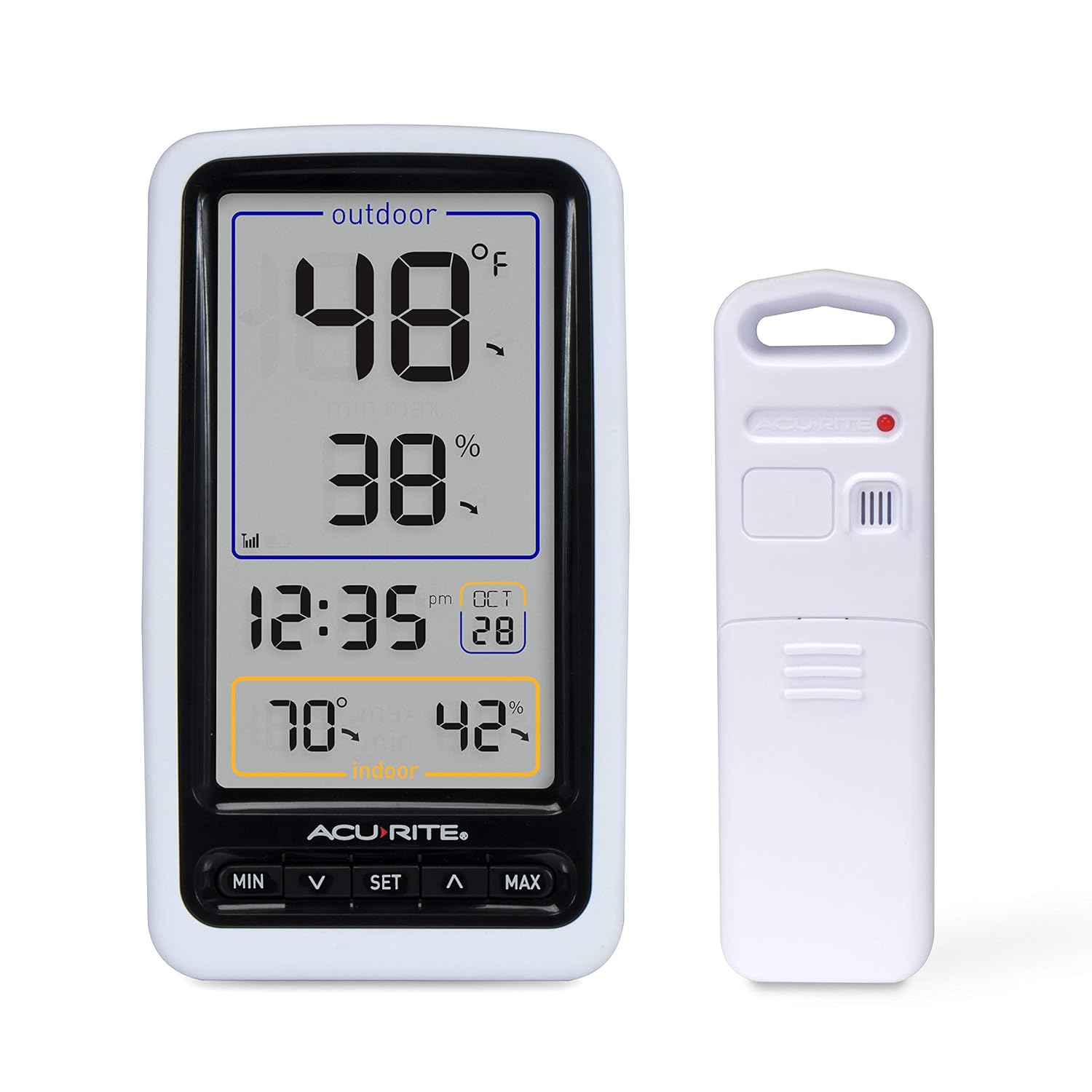
Image 1.1: The AcuRite 01136M indoor display unit and its accompanying wireless outdoor sensor.

Image 1.2: The indoor display unit positioned on a desk, showing its compact design suitable for various home environments.
2. Package Contents
Ensure all items are present before proceeding with setup:
- Indoor Display Unit
- Wireless Outdoor Sensor
- Instruction Manual (this document)
3. Features
- Measures indoor and outdoor temperature (°F or °C) and humidity.
- Displays trend arrows indicating rising, falling, or stable measurements.
- Outdoor temperature shown in large, 1-inch digits for easy readability.
- Large display and modern design suitable for any room.
- Wireless sensor transmits outdoor temperature and humidity readings from up to 165 feet away.
- Records daily high and low temperatures and humidity levels.
4. Setup
4.1 Battery Installation
For optimal performance, use high-quality alkaline batteries. Lithium batteries are recommended for outdoor sensors in regions with temperatures below -4°F (-20°C).
- Outdoor Sensor: Remove the battery compartment cover on the back of the sensor. Insert 2 “AA” batteries, observing the polarity markings (+/-). Replace the cover.
- Indoor Display Unit: Remove the battery compartment cover on the back of the display. Insert 3 “AAA” batteries, observing the polarity markings (+/-). Replace the cover.

Image 4.1: The back of the indoor display unit, showing the battery compartment and tabletop stand.
4.2 Initial Synchronization
After installing batteries, the indoor display unit will immediately begin searching for a signal from the outdoor sensor. This process may take a few minutes. Ensure both units are within range of each other during initial setup. If no signal is received, refer to the Troubleshooting section.
4.3 Sensor Placement Guidelines
Proper placement of the outdoor sensor is crucial for accurate readings.
- Location: Place the sensor in a shaded area to avoid direct sunlight, which can cause artificially high temperature readings.
- Height: Mount the sensor approximately 4 to 8 feet (1.2 to 2.4 meters) off the ground.
- Distance: The sensor can be up to 165 feet (50 meters) from the indoor display unit. Avoid large metal surfaces, thick walls, or other electronic devices that may interfere with the wireless signal.
- Protection: While the sensor is weather-resistant, placing it under an eave or similar overhang can extend its lifespan and protect it from extreme weather conditions.

Image 4.2: The wireless outdoor sensor hanging from a tree branch, demonstrating a typical placement for outdoor temperature and humidity monitoring.
4.4 Display Unit Placement
The indoor display unit is designed for tabletop use and can be placed in any room where you wish to monitor indoor conditions and view outdoor data.

Image 4.3: Side view of the indoor display unit, highlighting its integrated kickstand for tabletop placement.
5. Operation
5.1 Display Overview
The LCD display provides a comprehensive view of current conditions:
- Outdoor Temperature & Humidity: Located at the top, with large digits for temperature and a trend arrow.
- Time & Date: Centrally located.
- Indoor Temperature & Humidity: Located at the bottom, with a trend arrow.
- Signal Strength Indicator: Shows the strength of the wireless signal from the outdoor sensor.

Image 5.1: Front view of the indoor display unit, clearly showing the outdoor temperature, humidity, time, and indoor temperature and humidity readings.
5.2 Button Functions
The display unit features several buttons for setting and viewing information:
- MIN: Press to view minimum recorded temperature and humidity for indoor and outdoor. Press again to clear records.
- MAX: Press to view maximum recorded temperature and humidity for indoor and outdoor. Press again to clear records.
- SET: Used to enter time and date setting mode.
- ∧ (Up Arrow): Used to adjust values during setting mode.
- ∨ (Down Arrow): Used to adjust values during setting mode.
5.3 Setting Time and Date
- Press and hold the SET button for 3 seconds to enter setting mode. The first setting will flash.
- Use the ∧ or ∨ buttons to adjust the currently flashing value.
- Press the SET button to confirm your selection and move to the next setting.
- The order of settings is typically: 12/24 Hour Format, Hour, Minute, Month, Day, Year.
- Press the SET button repeatedly until all settings are confirmed to exit setting mode.
6. Maintenance
6.1 Battery Replacement
Replace batteries in both the indoor display unit and outdoor sensor when the low battery indicator appears on the display. Always replace all batteries in a unit at the same time with new batteries of the same type.
6.2 Cleaning
Clean the display unit and sensor with a soft, damp cloth. Do not use abrasive cleaners or solvents, as these may damage the plastic parts and electronic components. Ensure no moisture enters the battery compartments.
7. Troubleshooting
| Problem | Possible Solution |
|---|---|
| No outdoor temperature/humidity reading (“--” on display) |
|
| Inaccurate temperature/humidity readings |
|
| Display is dim or blank |
|
8. Specifications
- Indoor Temperature Range: 32°F to 122°F (0°C to 50°C)
- Outdoor Temperature Range: -40°F to 158°F (-40°C to 70°C)
- Indoor Humidity Range: 1% to 99% RH
- Outdoor Humidity Range: 1% to 99% RH
- Wireless Range: 165 ft (50 m) RF 433 MHz
- Indoor Display Power: 3 x “AAA” alkaline batteries (not included)
- Outdoor Sensor Power: 2 x “AA” alkaline or lithium batteries (not included)
- Product Dimensions (Display): 1 x 3.5 x 6 inches (2.54 x 8.89 x 15.24 cm)
- Item Model Number: 01136M
- Manufacturer: AcuRite
9. Warranty and Support
For warranty information, product registration, or technical support, please visit the official AcuRite website or contact their customer service. Keep your purchase receipt as proof of purchase.
You can find more information and support resources by visiting the AcuRite Store on Amazon.


