Introduction
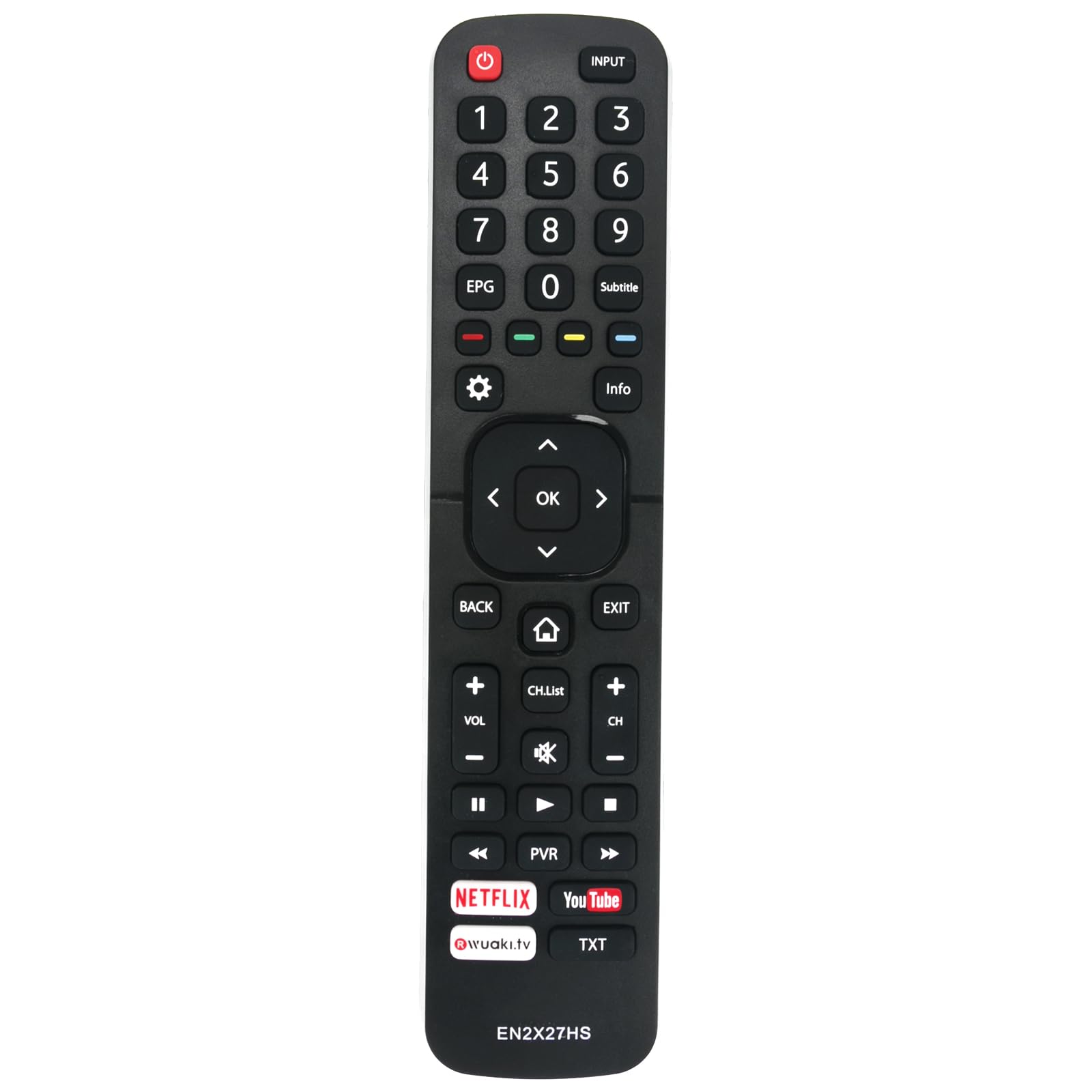
Thank you for choosing the AULCMEET EN2X27HS Replacement Remote Control. This remote is designed to provide seamless operation for a wide range of Hisense 4K Smart TV models. This manual will guide you through the simple setup, operation, and maintenance to ensure you get the best experience from your new remote control.
Setup
The AULCMEET EN2X27HS remote control is designed for immediate use with compatible Hisense 4K Smart TVs without requiring any programming. Simply install the batteries, and it's ready to operate your television.
Battery Installation
- Locate the battery compartment on the back of the remote control.
- Slide the battery cover downwards to open it.
- Insert two (2) AAA batteries, ensuring correct polarity (+ and -) as indicated inside the compartment.
- Slide the battery cover back into place until it clicks securely.
This image displays the rear of the remote control, highlighting the battery compartment cover. To install batteries, slide this cover down.
Operating the Remote Control
This remote control provides full functionality for your compatible Hisense 4K Smart TV. Point the remote directly at your TV's infrared receiver for optimal performance.
Basic Functions
- Power: Turns the TV on or off.
- Volume Up/Down: Adjusts the sound level.
- Channel Up/Down: Changes TV channels.
- Mute: Silences the TV audio.
- Input/Source: Selects the input source (HDMI, AV, etc.).
- Navigation Buttons (Up, Down, Left, Right, OK): Used to navigate menus and select options.
- Smart TV Buttons: Accesses smart TV features and applications.
Compatible Hisense TV Models
This remote control is compatible with Hisense 4K Smart TV Series M2600, M3300, and specific models including: H55M3300, HE40K3300, H40M3300, H43M3000, HE50K3300, HE55K3300, HE43K300UWTS, HE65K5500UWTS, H65M5500, H49M3000, HE49K3000UWTS, H75M7900, H55MEC3050, H49M2600, H32M2600, H32MEC2650, H40M2600, H40MEC2650, H49MEC3050, HE43K300UWTS, H43NEC5100, H43NEC5200, HE43K3000, H49M2600, H49MEC2650, H49M3000, H49MEC3050, H40M3300, HE49K3000, HE49K300UWTS, H50M3000, H50M5500, H50N5300, HE50K3000, HE50K3300UWTS, H50NEC5200, H55MEC3050, H55M5500, H55M7000, H55N5300, HE55K3000, HE55K3300UWTS, H55NEC5200, H55N5300, H65M5500, H65M7000, HE65K5500, HE65K5500UWTS, HE65K5510, HE65K5510UWTS, H65NEC5200, H75M7900, HE75K7900, HE75K700UXWTS3D, EN2AK27H, 43K300UWTS, 65K5500UWTS, H40M3300, H40MEC3350, H43M3000UK, H43MEC3050UK, H43N5700, H49M3000, H49MEC2650, H49MEC3050, H49N5700, H50M3300, H50N5300, H55M3310, H55M7000, H55MEC3350, H55MEC5650, H55N5300, H55NEC5200, H65M5510, H65N5300, HE32M2161HWTS, HE40K3300UWTS, HE43K300UWTS, HE43K300UWTS0001, HE43K300UWTS0A01, HE49K3000UWTS, HE49M2161FWTS0100, HE50K3300UWTS, HE50K5502.

This image shows the remote control being used by a person to operate a Hisense television, demonstrating typical usage.
Maintenance
To ensure optimal performance and longevity of your remote control, follow these maintenance guidelines:
- Cleaning: Wipe the remote control regularly with a soft, dry cloth. Avoid using liquid cleaners or abrasive materials.
- Battery Replacement: Replace batteries when the remote's response becomes sluggish or stops working. Always replace both batteries at the same time with new ones of the same type (AAA).
- Storage: Store the remote in a cool, dry place away from direct sunlight and extreme temperatures. If not used for extended periods, remove the batteries to prevent leakage.
Troubleshooting
If your remote control is not functioning as expected, please refer to the following common issues and solutions:
- Remote not responding:
- Check if the batteries are inserted correctly with the correct polarity.
- Replace old batteries with new AAA batteries.
- Ensure there are no obstructions between the remote control and the TV's infrared sensor.
- Make sure you are within the effective operating range and pointing the remote directly at the TV.
- Specific buttons not working:
- This could indicate a dirty contact under the button. Try gently pressing the button multiple times. If the issue persists, the remote may require replacement.
- Short operating range:
- Batteries may be low. Replace them with new ones.
- Ensure there is no strong light source (like direct sunlight) interfering with the infrared signal.
Specifications
| Model Number | EN2X27HS |
| Product Dimensions | 5 x 1 x 0.5 inches |
| Item Weight | 3.2 ounces |
| Batteries Required | 2 AAA batteries (not included) |
| Compatible Devices | Hisense 4K Smart Televisions |
| Special Feature | Ergonomic design |
| Color | Black |
Warranty and Support
For product support, warranty inquiries, or further assistance, please refer to the contact information provided with your purchase or visit the AULCMEET official website. Specific warranty terms may vary and are typically outlined in your purchase documentation.