
1. Introduction
This manual provides detailed instructions for the safe and effective use of your TENSTAR Robot DC-DC Boost Converter. This device is designed to convert a lower DC input voltage to a higher, adjustable DC output voltage, featuring constant current capabilities, making it suitable for applications such as LED driving, battery charging, and mobile power supplies. Please read this manual thoroughly before operation and retain it for future reference.
2. Safety Information
Always observe the following safety precautions to prevent injury or damage to the device:
- Electrical Hazard: This device operates with electrical current. Ensure all connections are secure and insulated to prevent short circuits or electric shock.
- Input/Output Voltage: Do not exceed the specified maximum input or output voltage and current ratings. Doing so can damage the converter and connected devices.
- Polarity: Always observe correct input and output polarity. Incorrect connections will damage the module.
- Ventilation: Ensure adequate ventilation around the module, especially during high-power operation, to prevent overheating.
- Professional Installation: If you are unfamiliar with electronics, seek professional assistance for installation and setup.
- Children: Keep the device out of reach of children.
3. Product Overview
The TENSTAR Robot DC-DC Boost Converter is a compact and efficient power module. It features input and output terminals, an inductor, capacitors, and potentiometers for adjusting output voltage and current.

Figure 1: Top view of the DC-DC Boost Converter, highlighting the main components including the inductor and capacitors.
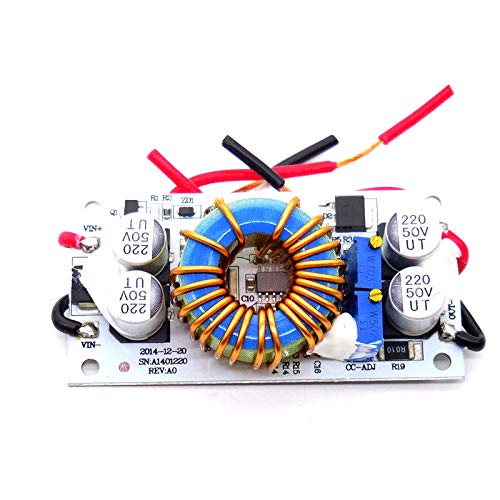
Figure 2: Angled view of the converter, illustrating the input (VIN+) and output (VOUT+) terminals, and the two adjustment potentiometers.
3.1 Key Components
- VIN+ / VIN-: Input voltage terminals.
- VOUT+ / VOUT-: Output voltage terminals.
- CV-ADJ Potentiometer: Adjusts the output voltage.
- CC-ADJ Potentiometer: Adjusts the constant output current limit.
- Toroidal Inductor: Key component for energy storage in boost conversion.
- Capacitors: For input and output voltage filtering.
4. Specifications
| Feature | Specification |
|---|---|
| Module Type | Non-isolated Boost Converter (Step-Up) |
| Input Voltage Range | Typically 8V - 60V DC (Refer to product label for exact range) |
| Output Voltage Range | Adjustable, 12V - 80V DC (Output voltage must be higher than input) |
| Output Current | Adjustable, up to 10A (Max) |
| Output Power | 250W (Max) |
| Conversion Efficiency | Up to 95% (Efficiency depends on input/output voltage, current, and voltage difference) |
| Operating Temperature | -40°C to +85°C (If ambient temperature exceeds 40°C, please reduce power or enhance heat dissipation) |
| Item Weight | 50 Grams (1.76 ounces) |
| Dimensions | Approx. 70mm x 36mm x 13mm (L x W x H) |
| UPC | 696310124385 |
| ASIN | B07KXH5YS2 |
| Manufacturer | Laliva |
5. Setup
5.1 Wiring Connections
- Input Connection: Connect your DC power source to the VIN+ (positive) and VIN- (negative) terminals. Ensure the input voltage is within the specified range.
- Output Connection: Connect your load (e.g., LED array, battery) to the VOUT+ (positive) and VOUT- (negative) terminals.
- Verify Polarity: Double-check all connections for correct polarity before applying power.
5.2 Voltage and Current Adjustment
The module features two potentiometers for adjustment:
- Output Voltage Adjustment (CV-ADJ):
- Connect a voltmeter to the output terminals (VOUT+ and VOUT-).
- Apply input power.
- Turn the CV-ADJ potentiometer clockwise to increase the output voltage, or counter-clockwise to decrease it. Adjust to your desired output voltage.
- Constant Current Adjustment (CC-ADJ):
- To set the constant current limit, first adjust the output voltage to a value slightly higher than the required voltage for your load.
- Connect an ammeter in series with the output load, or use a suitable electronic load.
- Turn the CC-ADJ potentiometer counter-clockwise to reduce the current. Once the current reaches your desired limit, the module will operate in constant current mode.
- Note: If you are charging a battery, connect the battery after setting the voltage and current.
6. Operating Instructions
Once the setup is complete and all connections are verified:
- Apply power to the input terminals.
- The module will begin to convert the input voltage to the set output voltage and current.
- Monitor the output voltage and current to ensure they remain within the desired parameters for your application.
- For applications requiring constant current, the module will automatically limit the current to the set value, even if the load resistance changes.
7. Maintenance
The TENSTAR Robot DC-DC Boost Converter is designed for reliable operation with minimal maintenance. Follow these guidelines:
- Cleaning: Keep the module clean and free from dust and debris. Use a soft, dry cloth for cleaning. Do not use liquids or solvents.
- Inspection: Periodically inspect the wiring connections for tightness and signs of wear or damage.
- Environment: Operate the module in a dry, well-ventilated environment, away from extreme temperatures, humidity, and corrosive substances.
- Heat Dissipation: For prolonged operation at high power, consider adding a heatsink to the main switching components or ensuring sufficient airflow to prevent thermal shutdown or reduced lifespan.
8. Troubleshooting
If you encounter issues with your DC-DC Boost Converter, refer to the following common problems and solutions:
- No Output Voltage:
- Check input power supply: Ensure it is connected correctly and providing voltage within the specified input range.
- Check wiring: Verify all input and output connections for correct polarity and secure contact.
- Potentiometer setting: The output voltage potentiometer (CV-ADJ) might be set to its minimum. Try adjusting it clockwise.
- Output Voltage is Too Low/Unstable:
- Input voltage too low: Ensure the input voltage is sufficient and stable.
- Overload: The load might be drawing too much current, exceeding the module's capacity. Reduce the load or ensure proper heat dissipation.
- Poor connections: Recheck all wiring for loose connections.
- Output Current is Not Constant/Too Low:
- CC-ADJ setting: Adjust the constant current potentiometer (CC-ADJ) clockwise to increase the current limit.
- Load resistance: Ensure the load resistance is appropriate for the desired current and voltage.
- Voltage too low: If the output voltage is set too low for the load, the current may not reach the set limit.
- Module Overheating:
- Excessive load: Reduce the output current or power.
- Insufficient ventilation: Ensure the module has adequate airflow. Consider adding a heatsink if operating at high power for extended periods.
- Input/Output voltage difference: A very large difference between input and output voltage can increase heat generation.
9. Warranty and Support
For warranty information, technical support, or service inquiries regarding your TENSTAR Robot DC-DC Boost Converter, please contact the seller or manufacturer directly. Please have your purchase details, including the ASIN (B07KXH5YS2) and UPC (696310124385), available when contacting support.