1. Product Overview
The ABB XT2 N 160 is a high-performance molded case circuit breaker (MCCB) designed for reliable protection in electrical systems. This device is part of the Tmax XT series, known for its compact design, advanced protection features, and ease of installation. It is suitable for a wide range of applications, ensuring safety and operational continuity.
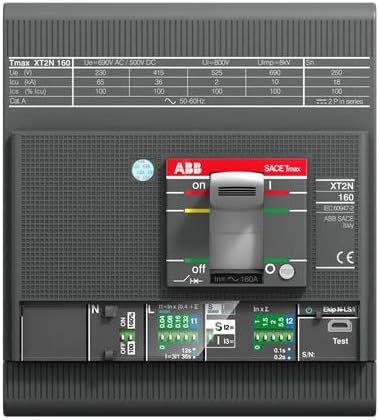
Figure 1: Front view of the ABB XT2 N 160 circuit breaker. This image displays the main ON/OFF switch, the Ekip trip unit with its display and adjustment dials, and the various connection terminals. Key specifications like Tmax XT2N 160, Ue=690V AC/500V DC, and current ratings are visible on the top label. The bottom section shows settings for InxI, S12, and S13, along with a 'Test' button.
2. Safety Information
Always adhere to local and national electrical codes and regulations. Installation and maintenance should only be performed by qualified personnel. Ensure the power supply is disconnected before any installation, maintenance, or troubleshooting procedures. Use appropriate personal protective equipment (PPE).
- Disconnect Power: Always de-energize the circuit before working on the breaker.
- Qualified Personnel: Installation and service must be performed by trained and authorized electricians.
- Proper Tools: Use insulated tools to prevent electrical shock.
- Environmental Conditions: Ensure the operating environment meets the product's specifications (temperature, humidity).
3. Specifications
| Feature | Detail |
|---|---|
| Brand | ABB |
| Manufacturer | ABB |
| Model Number | 1SDA067099R1 |
| Product Dimensions (L x W x H) | 13.5 x 22 x 17.5 cm |
| Item Weight | 1.41 Kilograms |
| Color | White |
| Batteries Included? | No |
| Batteries Required? | No |
| ASIN | B07KWJ8MMK |
| First Available Date | December 31, 2018 |
4. Setup and Installation
The ABB XT2 N 160 circuit breaker is designed for easy installation in appropriate electrical enclosures. Follow these general steps:
- Preparation: Ensure the main power supply to the installation area is completely shut off and locked out. Verify with a voltage tester.
- Mounting: Securely mount the circuit breaker within the designated panel or enclosure using appropriate fasteners. Ensure proper ventilation.
- Wiring: Connect the incoming and outgoing power cables to the designated terminals (Line and Load) on the circuit breaker. Ensure all connections are tight and secure to prevent loose contacts and overheating. Refer to the wiring diagram provided with the product packaging for specific terminal assignments.
- Grounding: Connect the ground wire to the system's protective earth.
- Verification: Double-check all connections for correctness and tightness. Ensure no foreign objects are inside the enclosure.
- Power On: Once installation is complete and verified, restore power to the circuit.
5. Operating Instructions
The XT2 N 160 circuit breaker features a simple ON/OFF mechanism and an Ekip trip unit for protection settings.
- Switching ON: To energize the circuit, push the main toggle handle to the 'ON' position.
- Switching OFF: To de-energize the circuit, push the main toggle handle to the 'OFF' position.
- Tripped State: If an overload or short circuit occurs, the breaker will automatically trip, moving the handle to an intermediate position. To reset, first move the handle fully to the 'OFF' position, then to 'ON'. Investigate the cause of the trip before resetting.
- Ekip Trip Unit Settings: The Ekip trip unit allows for precise adjustment of protection parameters such as long-time (Ir), short-time (Isd), instantaneous (Ii), and ground fault (Ig) protection. Refer to the detailed Ekip manual for specific programming instructions. The image shows dials for adjusting these settings.
- Test Button: A 'Test' button is typically present on the trip unit to verify the mechanical and electrical operation of the breaker. Pressing this button should cause the breaker to trip.
6. Maintenance
Regular maintenance ensures the longevity and reliable operation of your ABB XT2 N 160 circuit breaker.
- Visual Inspection: Periodically inspect the breaker for any signs of physical damage, discoloration, loose connections, or excessive dust accumulation.
- Cleaning: Keep the breaker and its surroundings clean and free of dust and debris. Use a dry, lint-free cloth. Do not use solvents or abrasive cleaners.
- Connection Tightness: Annually check the tightness of all electrical connections. Loose connections can lead to overheating and potential failure.
- Functional Test: Perform a functional test using the 'Test' button on the trip unit at recommended intervals (e.g., annually) to ensure the tripping mechanism is operational.
- Professional Service: For advanced diagnostics or repairs, contact qualified ABB service personnel.
7. Troubleshooting
If you encounter issues with your ABB XT2 N 160 circuit breaker, refer to the following common problems and solutions:
| Problem | Possible Cause | Solution |
|---|---|---|
| Breaker trips frequently | Overload, short circuit, ground fault, or incorrect trip unit settings. | Reduce load, check for short circuits/ground faults, verify and adjust trip unit settings. |
| Breaker does not reset | Persistent fault, internal damage, or handle not fully moved to OFF before resetting. | Ensure fault is cleared. Move handle fully to OFF, then to ON. If still no reset, contact service. |
| Overheating at terminals | Loose connections or excessive current. | Tighten connections. Verify load current is within breaker rating. |
8. Warranty and Support
The ABB XT2 N 160 circuit breaker comes with a Worldwide ABB Warranty, ensuring quality and reliability. For specific warranty terms and conditions, please refer to the documentation provided with your purchase or visit the official ABB website.
For technical support, service, or spare parts, please contact your local ABB representative or authorized distributor. You can find contact information on the official ABB website: www.abb.com


