1. Introduction
The PolarPro 82mm Circular Polarizer (CP) Filter is a professional-grade optical accessory designed to enhance image quality by reducing reflections, increasing color saturation, and improving contrast. Crafted with premium CinemaSeries™ German optical glass and an ultra-durable aluminum frame, this filter is engineered for demanding photographic environments, delivering razor-sharp clarity and accurate color reproduction.

Image 1.1: The PolarPro 82mm Circular Polarizer Filter, showcasing its design and knurled edge.
2. Key Features
- Professional-Grade Optical Clarity: Utilizes ultra-premium CinemaSeries™ German optical glass for razor-sharp image clarity and edge-to-edge color accuracy.
- Advanced Multi-Coated Protection: Features a 16-layer anti-reflective and hydrophobic coating that resists water, oil, and scratches, while effectively cutting glare and boosting contrast.
- Ultra-Durable Aluminum Frame: Constructed from aerospace-grade aluminum, ensuring strength, lightweight design, and a secure fit without vignetting.
- Precision Polarization Control: Equipped with an ultra-smooth rotating CP ring for fast and accurate adjustments to polarization strength, allowing precise control over sky definition, glare removal, and surface reflections.
- Trusted Performance: Designed to meet the demands of world-class photographers and cinematographers, offering industry-leading color fidelity and elite build quality.
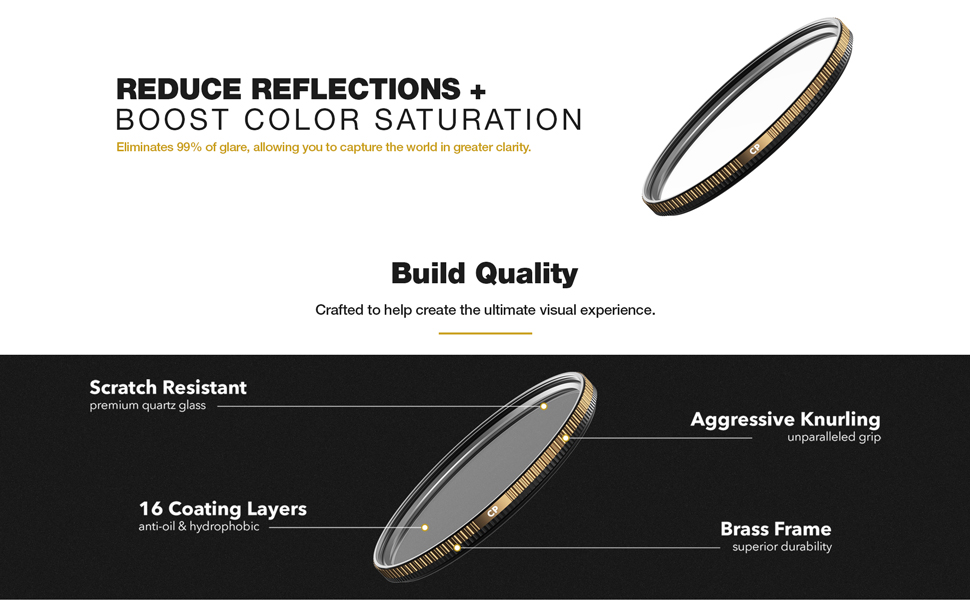
Image 2.1: Detailed view of the filter's construction, highlighting scratch-resistant glass, 16 coating layers, aggressive knurling, and brass frame.
3. Setup and Installation
The PolarPro 82mm CP Filter is designed for easy attachment to any camera lens with an 82mm filter thread. Ensure your lens has the correct thread size before installation.
- Prepare Your Lens: Ensure your camera lens is clean and free of dust or debris on the front element.
- Align the Filter: Carefully align the filter's threads with the threads on the front of your camera lens.
- Attach the Filter: Gently rotate the filter clockwise until it is securely fastened. Avoid overtightening, as this can make removal difficult. The filter is designed to maintain a secure fit without causing vignetting.

Image 3.1: The Circular Polarizer filter securely mounted on a camera lens.
4. Operating the CP Filter
A Circular Polarizer filter works by selectively blocking polarized light, which is often responsible for reflections and haze. To achieve the desired effect, rotate the outer ring of the filter while looking through your camera's viewfinder or live view.
- Reducing Reflections: Rotate the filter until reflections from non-metallic surfaces (such as water, glass, or wet foliage) are minimized or eliminated. This is particularly effective when shooting through windows or capturing scenes with water.
- Enhancing Color Saturation and Contrast: When shooting landscapes, rotate the filter to deepen the blue of the sky, make clouds more prominent, and enhance the vibrancy of colors in foliage. The effect is most pronounced when shooting at a 90-degree angle to the sun.
- Adjusting Polarization Strength: The ultra-smooth rotating ring allows for precise control over the degree of polarization. Experiment with different rotation angles to achieve the optimal effect for your specific scene.
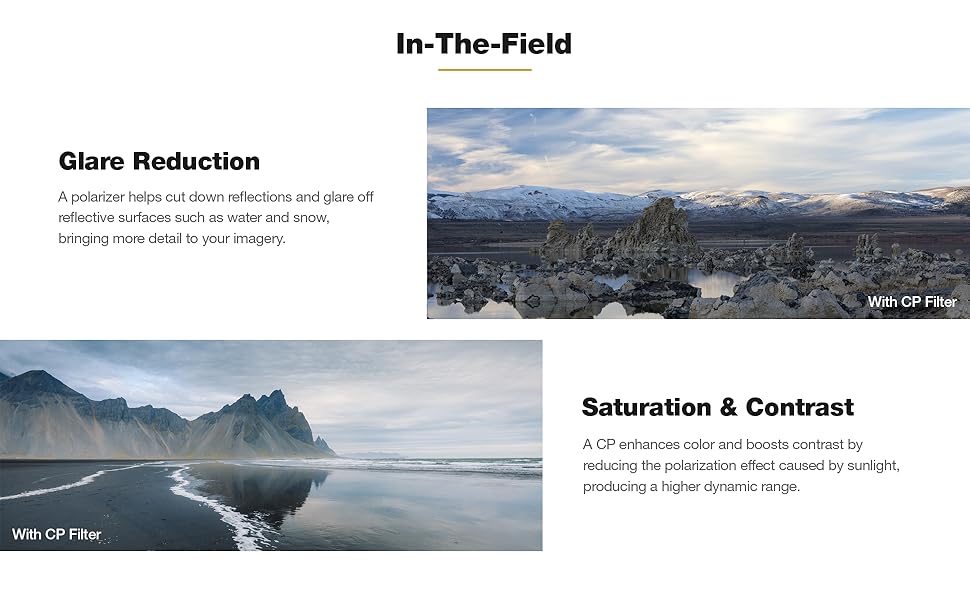
Image 4.1: Examples demonstrating the filter's ability to reduce glare and enhance saturation and contrast in various outdoor scenes.
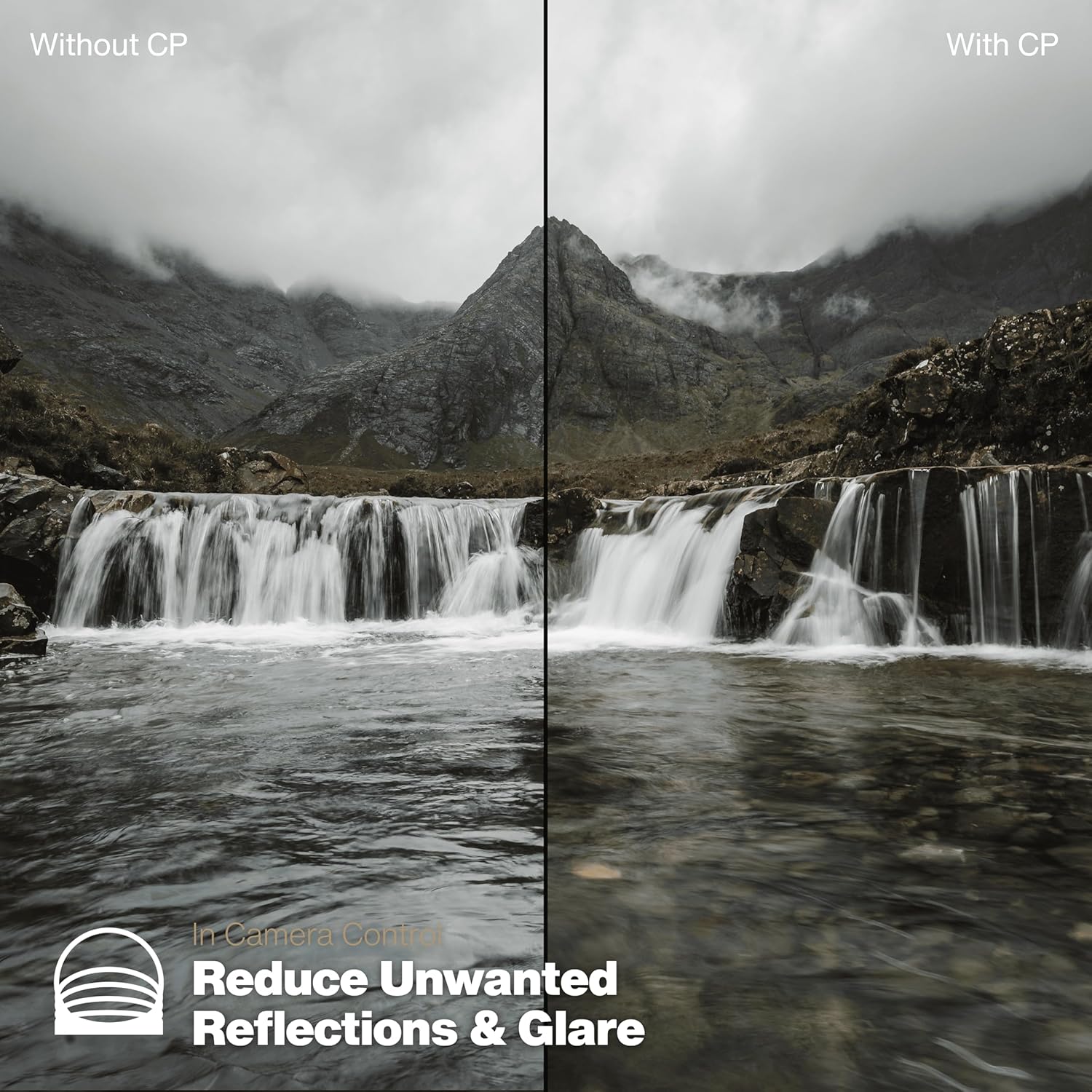
Image 4.2: A visual comparison illustrating how the CP filter reduces unwanted reflections and glare in water.
5. Maintenance and Care
Proper care will ensure the longevity and optimal performance of your PolarPro CP Filter. The filter features a hydrophobic coating that repels water and oil, simplifying cleaning.
- Cleaning the Glass: Use the included cleaning cloth or a dedicated microfiber lens cloth to gently wipe away dust, fingerprints, or smudges. For stubborn marks, a small amount of lens cleaning solution applied to the cloth (not directly to the filter) can be used.
- Avoid Abrasives: Do not use abrasive materials, harsh chemicals, or paper products, as these can scratch the filter's coatings.
- Storage: When not in use, store the filter in its provided hard case to protect it from dust, scratches, and impacts.
- Handling: Always handle the filter by its metal frame to avoid touching the glass surface.
6. Troubleshooting
| Issue | Possible Cause | Solution |
|---|---|---|
| Filter appears dirty or smudged in photos. | Dust, fingerprints, or oil on the filter surface. | Clean the filter thoroughly using a microfiber cloth and, if necessary, a lens cleaning solution. |
| Difficulty rotating the filter ring. | Dust or debris caught in the rotating mechanism, or overtightening during installation. | Ensure the filter is not overtightened. Gently clean around the rotating ring with a soft brush or air blower. If the issue persists, contact customer support. |
| Polarization effect is not visible or too strong. | Incorrect rotation of the filter, or lighting conditions are not suitable for polarization. | Rotate the outer ring of the filter slowly while observing the effect through your camera. The effect is strongest when shooting at a 90-degree angle to the sun. Polarization is less effective in overcast conditions or when shooting directly into or away from the sun. |
7. Specifications
- Model Number: PP-82-CP
- Filter Type: Circular Polarizer (CP)
- Filter Thread Size: 82mm
- Material: CinemaSeries™ Fused Quartz Glass, Aerospace-Grade Aluminum Frame
- Coating: 16-Layer Anti-Reflective and Hydrophobic Multi-Coating
- Water Resistance Level: Waterproof
- Product Dimensions: 3.23 x 3.23 x 0.1 inches (8.2 x 8.2 x 0.25 cm)
- Item Weight: 6 ounces (170 grams)
- UPC: 817465021460
- Manufacturer: PolarPro Filters
- Included in Box: Filter, Hard Case, Cleaning Cloth
8. Warranty and Support
PolarPro products are built to the highest standards of quality and performance. For information regarding warranty coverage, returns, or technical support, please refer to the official PolarPro website or contact their customer service directly.
Return Policy: This product is eligible for a refund/replacement within 30 days of purchase, subject to the seller's return policy.
For further assistance, visit the PolarPro Store on Amazon.


