
PRORECK Dance 12
PRORECK Dance 12 Portable PA Speaker System User Manual
Model: Dance 12
1. Product Overview
The PRORECK Dance 12 is a portable 12-inch, 1000-watt, 2-way powered PA speaker system designed for various audio applications. It features integrated Bluetooth, USB, SD card reader, and FM radio functionalities, along with a remote control and speaker stands for convenient setup and operation.
1.1 Key Features
- Portable 12-inch 1000 Watt 2-Way Powered PA Speaker System.
- Integrated Bluetooth, USB, SD Card Reader, and FM Radio functions.
- 150-Watt RMS, 1000 Watts Peak power output.
- 12-inch Woofer and Compression Driver with 1.35-inch Titanium Diaphragm.
- Digital LCD Screen for easy navigation.
- Master volume controls, Mic, Line, Treble, and Bass volume controls.
- 1/4'' Mic and RCA Line Inputs and Output, plus Speakon output.
- 115 V/230 V power selector.
- Includes remote control for convenient operation.
- Integrated 35-mm speaker stand mounts.
1.2 Package Contents
Please verify that all items listed below are included in your package. If any items are missing or damaged, contact customer support immediately.
- 2 x PRORECK Dance 12 Powered PA Speakers
- 2 x Speaker Stands
- 1 x Microphone
- 1 x Remote Control
- 1 x User Manual
- 1 x Microphone Cable
- 1 x Speakon Cable
- 1 x Power Cord

This image displays all components included in the PRORECK Dance 12 package: two powered PA speakers with stands, one microphone, one remote control, one user manual, one microphone cable, one Speakon cable, and one power cord.
2. Important Safety Instructions
To reduce the risk of electric shock, fire, or injury, please read and follow all instructions carefully before using this product. Keep this manual for future reference.
- Power Source: Connect the unit only to a power supply of the type described in this manual or marked on the unit. Ensure the voltage selector switch (115V/230V) is set correctly for your region before plugging in.
- Grounding: This product is equipped with a three-prong grounding plug. Do not defeat the safety purpose of the grounding-type plug.
- Ventilation: Do not block any ventilation openings. Install in accordance with the manufacturer’s instructions.
- Heat: Do not install near any heat sources such as radiators, heat registers, stoves, or other apparatus (including amplifiers) that produce heat.
- Water and Moisture: Do not use this apparatus near water. Do not expose to dripping or splashing. No objects filled with liquids, such as vases, shall be placed on the apparatus.
- Cleaning: Clean only with a dry cloth.
- Cables: Protect the power cord from being walked on or pinched, particularly at plugs, convenience receptacles, and the point where they exit from the apparatus.
- Servicing: Refer all servicing to qualified service personnel. Servicing is required when the apparatus has been damaged in any way, such as power-supply cord or plug is damaged, liquid has been spilled or objects have fallen into the apparatus, the apparatus has been exposed to rain or moisture, does not operate normally, or has been dropped.
- Overloading: Do not overload wall outlets or extension cords as this can result in a risk of fire or electric shock.
- Placement: Ensure speakers are placed on stable surfaces or securely mounted on stands to prevent tipping.
3. Component Identification
3.1 Front Panel Controls
The front panel provides access to the main control interface for audio playback and adjustments.

A detailed diagram of the PRORECK Dance 12 speaker's front panel, highlighting the USB/SD/FM/Bluetooth function panel, MP3 volume, microphone volume, and microphone input.
- USB/SD/FM/Bluetooth Function Panel: Digital display and controls for selecting input modes and managing playback.
- MP3 Volume: Adjusts the volume level for USB, SD, Bluetooth, and FM radio inputs.
- Mic Volume: Controls the volume of the connected microphone.
- Mic Input: 1/4-inch jack for connecting a microphone.
- Equalizer: Controls for adjusting treble and bass frequencies.
3.2 Rear Panel Connections
The rear panel houses all necessary audio input/output ports and power connections.
An illustration of the PRORECK Dance 12 speaker's rear panel, showing the RCA input and output, Speakon output, power switch, and the rotating knob for securing the speaker stand.
- RCA Input & Output: Stereo RCA jacks for connecting external audio sources (e.g., mixer, CD player) and for linking to other audio equipment.
- Speakon Output: For connecting the active speaker to a passive speaker using a Speakon cable.
- Power Switch: Toggles the unit's power on or off.
- Power Input: AC power cord connection.
- Voltage Selector: Switch between 115V and 230V power input.
- Rotating Knob for Securing Speaker Stand: Used to firmly attach the speaker to a compatible speaker stand.
- Separate LED Switch: Controls the internal LED lighting of the speaker.
4. Setup Guide
4.1 Speaker Stand Assembly
Proper assembly of the speaker stands ensures stability and optimal sound projection.
- Unfold the tripod legs of the speaker stand until they are fully extended and stable.
- Adjust the height of the stand using the locking pin and knob to your desired level. Ensure the locking pin is fully engaged and the knob is tightened.
- Carefully lift the PRORECK Dance 12 speaker and place its bottom mounting hole onto the pole of the speaker stand.
- Secure the speaker to the stand by tightening the rotating knob located on the speaker's rear panel.

This image provides the dimensions of the PRORECK Dance 12 speaker (23.2 inches height, 15 inches width, 12 inches depth) and illustrates the adjustable height of the speaker stands, from 43 inches to 55 inches.
4.2 Connecting the Speakers
The PRORECK Dance 12 system includes one active (powered) speaker and one passive speaker. The active speaker powers the passive one.
- Ensure both speakers are securely mounted on their stands.
- Locate the Speakon output on the rear panel of the active speaker.
- Connect one end of the provided Speakon cable to the Speakon output of the active speaker.
- Connect the other end of the Speakon cable to the Speakon input on the passive speaker.
4.3 Power Connection
Before connecting to power, ensure the voltage selector on the active speaker is set correctly (115V or 230V) for your region.
- Ensure the power switch on the active speaker is in the OFF position.
- Connect the provided power cord to the power input on the active speaker's rear panel.
- Plug the other end of the power cord into a suitable grounded electrical outlet.
5. Operating Instructions
5.1 Power On/Off
To power on the system, flip the power switch on the active speaker to the ON position. The LCD screen will illuminate. To power off, flip the switch to the OFF position.
5.2 Bluetooth Pairing
- Turn on the PRORECK Dance 12 speaker system.
- Press the 'Mode' button on the front panel or remote control until 'Bluetooth' is displayed on the LCD screen. The speaker will enter pairing mode, indicated by a flashing Bluetooth icon.
- On your mobile device (smartphone, tablet, etc.), enable Bluetooth and search for available devices.
- Select 'PRORECK Dance 12' from the list of devices.
- Once paired, the Bluetooth icon on the speaker's LCD screen will stop flashing, and a confirmation tone may sound. You can now play audio from your device through the speakers.
5.3 USB/SD Card Playback
- Insert a USB flash drive or SD card (pre-loaded with MP3 audio files) into the respective slot on the front panel.
- Press the 'Mode' button to select 'USB' or 'SD' mode. The system will automatically begin playing the first compatible audio file.
- Use the playback controls (Play/Pause, Next, Previous) on the front panel or remote control to manage your music.
- Adjust the MP3 volume knob to control the playback level.
5.4 FM Radio Operation
- Press the 'Mode' button to select 'FM' mode.
- Press and hold the 'Play/Pause' button to initiate an automatic scan for FM radio stations. The system will save all found stations.
- Use the 'Next' and 'Previous' buttons to navigate through the saved stations.
5.5 Microphone Usage
- Connect the microphone to the 'Mic Input' jack on the front panel using the provided microphone cable.
- Adjust the 'Mic Volume' knob to control the microphone's output level.
- Use the 'Treble' and 'Bass' controls to fine-tune the microphone's tone.
5.6 Remote Control Functions
The included remote control allows for convenient operation from a distance. Functions include power on/off, mode selection, volume control, playback controls (play/pause, next/previous track), FM station tuning, and numerical input for direct track selection.
5.7 Audio Input/Output
The PRORECK Dance 12 offers versatile connectivity for various audio setups.
- RCA Line Input: Connect external audio devices such as mixers, CD players, or other audio sources using RCA cables.
- RCA Line Output: Use this to send the audio signal to another powered speaker or recording device.
- Speakon Output: Specifically for connecting the active speaker to the passive speaker in the system.

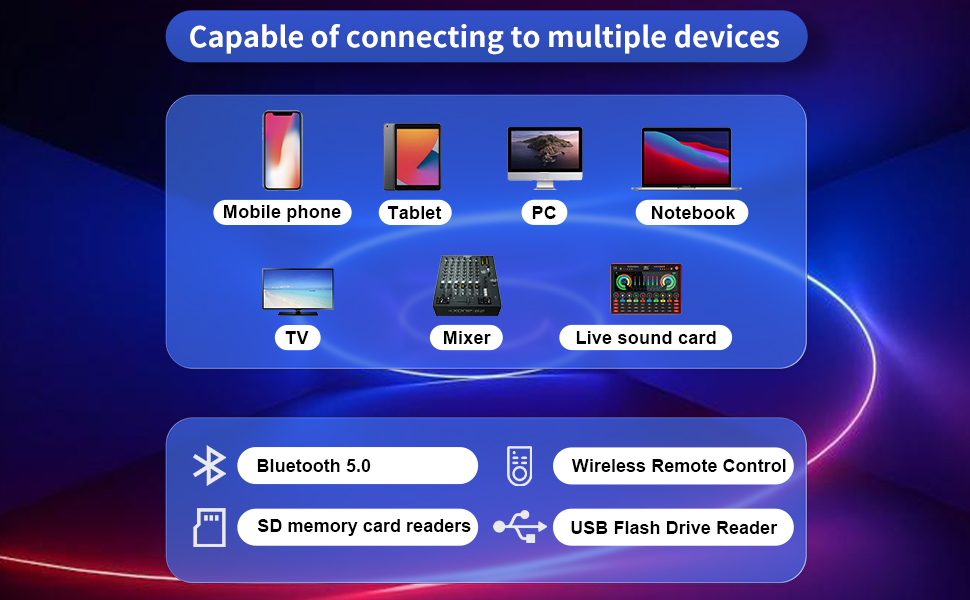
A diagram showing the PRORECK Dance 12 speaker's compatibility with various devices including mobile phones, tablets, PCs, notebooks, TVs, mixers, and live sound cards, highlighting Bluetooth 5.0, wireless remote control, SD memory card reader, and USB flash drive reader features.
6. Care and Maintenance
Proper care and maintenance will extend the lifespan of your PRORECK Dance 12 speaker system.
- Cleaning: Disconnect the power before cleaning. Use a soft, dry cloth to wipe the exterior surfaces. Do not use abrasive cleaners, waxes, or solvents.
- Storage: When not in use for extended periods, store the speakers in a cool, dry place, away from direct sunlight and extreme temperatures. It is recommended to use the original packaging for storage and transport.
- Handling: Always handle the speakers carefully. Avoid dropping or subjecting them to strong impacts. Use the integrated handles for transportation.
- Ventilation: Ensure that the ventilation openings are clear of dust and debris to prevent overheating.
7. Troubleshooting
If you encounter issues with your PRORECK Dance 12 system, refer to the following common problems and solutions.
- No Power:
- Check if the power cord is securely connected to both the speaker and the electrical outlet.
- Ensure the power switch is in the ON position.
- Verify that the electrical outlet is functioning by plugging in another device.
- Check the voltage selector switch (115V/230V) on the rear panel is set correctly for your region.
- No Sound:
- Ensure the master volume and individual input volumes (Mic, MP3, Line) are turned up.
- Verify that the Speakon cable connecting the active and passive speakers is securely attached at both ends.
- Check the audio source (Bluetooth device, USB/SD card, external device) for proper playback and volume.
- If using an external audio source, ensure the RCA cables are correctly connected to the 'Line In' ports.
- Try switching between different input modes (Bluetooth, USB, SD, FM, Line) to confirm the issue is not mode-specific.
- Bluetooth Pairing Issues:
- Ensure the speaker is in Bluetooth mode and discoverable (flashing Bluetooth icon).
- Make sure your Bluetooth device is within range (typically 30 feet or 10 meters).
- Turn off and on Bluetooth on your device, then try pairing again.
- If previously paired, try 'forgetting' the device on your phone and re-pairing.
- Ensure no other Bluetooth devices are actively connected to the speaker.
- Remote Control Not Working:
- Check if the battery in the remote control is correctly inserted and not depleted.
- Ensure there are no obstructions between the remote control and the speaker's IR receiver.
- Point the remote directly at the speaker's front panel.
8. Technical Specifications
| Feature | Specification |
|---|---|
| Model | Dance 12 |
| Mounting Type | Portable |
| Power Source | Corded Electric |
| Peak Power | 1000 Watts |
| RMS Power | 150 Watts |
| Woofer Size | 12 Inches |
| Compression Driver | 1.35-inch Titanium Diaphragm |
| Number of Channels | 3 |
| Audio Inputs | 1/4'' Mic, RCA Line |
| Audio Outputs | RCA Line, Speakon |
| Connectivity Technology | Bluetooth, USB, SD Card Reader, FM Radio |
| Bluetooth Version | 5.0 |
| Cable Length (Speakon) | 30 Feet |
| Voltage Selector | 115 V/230 V |
| Item Weight | 57.1 pounds (per speaker) |
| Item Dimensions (L x W x H) | 29 x 16.5 x 25.2 inches (per speaker) |
| Color | Black |
9. Warranty and Customer Support
PRORECK products are designed and manufactured to the highest quality standards. This product is covered by a limited warranty against defects in materials and workmanship from the date of purchase.
For specific warranty terms, registration, or to obtain customer support, please refer to the warranty card included in your package or visit the official PRORECK website. If you experience any issues that cannot be resolved using the troubleshooting guide, please contact PRORECK customer service for assistance.
When contacting support, please have your product model (Dance 12) and purchase information readily available.
Related documentsDance 12

Ask a question about this manual
Ask about setup, troubleshooting, compatibility, parts, safety, or missing instructions. Manuals+ will review the question and use this page’s manual context to help answer it.