
BCXY CS-ECH311BL
Contents
Replacement Battery User Manual
Model: CS-ECH311BL
Product Overview
This manual provides essential information for the safe and effective use of the BCXY Replacement Battery, model CS-ECH311BL. This battery is designed as a replacement for specific ELCA devices.

Image: The BCXY Replacement Battery, showing its label with model and part numbers.
Compatible Models:
- ELCA EVO
- ELCA MAGO-EVO
- ELCA MITO-VETTA
- ELCA VETTA
Compatible Battery Part Number: ELCA 0401BA000311
Safety Information and Warnings
Please read and understand all safety instructions before using this product. Failure to follow these instructions may result in fire, electric shock, injury, or damage to the battery or device.
- DO NOT ATTEMPT TO DISASSEMBLE, OPEN OR SERVICE THE BATTERY PACK.
- REPLACE ONLY WITH THE BATTERY PACK DESIGNATED FOR THIS PRODUCT.
- DO NOT CRUSH, PUNCTURE, SHORT EXTERNAL CONTACTS OR DISPOSE OF IN FIRE OR WATER.
- DO NOT STORE ABOVE 60°C (140°F).
- NEW BATTERY PACK MUST BE FULLY CHARGED BEFORE USE.
- TO REDUCE RISK OF FIRE OR BURNS, READ INSTRUCTIONS IN OPERATING GUIDE BEFORE USING THE BATTERY.
This battery is certified with ISO9001, RoHS, and CE standards, ensuring quality and safety compliance.
Setup and Installation
Before installation, ensure your device is powered off and disconnected from any power source. Refer to your device's original instruction manual for specific battery replacement procedures.
- Power Off Device: Ensure the ELCA device is completely turned off and unplugged.
- Locate Battery Compartment: Identify the battery compartment on your ELCA device. This typically involves opening a cover or panel.
- Remove Old Battery: Carefully disconnect and remove the old battery. Note the orientation of the connector.
- Insert New Battery: Align the connector of the new BCXY replacement battery (Model: CS-ECH311BL) with the port in your device. Gently push the connector until it clicks into place.
- Secure Battery: Place the new battery securely within the compartment.
- Close Compartment: Reattach the battery compartment cover or panel.
- Initial Charge: It is recommended to fully charge the new battery before its first use.

Image: Close-up view of the battery's 3-pin connector, showing its design for proper insertion.
Operating Instructions
Once the battery is installed and fully charged, your ELCA device should operate as normal. The battery provides reliable power for your compatible device.
- Charging: Use only the original or manufacturer-approved charger for your ELCA device. The battery's limited charge voltage is 4.2V±0.05V.
- Usage: Operate your device within its specified temperature ranges. Avoid extreme hot or cold environments.
- Discharge: Avoid completely draining the battery frequently, as this can reduce its lifespan.
Maintenance and Storage
Proper maintenance and storage will extend the life of your battery.
- Regular Charging: For optimal performance, charge the battery regularly, even if the device is not in frequent use.
- Storage: If storing the battery for an extended period, store it in a cool, dry place at approximately 50% charge. Do not store above 60°C (140°F).
- Cleaning: Keep battery contacts clean and free of dust or debris. Use a dry cloth to wipe them if necessary.
- Disposal: Dispose of old batteries responsibly according to local regulations. Do not dispose of batteries in household waste or fire.
Troubleshooting
If you experience issues with your replacement battery, consider the following common solutions:
| Problem | Possible Cause | Solution |
|---|---|---|
| Device not powering on after battery installation. | Battery not fully charged, or not properly connected. | Ensure the battery is fully charged. Re-check the battery connection to ensure it is securely seated. |
| Battery not holding a charge. | Incorrect charging method, or battery lifespan reached. | Ensure you are using the correct charger. If the battery is old, it may need replacement. |
| Battery overheating during use or charging. | Faulty battery or charger, or improper ventilation. | Immediately discontinue use and charging. Contact support if the issue persists. Ensure device ventilation is not blocked. |
If troubleshooting steps do not resolve the issue, please contact customer support.
Specifications
Detailed technical specifications for the BCXY Replacement Battery (Model: CS-ECH311BL).
- Model Number: CS-ECH311BL
- Part Number: 0401BA000311
- Battery Type: Li-Polymer
- Capacity: 1250mAh
- Voltage: 3.7V
- Limited Charge Voltage: 4.2V ± 0.05V
- Dimensions: 59.70 x 37.10 x 6.30 mm (2.35 x 1.46 x 0.25 inches)
- Item Weight: 2.12 ounces
- Reusability: Rechargeable
- Certifications: ISO9001, RoHS, CE
- Standard: GB 31241-2014
- Manufacturer: Cameron Sino
- Barcode/UPC: 4894128126966
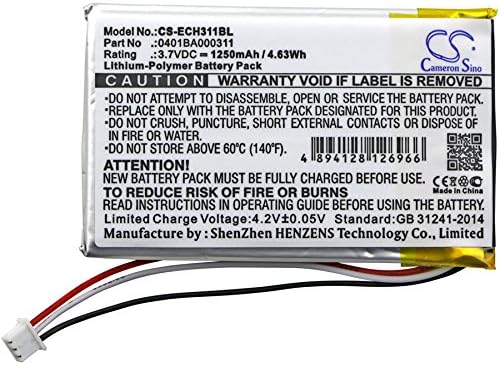
Image: Detailed view of the battery label, displaying model number, part number, voltage, capacity, and warning information.
Warranty and Support
For warranty information or technical support regarding your BCXY Replacement Battery, please refer to the seller's policy or contact the manufacturer directly.
Tips Before Purchase: Please confirm the compatible model and battery part number carefully before you purchase it. If you are not sure, please send email to us with your battery details or pictures, we will give you professional suggestions.
For further assistance, you may visit the BCXY Store on Amazon.
Ask a question about this manual
Ask about setup, troubleshooting, compatibility, parts, safety, or missing instructions. Manuals+ will review the question and use this page’s manual context to help answer it.