
1. Introduction
This user manual provides essential instructions for the safe and effective use of your BCXY Replacement Battery, model CS-MR1700SL, designed for the Magellan RoadMate 1700 GPS device. Please read this manual thoroughly before installation and use to ensure optimal performance and safety.
2. Important Safety Information
Failure to follow these safety instructions may result in fire, electric shock, injury, or damage to the battery or device. Keep this manual for future reference.
- Do not attempt to disassemble, open, or service the battery pack.
- Replace only with the battery pack designated for this product.
- Do not crush, puncture, short external contacts, or dispose of in fire or water.
- Do not store above 60°C (140°F).
- New battery packs must be fully charged before use.
- To reduce risk of fire or burns, read instructions in the operating guide before using the battery.
- Limited Charge Voltage: 4.2V ± 0.05V.
- Dispose of used batteries according to local regulations.

Image 1: Top view of the battery, displaying critical safety warnings and product specifications on its label. This includes warnings against disassembly, crushing, puncturing, and exposure to high temperatures or fire.
3. Installation Instructions
Before proceeding with installation, ensure your Magellan RoadMate 1700 device is powered off and disconnected from any power source. Refer to your device's original manual for specific battery compartment access instructions if needed.
- Power Off Device: Ensure the Magellan RoadMate 1700 is completely turned off.
- Locate Battery Compartment: Identify and open the battery compartment on your Magellan RoadMate 1700. This typically involves removing a back cover or panel.
- Remove Old Battery: Carefully disconnect the old battery's connector from the device's port. Gently lift and remove the old battery.
- Insert New Battery: Place the BCXY replacement battery into the compartment, ensuring it fits correctly.
- Connect Battery: Align the battery connector with the device's port and firmly plug it in. Ensure a secure connection.
- Secure Compartment: Close the battery compartment cover securely.
- Initial Charge: It is recommended to fully charge the new battery before its first use.
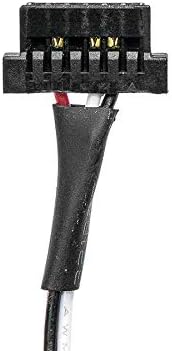
Image 2: Detailed view of the battery's connector, highlighting the wiring and pin configuration for proper connection to the Magellan RoadMate 1700 device.
4. Operation and Charging
4.1 First Use and Charging
For optimal performance, fully charge the battery before its initial use. Connect your Magellan RoadMate 1700 to its original charger or a compatible power source. The device's charging indicator will typically show when charging is in progress and when it is complete.
4.2 General Usage
- Use only chargers specified for your Magellan RoadMate 1700 device.
- Avoid completely draining the battery frequently, as this can reduce its overall lifespan.
- If the device will not be used for an extended period, store the battery with approximately 50% charge in a cool, dry place.
5. Battery Maintenance
Proper maintenance can extend the life of your BCXY replacement battery.
- Temperature: Avoid exposing the battery to extreme temperatures (hot or cold). Optimal operating temperature is typically between 0°C and 35°C (32°F and 95°F).
- Storage: If storing the device for a long time, remove the battery if possible and store it separately in a cool, dry place with about 50% charge.
- Cleaning: Keep battery contacts clean and free from dust or debris. Use a dry, soft cloth for cleaning.
- Avoid Physical Damage: Protect the battery from drops, impacts, and crushing.
6. Troubleshooting
If you encounter issues with your BCXY replacement battery, consider the following common solutions:
| Problem | Possible Cause | Solution |
|---|---|---|
| Device does not power on after battery installation. | Battery not properly connected or not charged. | Ensure the battery connector is securely plugged in. Fully charge the battery before attempting to power on. |
| Battery does not charge. | Faulty charger, cable, or connection. | Verify the charger and cable are working correctly. Ensure the charging port on the device is clean and undamaged. Re-seat the battery. |
| Battery drains quickly. | High power consumption by device, or battery not fully conditioned. | Reduce screen brightness or disable unnecessary features on your device. Ensure the battery has undergone a few full charge/discharge cycles to optimize performance. |
If these steps do not resolve the issue, please contact customer support.
7. Product Specifications
The following are the technical specifications for the BCXY Replacement Battery (Model CS-MR1700SL):
- Model Number: CS-MR1700SL
- Compatible Model: Magellan RoadMate 1700
- Compatible Battery Part Number: MAGELLAN 2793801J3
- Battery Type: Li-ion (Lithium-ion)
- Capacity: 750mAh (Milliampere Hour)
- Voltage: 3.7V
- Dimension: 50.06 x 35.88 x 5.70mm (1.97 x 1.41 x 0.22 inches)
- Item Weight: Approximately 2.12 ounces
- Certifications: ISO9001, RoHS, CE
- Manufacturer: Cameron Sino

Image 3: Angled view of the battery, clearly showing the model number, capacity, and voltage as printed on the product label.
8. Customer Support and Warranty
For any questions, concerns, or professional suggestions regarding your BCXY Replacement Battery, please contact our customer support team. When contacting support, please provide your battery details or pictures to assist us in providing the best possible assistance.
The product is manufactured under ISO9001 standards and holds RoHS and CE certifications, ensuring quality and compliance with environmental and safety directives.
Note: Specific warranty terms may vary. Please refer to your purchase documentation or contact customer support for detailed warranty information.