
1. Introduction
Thank you for choosing the Braun ExactFit 3 Arm Blood Pressure Monitor. This device is designed for accurate and reliable blood pressure measurement at home. It incorporates advanced features such as irregular heartbeat detection, an averaging function for consistent readings, and two cuff sizes to ensure a comfortable and precise fit for various arm circumferences. This manual provides essential information for the safe and effective use of your blood pressure monitor.
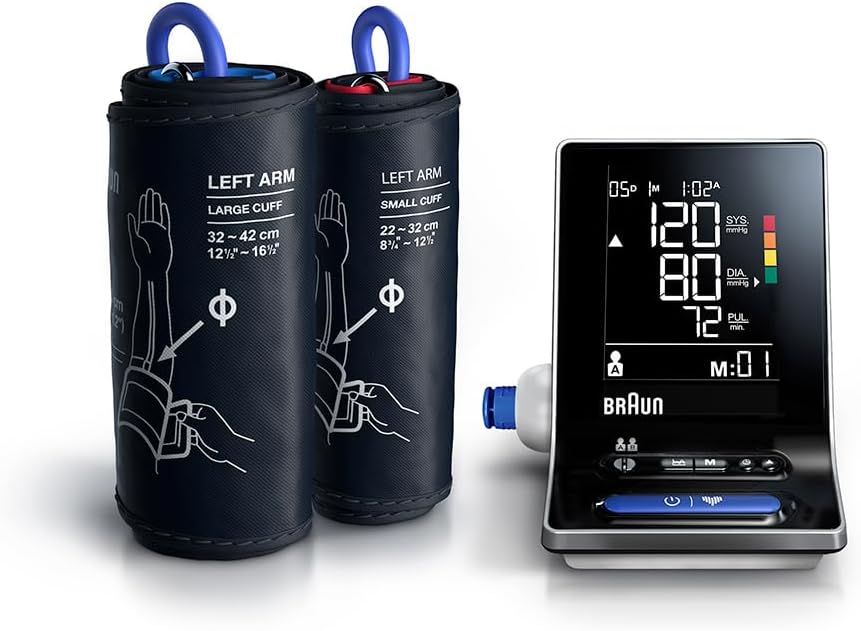
Image: The Braun ExactFit 3 Blood Pressure Monitor display unit shown alongside the two included arm cuffs (small and large).
2. Important Safety Information
- Always consult your physician regarding your blood pressure readings. Self-diagnosis and treatment based on measurements can be dangerous.
- This device is intended for adult home use only. It is not intended for use on infants, children, or pregnant women.
- Do not use this device if you have a serious arrhythmia. Consult your doctor if you have any concerns.
- Keep the device and its components out of reach of children and pets.
- Do not use the device in a moving vehicle or on an airplane.
- Avoid taking measurements immediately after bathing, consuming alcohol, smoking, or exercising.
- Ensure the cuff is applied correctly and comfortably. Over-tightening can cause discomfort or injury.
- Only use accessories and parts specified by the manufacturer.

Image: The Braun ExactFit 3 monitor and cuff, highlighting its clinically validated accuracy according to the European Society of Hypertension (ESH) protocol.
3. Package Contents
Your Braun ExactFit 3 Blood Pressure Monitor package should contain the following items:
- Braun ExactFit 3 Blood Pressure Monitor unit
- Small Cuff (22-32 cm / 8¾"-12½")
- Large Cuff (32-42 cm / 12½"-16½")
- 4 x AA Batteries
- Instruction Manual (this document)
- Quick Start Guide

Image: A top-down view of all items included in the Braun ExactFit 3 package: the monitor, two cuffs, a storage case, and user manuals.
4. Setup
4.1. Battery Installation
- Open the battery compartment cover on the back of the monitor.
- Insert the 4 AA batteries, ensuring the correct polarity (+ and -) as indicated inside the compartment.
- Close the battery compartment cover securely.
4.2. Connecting the Cuff
- Select the appropriate cuff size for your arm circumference. The small cuff fits 22-32 cm, and the large cuff fits 32-42 cm.
- Insert the air plug of the cuff firmly into the air jack on the left side of the monitor unit. Ensure it clicks into place.

Image: A close-up view of the two arm cuffs, labeled 'Large Cuff' and 'Small Cuff', indicating their respective arm circumference ranges.
4.3. Setting Date and Time (Initial Setup)
Upon first use or after battery replacement, the device may prompt you to set the date and time. Follow the on-screen instructions using the device buttons to adjust these settings for accurate record-keeping.
5. Operating Instructions
5.1. Applying the Arm Cuff
- Sit comfortably with your back supported and feet flat on the floor.
- Place the cuff on your bare upper left arm, approximately 1-2 cm above your elbow. The air tube should run down the inside of your arm.
- Ensure the cuff is snug but not too tight. You should be able to slide two fingers under the cuff.
- Rest your arm on a table so the cuff is at heart level.
5.2. Taking a Measurement
- Press the START/STOP button. The cuff will begin to inflate automatically.
- Remain still and silent during the measurement. Do not talk or move your arm.
- Once the measurement is complete, the cuff will deflate, and your systolic, diastolic, and pulse readings will be displayed on the screen.

Image: A person's hand holding the Braun ExactFit 3 monitor while taking a blood pressure reading, showing the clear digital display with color-coded indicators for easy interpretation.
5.3. Understanding Your Readings
- Systolic Pressure (SYS): The top number, indicating the pressure in your arteries when your heart beats.
- Diastolic Pressure (DIA): The bottom number, indicating the pressure in your arteries between beats.
- Pulse Rate: Your heart rate, measured in beats per minute.
- Color-Coded Indicator: The display features a color bar (green, yellow, orange, red) to help you quickly interpret your blood pressure category according to WHO guidelines.
5.4. Irregular Heartbeat Detection
The monitor is equipped with technology to detect irregular heartbeats. If an irregular heartbeat is detected during the measurement, a specific symbol will appear on the display. If this symbol appears frequently, consult your physician.

Image: A woman seated outdoors, using the Braun ExactFit 3 blood pressure monitor on her arm, illustrating the irregular heartbeat detection feature.
5.5. Advanced Averaging Function
The device can calculate the average of your last three measurements, providing a more representative overview of your blood pressure. Refer to the on-screen menu for accessing this feature.
5.6. Memory Function
The Braun ExactFit 3 stores up to 40 measurements for two users. To review past readings, press the 'M' (Memory) button. You can switch between user profiles (User 1 / User 2) if configured.
5.7. Braun Healthy Heart App
While the Braun ExactFit 3 is not a connected device, you can manually enter your blood pressure readings into the Braun Healthy Heart app on your smartphone. This allows you to track your progress over time and gain insights into your heart health trends.
6. Maintenance and Care
6.1. Cleaning
- Clean the monitor unit and cuff with a soft, dry cloth.
- If necessary, use a cloth lightly dampened with water or a mild detergent. Do not use abrasive cleaners or immerse the device in water.
- Ensure no liquid enters the device casing or the air jack.
6.2. Storage
- Store the device in a clean, dry place, away from direct sunlight, extreme temperatures, and humidity.
- If the device will not be used for an extended period, remove the batteries to prevent leakage.
6.3. Battery Replacement
When the low battery indicator appears on the display, replace all four AA batteries with new ones. Follow the battery installation steps in Section 4.1.
7. Troubleshooting
| Problem | Possible Cause | Solution |
|---|---|---|
| No display when powered on | Batteries are dead or incorrectly inserted. | Replace batteries or check polarity. |
| Error message (e.g., 'E1', 'E2') | Cuff not applied correctly, movement during measurement, or air leakage. | Re-apply cuff, remain still, check cuff connection. Refer to manual for specific error codes. |
| Inconsistent readings | Improper measurement technique, stress, or recent activity. | Ensure proper posture and relaxation. Take multiple readings and use the averaging function. Consult your doctor if readings remain inconsistent. |
| Irregular heartbeat symbol appears frequently | Possible underlying heart condition. | Consult your physician for diagnosis and advice. |
If the problem persists after attempting these solutions, please contact Braun customer support.
8. Specifications
- Model Number: BUA6150CEME
- Measurement Method: Oscillometric
- Display Type: LCD
- Power Source: 4 x AA Batteries (included)
- Cuff Sizes: Small (22-32 cm), Large (32-42 cm)
- Memory: 40 measurements for 2 users
- Weight: Approximately 300 grams (without batteries)
- Dimensions (L x W x H): 18.01 x 11.99 x 15.01 cm
- Operating Temperature: 10°C to 40°C (50°F to 104°F)
- Storage Temperature: -20°C to 55°C (-4°F to 131°F)
- Country of Origin: China
- Manufacturer: Helen of Troy
9. Warranty and Support
The Braun ExactFit 3 Blood Pressure Monitor comes with a manufacturer's warranty. Please refer to the warranty card included in your package for specific terms and conditions, including the warranty period and coverage details.
Customer Support:
For technical assistance, troubleshooting, or warranty claims, please contact the manufacturer directly:
Kaz Europe Sàrl, A Helen of Troy Company
Route de la Chaux 4
1030 Bussigny
Switzerland
Medical devices marked CE 0297.
You may also visit the official Braun Healthcare website for additional support resources and contact information specific to your region.