
Sena R1-STD-ET-L
Sena R1 Smart Communications Helmet User Manual
Model: R1-STD-ET-L
Brand: Sena
Introduction
The Sena R1 Smart Cycling Helmet is a blend of technology and traditional construct, featuring built-in speakers and mic into the shell of a cycling helmet. Enhance your cycling experience within your cycling group with group intercom, giving you the ability to communicate with your group with a range of up to a half-mile. Sena's Advanced Noise Control technology ensures your voice is transmitted clearly with no wind or white noise to be heard. Listen to your music, hear GPS navigation, take phone calls and more when you pair your smartphone to the R1. With a comfortable design, removable and washable inner padding, an eco-leather chinstrap, and a spin lock to adjust the fit, the Sena R1 is ready for your next cycling adventure.

The Sena R1 Smart Communications Helmet, showcasing its sleek design and integrated technology.
Setup and Sizing
Measuring Your Head for the Perfect Fit
Ensuring a proper fit is crucial for comfort, safety, and performance. Follow these steps to measure your head accurately:
- Measure Circumference: Use a flexible tape measure to wrap horizontally around your head. Position the tape approximately one inch (2.5 cm) above your eyebrows and at the top of your ears.
- Ensure Snugness and Level: Pull the tape measure snugly, but not too tightly. Make sure the tape is level all the way around your head, from front to back.
- Record Measurement: Note the number where the beginning of the tape measure meets the main body of the tape. This is your head circumference.
- Compare to Sizing Chart: Refer to the sizing guide below to determine the recommended helmet size based on your measurement.

A person demonstrating how to measure head circumference for helmet sizing.
Sizing Guide
| Size | Head Circumference (cm) | Head Circumference (inches) |
|---|---|---|
| S | 50 - 55 | 19.6 - 21.8 |
| M | 55 - 59 | 21.8 - 23.4 |
| L | 59 - 63 | 23.4 - 24.8 |
Adjusting Your Helmet
Once you have selected the correct size, adjust the helmet for a secure and comfortable fit:
- Open Dial Adjustment: Before placing the helmet on your head, fully open the dial adjustment located at the back of the helmet. This allows the helmet shell to fit properly down on your head.
- Position Helmet: Place the helmet on your head. It should feel snug but comfortable. Ensure the helmet is level, not sitting too far forward or too far back. The front edge should be about one inch above your eyebrows.
- Tighten Dial Adjustment: Slowly tighten the dial adjustment at the back until the helmet feels snug and secure. It should not be overly tight, just enough to prevent excessive movement.
- Buckle Chin Strap: Fasten the chin strap. The strap should be loose enough to allow you to move your mouth comfortably, but tight enough that you can only fit about three fingers between your chin and the strap.
- Adjust Side Straps: Adjust the buckles on the side straps so they sit flat against your head and around your ears. The straps should form a 'V' shape just below your ears, without touching them, for maximum comfort. You may need to re-adjust the chin strap after positioning the side buckles.

The rear dial adjustment on the Sena R1 helmet for a secure fit.
Checking the Fit
To confirm your helmet is properly adjusted:
- Shake your head side-to-side, front-to-back, and as if you are saying "no". The helmet should remain firmly in place and not slip at all.
- If you feel any pressure points, slightly loosen the dial adjustment at the back. Ensure you do not loosen it so much that the helmet can shift significantly when you move your head.
Operating Instructions
Integrated Communication System
The Sena R1 helmet features an integrated communication system for enhanced cycling experiences.
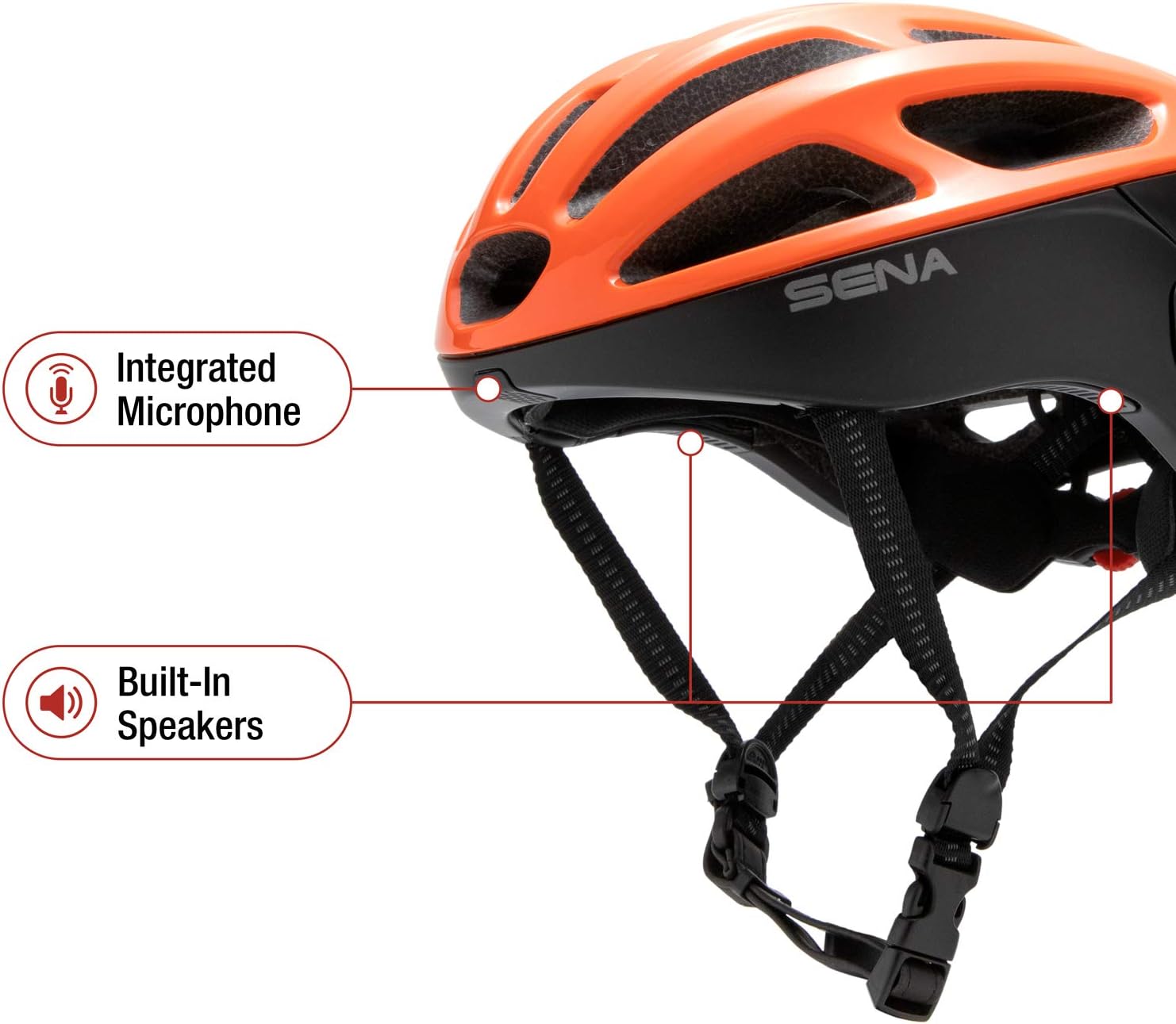
Integrated microphone and speakers for clear communication.
- Built-in Speakers and Mic: Listen to music and communicate clearly with integrated HD speakers and microphone. Advanced Noise Control technology helps ensure your voice is transmitted clearly, minimizing wind and white noise.
- Bluetooth Connectivity: Pair your smartphone to the R1 via Bluetooth to access various features on the go.
- Phone Calls: Make and receive phone calls directly through your helmet.
- Music and GPS: Stream music from your favorite apps or listen to GPS navigation cues.
- FM Radio: The helmet includes a built-in FM radio for additional entertainment options.
Group Intercom
Communicate with up to three other riders using the Group Intercom feature, with a range of up to a half-mile (900 meters) in open terrain.
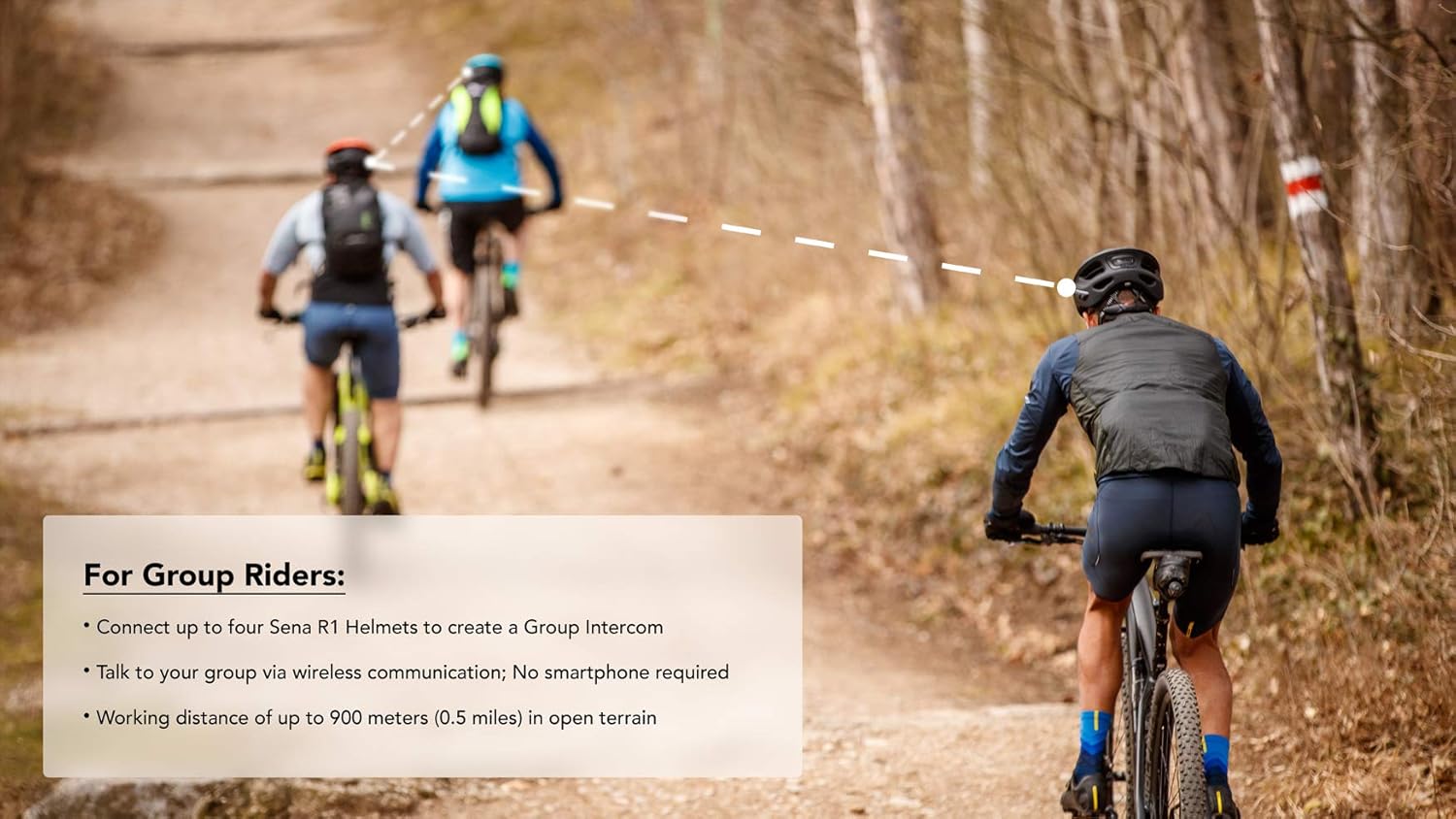
The Sena R1 enables seamless group communication during rides.
To pair helmets for group intercom:
- Ensure both helmets are powered on.
- Press and hold the center button on two helmets simultaneously until you hear "Intercom Pairing". The LED will flash red.
- Tap one of the helmets to connect.
- Repeat the process to add up to four helmets to the group intercom.
- Once all helmets are connected, tap each previous helmet in reverse order to bring them all into the group intercom.
Video demonstrating the Sena R1 Bluetooth Integrated Smart Bicycle Helmet features, including group intercom and audio capabilities.
Sena Cycling App
Customize settings and manage your R1 helmet using the dedicated Sena Cycling App on your smartphone.

The Sena Cycling App allows for easy management of helmet settings.
Maintenance
To ensure the longevity and optimal performance of your Sena R1 helmet, regular maintenance is recommended:
- Cleaning: Clean the helmet shell with a soft, damp cloth and mild soap. Avoid harsh chemicals or abrasive materials.
- Inner Padding: The inner padding is removable and washable. Refer to the user guide for specific washing instructions to maintain hygiene and comfort.
- Strap Care: Inspect the chin strap and side straps regularly for any signs of wear or damage. Ensure buckles are functioning correctly.
- Storage: Store the helmet in a cool, dry place away from direct sunlight and extreme temperatures.
Troubleshooting
If you encounter issues with your Sena R1 helmet, consider the following common solutions:
- Audio Quality Issues (Microphone/Speakers): If the microphone volume is low or speakers are unclear, ensure the helmet is properly positioned and the microphone is close to your mouth.
- Firmware Update: Many performance issues, including audio quality and connectivity, can be resolved by updating the helmet's firmware. Connect your helmet to a computer (Mac or Windows) and use the Sena Device Manager software to check for and install the latest firmware. This is a crucial step for optimal performance.
- Connectivity Problems: If you experience difficulty pairing with your smartphone or other helmets, try resetting the Bluetooth connection on both devices and re-attempting the pairing process.
- Battery Life: The Sena R1 has a 12-hour battery life. Ensure the helmet is fully charged before extended use.
Specifications
| Feature | Detail |
|---|---|
| Brand | Sena |
| Model Name | R1-STD |
| Model Number | R1-STD-ET-L |
| Color | Electric Tangerine |
| Size | Large |
| Special Feature | Bluetooth |
| Outer Material | Polycarbonate (PC) |
| Inner Material | Leather |
| Item Weight | 380 Grams |
| Item Dimensions (L x W x H) | 10.4 x 13.2 x 7.6 inches |
| Recommended Uses | Cycling |
| Included Components | Cable, Helmet |
Warranty
The Sena R1 Smart Communications Helmet comes with a 2 Year Warranty from the manufacturer.
For detailed warranty information and claims, please refer to the official Sena website or the full user manual.
Support & Resources
For further assistance and detailed information, please refer to the following resources:
- Official User Manual (PDF): Download User Manual
- Official User Guide (PDF): Download User Guide
- Sena Official Website: Visit the Sena Store on Amazon for product information and support.
Related documentsR1-STD-ET-L


Ask a question about this manual
Ask about setup, troubleshooting, compatibility, parts, safety, or missing instructions. Manuals+ will review the question and use this page’s manual context to help answer it.