
1. Introduction
This manual provides instructions for the ECONTROLLY replacement remote control, designed for use with various Jensen AudioVox TV DVD Combo units. This remote offers direct functionality without the need for programming, ensuring a straightforward user experience.
1.1 Compatible Models
This remote control is compatible with the following Jensen AudioVox TV/DVD Combo models:
- JE5015, JTV19DC, JE2815, JE4015, JE3215, JE2814, JE1914DVDC
- JE1913AC2, JE3914, JE4614, JE5014, JE3213AC, JTV2815DC
- JE3214, JE1914, JE2414, JE2613AC, PSVCJE1912LED, RTPSVCJE1912LED
- JE2212LED, JE2613, JE3213, JE1913, PSVCJE3212, PSVCJE1914
- LE3212LED, PSVCJE3212LED, PSVCJE2212LED, PSVCJE1914LED
- JE3212LED, PSVCJE3212LED, JE3215, JE4015, JE5015, JE2815, JTV2815DC, JTV19DC
2. Setup
2.1 Battery Installation
The remote control requires two (2) AAA batteries (not included). Follow these steps to install the batteries:
- Locate the battery compartment cover on the back of the remote control.
- Press down on the tab and slide the cover downwards to open the compartment.
- Insert two new AAA batteries, ensuring the positive (+) and negative (-) terminals align correctly with the markings inside the compartment.
- Slide the battery compartment cover back into place until it clicks securely.

Figure 1: Rear view of the remote control with the battery compartment open, illustrating where to insert two AAA batteries.
Once batteries are installed, the remote is ready for use. No programming or pairing is required.
3. Operating Instructions
This section details the functions of the buttons on your ECONTROLLY replacement remote control.
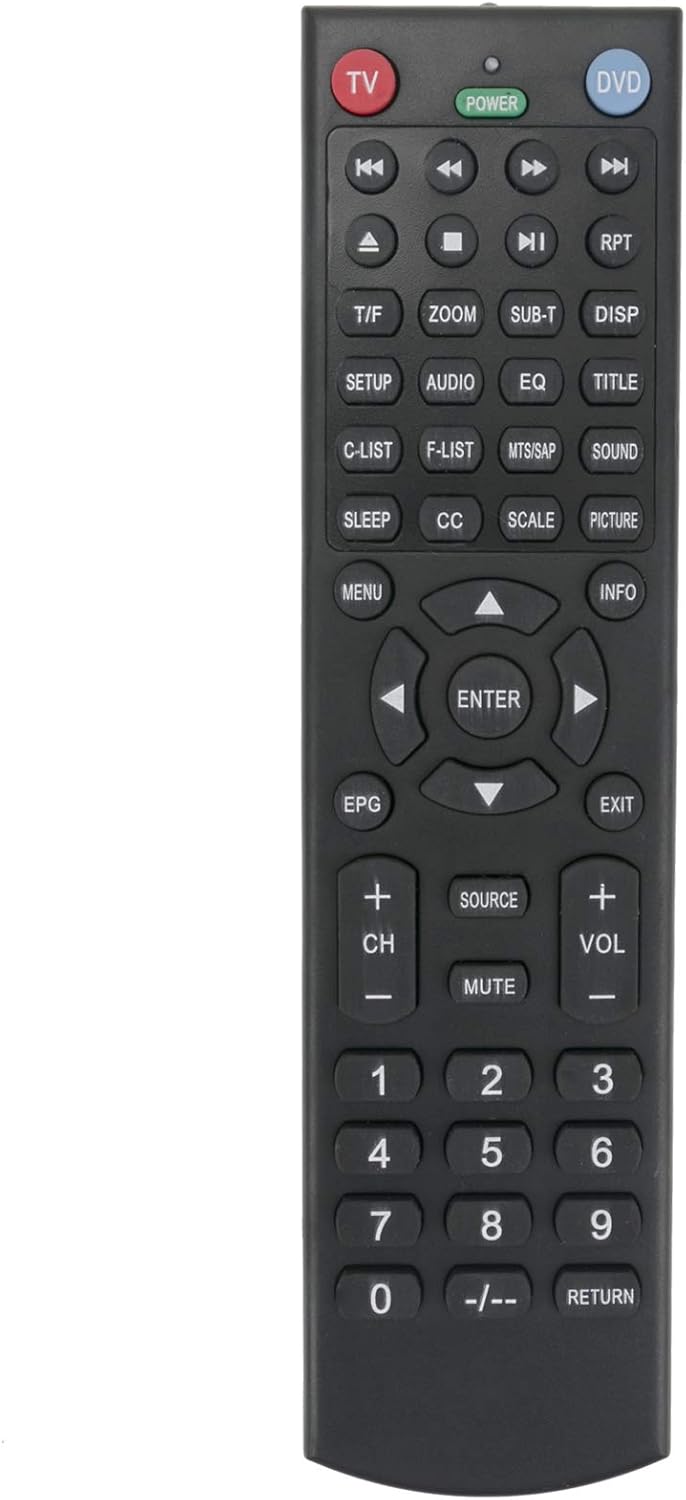
Figure 2: Front view of the remote control, displaying the layout of all functional buttons.
3.1 Button Functions Overview
- TV / DVD Buttons: Selects the operating mode for either TV or DVD functions.
- POWER: Turns the connected device (TV or DVD player) on or off.
- Playback Controls (Rewind, Play/Pause, Fast Forward, Stop, Previous, Next): Used for controlling DVD playback.
- T/F (Time/Frame): Function related to time or frame display.
- ZOOM: Adjusts the screen zoom level.
- SUB-T (Subtitle): Toggles subtitles on/off during playback.
- DISP (Display): Shows on-screen display information.
- SETUP: Accesses the setup menu of the device.
- AUDIO: Selects audio tracks or modes.
- EQ (Equalizer): Adjusts audio equalizer settings.
- TITLE: Accesses the DVD title menu.
- C-LIST (Channel List): Displays the channel list.
- F-LIST (Favorite List): Displays the favorite channel list.
- MTS/SAP: Selects Multi-channel Television Sound/Secondary Audio Program.
- SOUND: Adjusts sound settings.
- SLEEP: Sets a sleep timer for the device.
- CC (Closed Caption): Toggles closed captions on/off.
- SCALE: Adjusts screen aspect ratio or scaling.
- PICTURE: Adjusts picture settings.
- MENU: Opens the main menu.
- INFO: Displays information about the current program or media.
- Navigation Buttons (Up, Down, Left, Right, ENTER): Used to navigate menus and confirm selections.
- EPG (Electronic Program Guide): Accesses the electronic program guide.
- EXIT: Exits the current menu or function.
- CH+ / CH- (Channel Up/Down): Changes TV channels.
- SOURCE: Selects input sources (e.g., HDMI, AV).
- MUTE: Mutes or unmutes the audio.
- VOL+ / VOL- (Volume Up/Down): Adjusts the volume level.
- Numeric Keypad (0-9): Directly enters channel numbers or menu selections.
- -/--: Used for entering two-digit channel numbers.
- RETURN: Returns to the previous screen or menu.
For specific functions and advanced settings, please refer to the original user manual of your Jensen AudioVox TV DVD Combo unit.
4. Maintenance
4.1 Battery Replacement
Replace batteries when the remote control's performance diminishes or stops working. Always replace both batteries simultaneously with new AAA alkaline batteries. Do not mix old and new batteries, or different types of batteries.
4.2 Cleaning
To clean the remote control, use a soft, dry cloth. Do not use liquid cleaners, abrasive pads, or chemical solvents, as these can damage the remote's surface or internal components.
4.3 Storage
If the remote control will not be used for an extended period, remove the batteries to prevent leakage and potential damage to the device.
5. Troubleshooting
- Remote not responding:
- Ensure batteries are inserted correctly with the correct polarity (+/-).
- Replace old batteries with new AAA alkaline batteries.
- Check for any obstructions between the remote control and the device's infrared sensor.
- Ensure you are within the effective range and line of sight of the device.
- Verify the remote is set to the correct mode (TV or DVD) for the function you are trying to perform.
- Specific buttons not working:
- This may indicate a faulty button or a specific function not supported by your device model.
- Clean the remote control surface, especially around the unresponsive button, to remove any debris.
If issues persist after following these steps, contact the seller for further assistance.
6. Specifications
| Feature | Detail |
|---|---|
| Model Number | RECE-JE5015 |
| Brand | ECONTROLLY |
| Product Dimensions | 7 x 2 x 0.65 inches |
| Item Weight | 1 ounce |
| Batteries Required | 2 AAA batteries (not included) |
| Connectivity Technology | Infrared |
| Compatible Devices | Television (Jensen AudioVox TV DVD Combos) |
7. Warranty and Support
For warranty information and customer support, please refer to the documentation provided at the time of purchase or contact the seller directly. Keep your purchase receipt as proof of purchase.
For technical assistance or inquiries regarding product functionality, it is recommended to reach out to the ECONTROLLY customer service or the retailer from whom the product was purchased.
