
Introduction
This manual provides instructions for the assembly, operation, and maintenance of your Best Choice Products 360-Degree Rotating Adjustable Christmas Tree Stand, Model SKY5180. Please read this manual thoroughly before use to ensure safe and efficient operation.
Safety Information
WARNING: To reduce the risk of fire or electric shock:
- Ensure the tree stand is placed on a stable, level surface.
- Do not overload the electrical outlets. The total wattage of connected lights should not exceed 800 watts.
- Keep all light set cords neatly gathered and secured to prevent tangling during rotation.
- Do not leave the product unattended while in operation.
- This product is designed for indoor use only.
- Always unplug the stand from the power source before cleaning or performing maintenance.
What's in the Box
Verify that all components are present before assembly:
- 1x Tree Stand Base Unit
- 4x Detachable Legs
- 1x Power Cord with On/Off Switch
- 2x Tree Pole Adapters (for various pole diameters)
- 1x Wireless Remote Controller
- 1x Instruction Manual

Image: All components of the Best Choice Products Rotating Christmas Tree Stand, including the base, detachable legs, power cord, and remote control.
Setup
- Attach the Legs: Insert each of the four detachable legs into the corresponding slots on the main base unit until they click securely into place.
- Select Tree Pole Adapter: Choose the appropriate adapter (Sleeve A or Sleeve B) that best fits the diameter of your artificial Christmas tree pole. The stand supports tree poles with a diameter between 0.9 inches and 1.25 inches.
- Insert Tree: Carefully place your artificial Christmas tree pole into the central opening of the stand. Ensure the tree is centered and stable. The stand is designed for artificial trees up to 7.5 feet tall and weighing up to 80 pounds.
- Secure the Tree: Rotate the collar at the top of the stand clockwise to tighten it around the tree pole, securing the tree firmly in place.
- Connect Power: Plug the stand's power cord into a standard electrical outlet.

Image: An underside view of the tree stand, highlighting the slots for the detachable legs and indicating the compatible tree pole sizes (0.9 in. - 1.25 in.).

Image: A close-up of the tree stand's central pole holder, showing the mechanism for inserting and securing the tree pole, along with the adapters.
Video: An official product video demonstrating the assembly and basic operation of the 360-Degree Rotating Christmas Tree Stand.
Operating Instructions
Your tree stand features a 3-setting switch and built-in electrical outlets for convenient operation.
3-Setting Switch
The switch located on the base of the stand has three positions:
- Position I (Lights On, Stand Stationary): The tree lights connected to the stand's outlets will illuminate, but the stand will not rotate.
- Position O (Off): The stand and any connected lights will be completely powered off.
- Position II (Lights On, Stand Rotates): The tree lights will illuminate, and the stand will rotate continuously, completing a full 360-degree rotation approximately every 70 seconds.
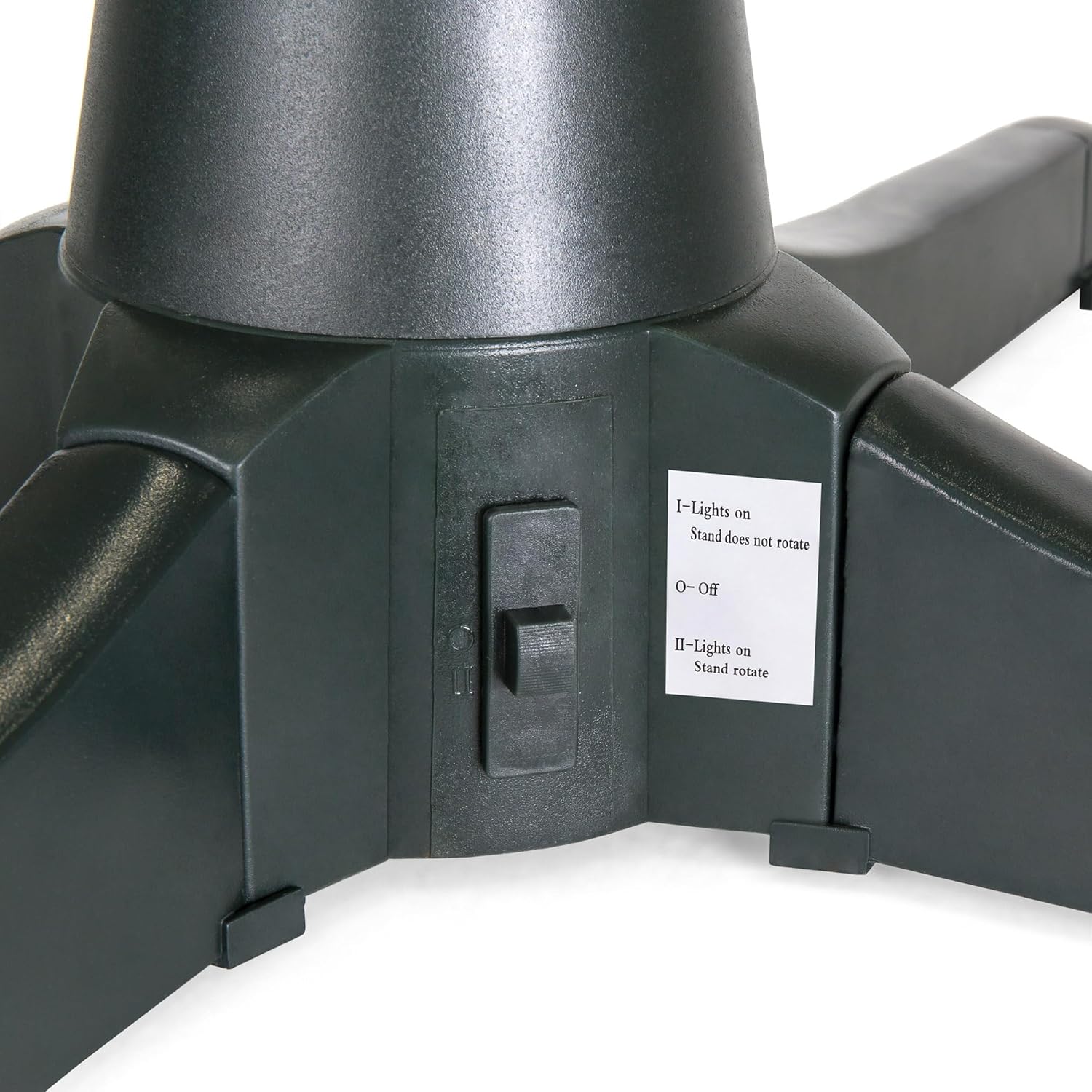
Image: A close-up of the physical 3-setting switch on the side of the tree stand base, indicating its different functions.
Built-in Electrical Outlets
The stand includes three (3) two-prong electrical outlets. These are designed to power your Christmas tree lights, preventing wires from tangling as the tree rotates. Plug your tree's light cords directly into these outlets.

Image: A Christmas tree stand with a tree inserted, showing the power cord and the built-in outlets where tree lights are connected.
Wireless Remote Controller
The included wireless remote allows for convenient control of the stand's functions from a distance. Refer to the remote's specific button labels for controlling rotation, lights, and other features.
Maintenance
- Cleaning: Unplug the stand before cleaning. Wipe the surface with a soft, dry cloth. Do not use abrasive cleaners or immerse the unit in water.
- Storage: When not in use, disassemble the legs and store the stand in its original packaging in a cool, dry place.
- Cord Care: Regularly inspect the power cord for any damage. Do not use the stand if the cord is frayed or damaged.
Troubleshooting
| Problem | Possible Cause | Solution |
|---|---|---|
| Stand does not rotate or lights do not turn on. | Not plugged in; switch in 'Off' position; power outage; overloaded circuit. | Ensure the stand is securely plugged into a working outlet. Check the 3-setting switch position. Verify power to the outlet. Reduce load if circuit is overloaded. |
| Tree wobbles or is unstable. | Incorrect adapter used; collar not tightened sufficiently; tree pole too thin/thick; tree exceeds weight/height limits. | Ensure the correct tree pole adapter is used. Tighten the collar firmly. Verify tree pole diameter is within 0.9"-1.25". Ensure tree height is max 7.5ft and weight is max 80 lbs. |
| Grinding or unusual noise during rotation. | Cords tangled; tree branches obstructing mechanism; excessive weight. | Ensure all light cords are neatly secured and not interfering with rotation. Check for any branches or decorations obstructing the stand. Confirm tree weight is within limits. |
Specifications
- Brand: Best Choice Products
- Model Number: SKY5180
- Product Dimensions: 26" (L) x 26" (W) x 7.5" (H)
- Color: Black
- Material: Acrylonitrile Butadiene Styrene (ABS)
- Item Weight: 2.9 Pounds
- Weight Capacity: 80 lbs
- Max Tree Height: 7.5 ft
- Tree Pole Diameter Compatibility: 0.9" - 1.25"
- Rotation: 360-degree rotation every 70 seconds
- Electrical Outlets: 3x Two-prong outlets (Max 800W total)
- Recommended Use: Indoor
- Assembly Required: Yes
- Batteries Required: No

Image: Diagram illustrating the overall dimensions of the tree stand: 26 inches (L) x 26 inches (W) x 7.5 inches (H).
Warranty and Support
For warranty information or product support, please refer to the documentation included with your purchase or contact Best Choice Products customer service directly. Keep your purchase receipt for warranty claims.


