
INSMY C12
INSMY C12 IPX7 Waterproof Shower Bluetooth Speaker User Manual
Model: C12 | Brand: INSMY
Introduction
Thank you for purchasing the INSMY C12 IPX7 Waterproof Shower Bluetooth Speaker. This portable and durable speaker is designed to provide high-quality audio in various environments, including showers, beaches, and outdoor activities. Its IPX7 waterproof rating ensures it can withstand immersion, making it an ideal companion for your adventures. This manual provides detailed instructions on how to set up, operate, and maintain your speaker to ensure optimal performance and longevity.
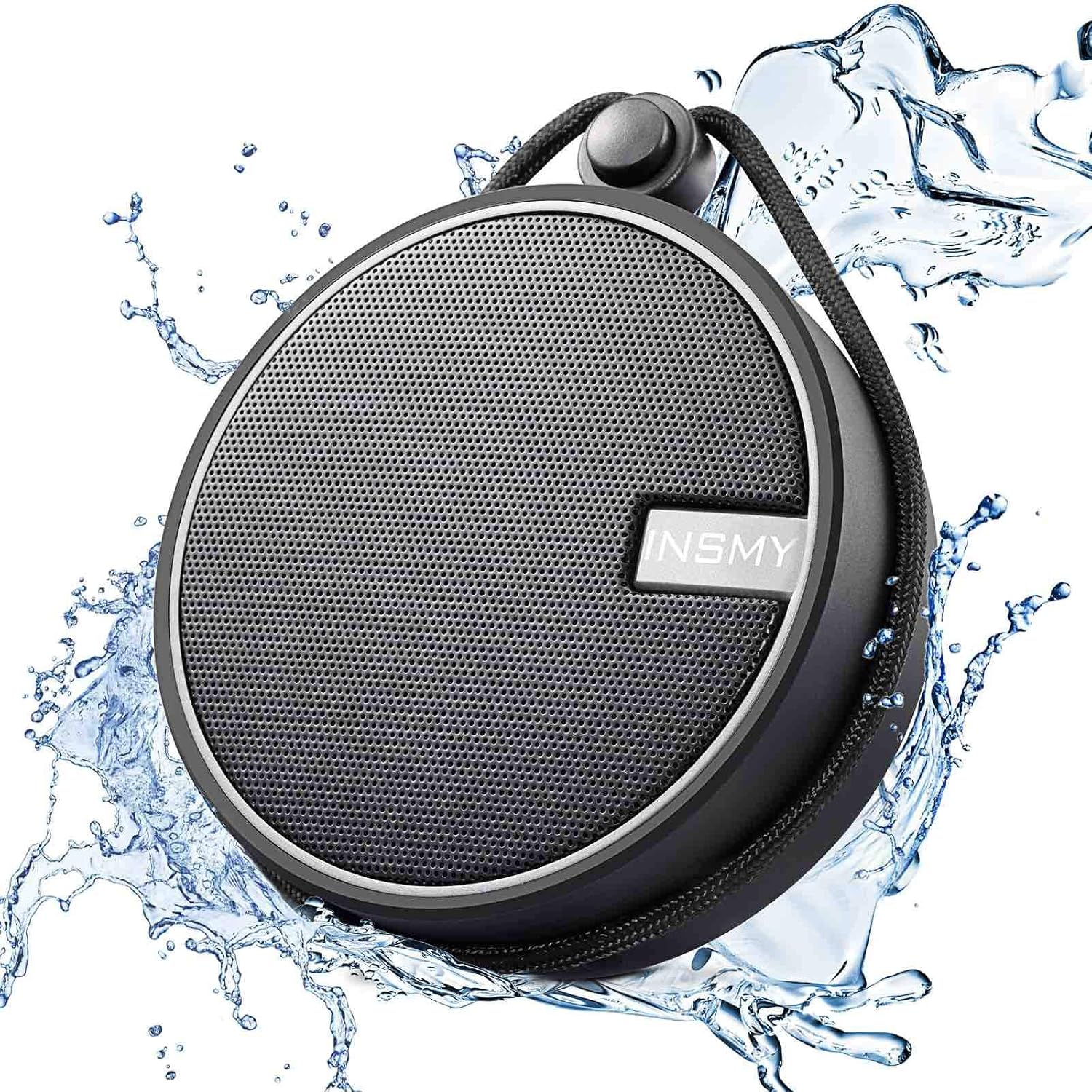
Image: The INSMY C12 speaker, black with a grey grille, surrounded by splashing water, highlighting its waterproof design.
Safety Information
Please read all safety warnings and instructions carefully before using this product. Keep this manual for future reference.
- Do not expose the speaker to extreme temperatures (hot or cold) or high humidity.
- Avoid dropping or subjecting the speaker to strong impacts.
- Do not attempt to disassemble, repair, or modify the speaker. This will void the warranty.
- Keep the speaker away from medical devices, as its magnetic components may interfere with their operation.
- Ensure the charging port cover is securely closed when using the speaker near water to maintain its IPX7 waterproof rating.
- Use only the provided charging cable or a certified equivalent.

Image: A person submerged underwater, holding the INSMY C12 speaker, illustrating its IPX7 waterproof capability for immersion up to 1 meter for 30 minutes.
Package Contents
Verify that all items are present in your package:
- INSMY Speaker (C12)
- Instruction book (this manual)
- Suction cup
- USB Charging Cable (implied, typically included)
Product Overview
Familiarize yourself with the components and controls of your INSMY C12 speaker.

Image: The INSMY C12 speaker surrounded by icons representing its compatibility and features: phone, tablet, Bluetooth 5.0, computer, Siri, Google Assistant, built-in microphone, and TF card support.
Controls and Ports:
- Power Button: Press and hold to turn the speaker on or off.
- Volume Up (+): Short press to increase volume. Long press for next track.
- Volume Down (-): Short press to decrease volume. Long press for previous track.
- Play/Pause Button: Press to play or pause music. Answer/end calls.
- Microphone: For hands-free calling.
- USB Charging Port: For charging the speaker.
- TF Card Slot: For playing music directly from a Micro SD card.
- Lanyard/Strap: For portability and hanging.
- Suction Cup Attachment Point: For attaching the included suction cup.
Setup
1. Charging the Speaker
Before first use, fully charge your INSMY C12 speaker.
- Open the waterproof cover on the side of the speaker to reveal the USB charging port.
- Connect the small end of the USB charging cable to the speaker's charging port.
- Connect the larger end of the USB cable to a USB power adapter (e.g., phone charger, computer USB port).
- The LED indicator will illuminate during charging and turn off when fully charged.
- Charging time is approximately 3 hours. A full charge provides up to 12 hours of playtime.
- Ensure the waterproof cover is securely closed after charging to maintain water resistance.

Image: The INSMY C12 speaker on a sandy beach, with an overlay indicating "12 Hour Playtime" and sun/moon icons, signifying its long battery life for extended use.
2. Bluetooth Pairing
Pair your speaker with your Bluetooth-enabled device (smartphone, tablet, laptop).
- Press and hold the Power button on the speaker until you hear an audible prompt and the LED indicator flashes blue, indicating it's in pairing mode.
- On your device, go to Bluetooth settings and ensure Bluetooth is enabled.
- Search for available devices. Select "INSMY C12" from the list.
- Once paired, you will hear a confirmation sound, and the LED indicator will turn solid blue.
- The speaker will automatically reconnect to the last paired device when powered on, if within range.
3. Attaching the Suction Cup
The included suction cup allows you to attach the speaker to smooth surfaces like bathroom tiles or glass.
- Ensure the surface is clean, dry, and smooth.
- Attach the suction cup to the designated attachment point on the back of the speaker.
- Press the suction cup firmly against the desired surface until it creates a strong seal.
- To remove, gently pull the edge of the suction cup to break the seal.

Image: The INSMY C12 speaker attached to a tiled bathroom wall above a sink using its suction cup, demonstrating its versatility for placement.
Operating Instructions
Power On/Off:
- Power On: Press and hold the Power button for 2-3 seconds.
- Power Off: Press and hold the Power button for 2-3 seconds.
Music Playback (Bluetooth Mode):
- Play/Pause: Press the Play/Pause button once.
- Volume Up: Short press the "+" button.
- Volume Down: Short press the "-" button.
- Next Track: Long press the "+" button.
- Previous Track: Long press the "-" button.
Hands-Free Calling:
- Answer Call: Press the Play/Pause button once when a call comes in.
- End Call: Press the Play/Pause button once during a call.
- Reject Call: Press and hold the Play/Pause button for 2 seconds.
- Redial Last Number: Double-press the Play/Pause button.
TF Card Playback:
The speaker supports playing music directly from a TF (Micro SD) card.
- Insert a TF card (up to 32GB, FAT32 format) with MP3 audio files into the TF card slot.
- The speaker will automatically switch to TF card mode and begin playing music.
- Use the Play/Pause, Volume, and Track buttons as described above for control.
Maintenance
Proper care will extend the life of your speaker.
- Cleaning: Wipe the speaker with a soft, damp cloth. Do not use harsh chemicals or abrasive cleaners.
- Drying: After exposure to water, especially saltwater, rinse the speaker with fresh water and dry it thoroughly before charging.
- Storage: Store the speaker in a cool, dry place when not in use. Avoid prolonged exposure to direct sunlight or extreme temperatures.
- Charging Port: Always ensure the charging port cover is sealed when not charging to prevent water ingress.
Troubleshooting
If you encounter issues with your INSMY C12 speaker, refer to the following common problems and solutions:
| Problem | Possible Cause | Solution |
|---|---|---|
| Speaker does not turn on. | Low battery. | Charge the speaker fully. |
| Cannot pair with Bluetooth device. | Speaker not in pairing mode; Bluetooth off on device; device too far. | Ensure speaker is in pairing mode (flashing blue LED). Turn Bluetooth on your device. Move device closer to speaker (within 30 feet/10 meters). Forget "INSMY C12" on your device and try pairing again. |
| No sound or low volume. | Volume too low on speaker or device; incorrect audio output selected. | Increase volume on both speaker and connected device. Ensure "INSMY C12" is selected as the audio output on your device. |
| Sound distortion. | Volume too high; low battery; interference. | Reduce volume. Charge the speaker. Move away from other electronic devices that may cause interference. |
| TF card not playing. | Card not inserted correctly; unsupported format or files. | Reinsert TF card. Ensure card is FAT32 format and contains MP3 files. |
Specifications
| Feature | Detail |
|---|---|
| Model Name | C12 |
| Brand | INSMY |
| Water Resistance Level | IPX7 (Waterproof, fully submersible up to 1 meter for 30 minutes) |
| Wireless Communication Technology | Bluetooth |
| Bluetooth Range | Up to 100 Feet (30 meters) |
| Battery Life | 12 Hours |
| Battery Capacity | 1200 Milliampere Hour (mAh) |
| Charging Time | 3 Hours |
| Speaker Maximum Output Power | 5 Watts |
| Speaker Size | 2.5 Inches (Audio Driver Size: 40 Millimeters) |
| Product Dimensions | 3.46"D x 3.46"W x 1.2"H |
| Item Weight | 7.4 Ounces |
| Included Components | INSMY Speaker, Instruction book, Suction cup |
| Special Features | Waterproof, Built-in Microphone, Shockproof, Portable handheld size, Suction cup, TF Card Support |
Warranty and Support
The INSMY C12 speaker comes with a Limited Warranty. For specific warranty terms and conditions, please refer to the warranty card included in your product packaging or visit the official INSMY website.
If you require technical support, have questions about your product, or need to claim warranty service, please contact INSMY customer support through their official channels. Contact information can typically be found on the INSMY website or on the product packaging.
For more information and product updates, visit the INSMY Store on Amazon.
Ask a question about this manual
Ask about setup, troubleshooting, compatibility, parts, safety, or missing instructions. Manuals+ will review the question and use this page’s manual context to help answer it.