Introduction
The VOYAGER Proton Electric Scooter is designed for efficient and comfortable personal transportation. This compact and powerful scooter features a 250W brushless motor, capable of reaching speeds up to 12.5 MPH and traveling up to 6 miles on a single charge. Weighing just 18 lbs, it is highly portable and folds easily for convenient storage. Integrated LED lighting ensures visibility during night rides, and a built-in USB port allows for on-the-go device charging. This manual provides essential information for the safe operation, maintenance, and care of your VOYAGER Proton Electric Scooter.
Safety Guidelines
Your safety is paramount. Please read and understand all safety instructions before operating the scooter.
- Always wear a helmet and appropriate safety gear (knee pads, elbow pads) when riding.
- Adhere to all local traffic laws and regulations.
- Do not ride in wet conditions, heavy rain, or through puddles.
- Ensure the scooter is fully charged before each use.
- Do not exceed the maximum weight capacity of 220 lbs (100 kg).
- This scooter is recommended for adult use.
- Perform a pre-ride check: ensure brakes are functional, tires are in good condition, and all parts are secure.
Product Components
Familiarize yourself with the main parts of your VOYAGER Proton Electric Scooter.

Figure 1: Key features and components of the VOYAGER Proton Electric Scooter.
- Handlebar: For steering and control.
- LCD Display: Shows speed, battery level, and other operational data.
- Headlight: Front-facing LED light for illumination and visibility.
- Light Strip: Integrated LED light strip on the stem for enhanced visibility.
- Deck: The standing platform with a non-slip surface.
- Wheels: Solid rubber wheels for durability.
- Brake System: Rear braking for controlled stopping.
- USB Charging Port: Allows charging of external devices.
- Folding Mechanism: For compact storage and portability.
Initial Setup
Unfolding the Scooter
To prepare your scooter for use, follow these steps to unfold it:
- Place the scooter on a flat, stable surface.
- Locate the folding latch mechanism near the base of the handlebar stem.
- Carefully release the latch to allow the handlebar stem to pivot upwards.
- Raise the handlebar stem until it locks securely into the upright position. Ensure you hear a click or feel it firmly engage.
- Adjust the handlebar height if applicable (refer to specific model instructions if adjustable).
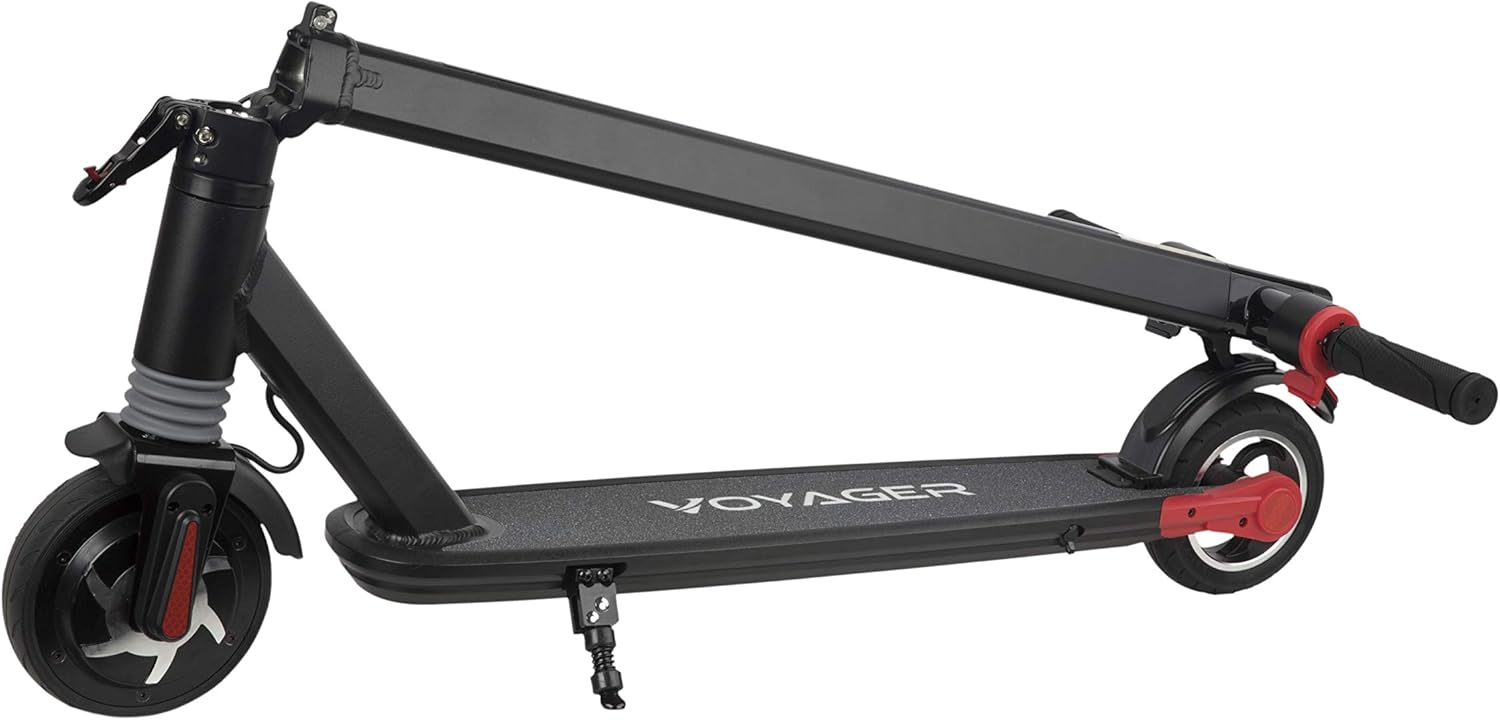
Figure 2: The VOYAGER Proton Electric Scooter in its folded configuration.
Charging the Battery
Before first use, fully charge the scooter's battery.
- Locate the charging port on the scooter.
- Connect the provided charger to the scooter's charging port, then plug the charger into a standard electrical outlet.
- The charging indicator light on the charger will change (e.g., from red to green) when charging is complete.
- Charging time is approximately 2.5 hours for a full charge.
- Do not overcharge the battery. Disconnect the charger once charging is complete.
Operating Instructions
Power On/Off
- To power on the scooter, press and hold the power button on the handlebar until the LCD display illuminates.
- To power off, press and hold the power button again until the display turns off.
Riding the Scooter
- Place one foot firmly on the scooter deck.
- Use your other foot to push off the ground to gain initial momentum.
- Once moving, gently press the throttle lever to engage the motor.
- To slow down or stop, release the throttle and apply the rear brake lever.
- The scooter can reach a maximum speed of 12.5 MPH.
LCD Display
The integrated LCD display provides real-time information:
- Speed: Displays your current riding speed.
- Battery Level: Indicates the remaining battery charge.
- Other indicators may include riding mode or error codes.
LED Headlight and Light Strip
For enhanced visibility, especially during low-light conditions:
- The LED headlight and light strip activate automatically when the scooter is powered on.
- Ensure these lights are functioning before riding at night.

Figure 3: The VOYAGER Proton Electric Scooter's LED headlight and light strip provide visibility during night rides.
USB Charging Port
The scooter features a convenient USB port for charging your mobile devices:
- Locate the USB port on the handlebar.
- Connect your device's USB charging cable to the port.
- Charging will commence automatically when the scooter is powered on.
Maintenance and Care
Regular maintenance ensures the longevity and optimal performance of your scooter.
- Cleaning: Wipe the scooter with a damp cloth after use. Do not use harsh chemicals or abrasive cleaners. Avoid direct water spray.
- Storage: Store the scooter in a cool, dry place away from direct sunlight and extreme temperatures. If storing for extended periods, ensure the battery is partially charged (around 50%) and recharge it every 30-60 days.
- Battery Care: Avoid fully draining the battery. Charge it regularly, even if not in frequent use, to prolong battery life.
- Tire Inspection: Regularly check the solid rubber tires for wear and tear. While solid, excessive wear can affect performance.
- Brake Check: Periodically test the rear brake to ensure it is responsive and effective.
- Fastener Check: Ensure all screws and fasteners are tight before each ride.
Troubleshooting Common Issues
If you encounter any issues with your VOYAGER Proton Electric Scooter, refer to the table below for potential solutions.
| Problem | Possible Cause | Solution |
|---|---|---|
| Scooter does not power on. | Low or depleted battery. | Charge the battery fully. |
| Scooter does not charge. | Charger not properly connected or faulty. | Ensure charger is securely plugged into scooter and outlet. Check charger for damage. |
| Low speed or power. | Low battery, heavy load, or uphill riding. | Charge battery. Reduce load. Scooter performance may vary on inclines. |
| Brake not responsive. | Brake cable loose or worn brake pad. | Inspect brake cable and pads. Adjust or replace if necessary (professional service recommended). |
| Unusual noises during operation. | Loose components or debris in wheels. | Check all fasteners. Inspect wheels for obstructions. |
Technical Specifications
| Feature | Specification |
|---|---|
| Brand | VOYAGER |
| Model Name | Proton |
| Model Number | SCOT-1020P |
| Motor Power | 250W Brushless Motor |
| Max Speed | 12.5 MPH |
| Max Distance Range | Up to 6 Miles |
| Item Weight | 18 Pounds |
| Max Load Capacity | 220 lbs |
| Charging Time | 2.5 Hours |
| Frame Material | Aluminum |
| Wheel Material | Rubber (Solid) |
| Brake Style | Rear Braking |
| Special Features | Portable, Lights (LED Headlight & Light Strip), Foldable, LCD Display, USB Charging Port |
| Recommended Age Range | Adult |
| UPC | 021331137562, 021331903631 |
Warranty and Customer Support
The VOYAGER Proton Electric Scooter comes with a Limited Warranty. For specific details regarding warranty coverage, duration, and terms, please refer to the warranty card included with your product or visit the official VOYAGER website.
For technical support, replacement parts, or any inquiries not covered in this manual, please contact VOYAGER customer service. Contact information can typically be found on the product packaging, the official VOYAGER website, or your purchase receipt.


