
KALERM 2601 Pro
KALERM 2601Pro Automatic Coffee Machine User Manual
Model: 2601 Pro | Brand: KALERM
Introduction
This user manual provides essential information for the safe and efficient operation, maintenance, and troubleshooting of your KALERM 2601Pro Automatic Coffee Machine. Please read this manual thoroughly before using the appliance and keep it for future reference.

Image: The KALERM 2601Pro Automatic Coffee Machine, showcasing its sleek design and a prepared latte.
Safety Information
To prevent injury or damage to the appliance, always observe the following safety precautions:
- Read all instructions carefully before use.
- Do not immerse the appliance, power cord, or plug in water or other liquids.
- Ensure the voltage rating on the appliance matches your local power supply.
- Keep the appliance out of reach of children.
- Do not operate the appliance if the power cord or plug is damaged.
- Always unplug the machine before cleaning or when not in use.
- Use only original spare parts and accessories.
Product Overview and Parts Identification
Familiarize yourself with the components of your KALERM 2601Pro coffee machine for proper operation and maintenance.

Image: Detailed diagram illustrating the various parts of the coffee machine.
- Bean container cover
- Water tank lid
- Water tank
- Coffee grounds container
- Drip tray
- Drip tray grid
- Bean container
- Grinding wheel
- Coffee spout
- Handle
- Milk pipe
- Milk frother
- Hot water spout
- Milk and cream spout
- Power cord
Initial Setup
Unpacking
Carefully remove the coffee machine from its packaging. Retain all packaging materials for future transport or service.
Placement
Place the machine on a stable, level surface, away from heat sources and direct sunlight. Ensure adequate ventilation around the appliance.
Power Connection
Connect the power cord (15) to the machine and then to a grounded electrical outlet. Ensure the voltage matches the machine's requirements (220V-240V).
Filling the Water Tank
- Remove the water tank lid (2).
- Fill the water tank (3) with fresh, cold drinking water up to the MAX level indicator.
- Replace the water tank lid securely.
Filling the Bean Container
- Open the bean container cover (1).
- Pour fresh coffee beans into the bean container (7). Do not overfill.
- Close the bean container cover securely.
Operating Instructions
Control Panel Overview
The touch screen interface allows for easy selection of various coffee beverages and machine functions.

Image: The control panel with numbered icons for various functions.
- Espresso icon
- Americano icon
- Hot water icon
- Power switch
- Screen
- Cappuccino icon
- Coffee Latte icon
- Hot milk/cream icon
- Cleaning button
- Rotary button
Making Coffee
The machine offers 5 programmable specialties. Follow these general steps:
- Ensure the water tank (3) is filled and the bean container (7) has sufficient coffee beans.
- Place a cup under the coffee spout (9).
- Turn on the machine using the Power switch (4). The screen (5) will display "READY" once the machine has heated up.
- Select your desired beverage (e.g., Espresso, Americano, Cappuccino, Coffee Latte) by touching the corresponding icon on the screen.
- For milk-based drinks (Cappuccino, Coffee Latte, Hot milk/cream), ensure the milk pipe (11) is correctly inserted into a milk container and the milk frother (12) is in position.
- The machine will automatically grind the beans, brew the coffee, and dispense the beverage.
- Adjust coffee strength, water amount, and milk/cream amount using the programmable settings as desired.
Hot Water Dispensing
- Place a cup under the hot water spout (13).
- Select the Hot water icon (3) on the control panel.
- The machine will dispense hot water.
Settings and Programming
The KALERM 2601Pro allows for customization of your coffee experience:
- Programmable Specialties: 5 programmable specialties are available for quick selection.
- Rotary Button: Use the rotary button (10) for intuitive navigation through menu options and adjustments.
- Adjustable Water Amount: Program and adjust the amount of water for each beverage to suit your preference.
- Coffee Strength: Choose from 3 levels of programmable and adjustable coffee strength.
- Milk/Cream Amount: Program and adjust the amount of milk/cream for milk-based beverages.
- Brewing Temperature: The brewing temperature is programmable and adjustable.
- Remaining Time Display: The screen (5) displays the remaining time for certain operations, such as brewing or heating.
Maintenance and Cleaning
Regular cleaning and maintenance ensure the longevity and optimal performance of your KALERM 2601Pro coffee machine.
Daily Cleaning
- Drip Tray and Coffee Grounds Container: Empty and clean the drip tray (5) and coffee grounds container (4) daily or when prompted by the machine.
- Milk System Rinsing: The machine features integrated milk system rinsing and cleaning. Follow on-screen prompts for this process after preparing milk-based beverages.
Integrated Cleaning Programs
The machine is equipped with integrated rinsing, cleaning, and descaling programs. These programs are designed to be highly user-friendly with one-touch cleaning functions.
- When a cleaning or descaling notification appears on the screen (5), press the Cleaning button (9) or follow the on-screen instructions.
- The machine will guide you through the necessary steps for rinsing, cleaning, or descaling.
Brew Unit Maintenance
The patented brew unit has an auto-clean function. Refer to the machine's display for any specific brew unit cleaning prompts.
Active Bean Monitoring
The machine actively monitors bean levels. Refill the bean container (7) when prompted to ensure continuous operation.
Troubleshooting
This section provides solutions to common issues you might encounter with your KALERM 2601Pro coffee machine.
General Issues
- Machine not turning on: Ensure the power cord (15) is securely connected to both the machine and a working electrical outlet.
- No coffee dispensed: Check if the water tank (3) is filled and the bean container (7) has enough coffee beans. Ensure the coffee spout (9) is not blocked.
- Coffee tastes weak: Adjust the coffee strength setting in the machine's programming options. Check the grinding wheel (8) for proper adjustment.
- Milk not frothing correctly: Ensure the milk pipe (11) and milk frother (12) are clean and correctly assembled. Use fresh, cold milk.
Fault Warnings and Notifications
The intelligent PCBA control system provides fault warnings and notification reminders on the screen (5). Follow the on-screen instructions to resolve any issues.
If an issue persists after following the troubleshooting steps, please contact customer support for assistance.
Technical Specifications
Refer to the table below for detailed technical data of the KALERM 2601Pro Automatic Coffee Machine.
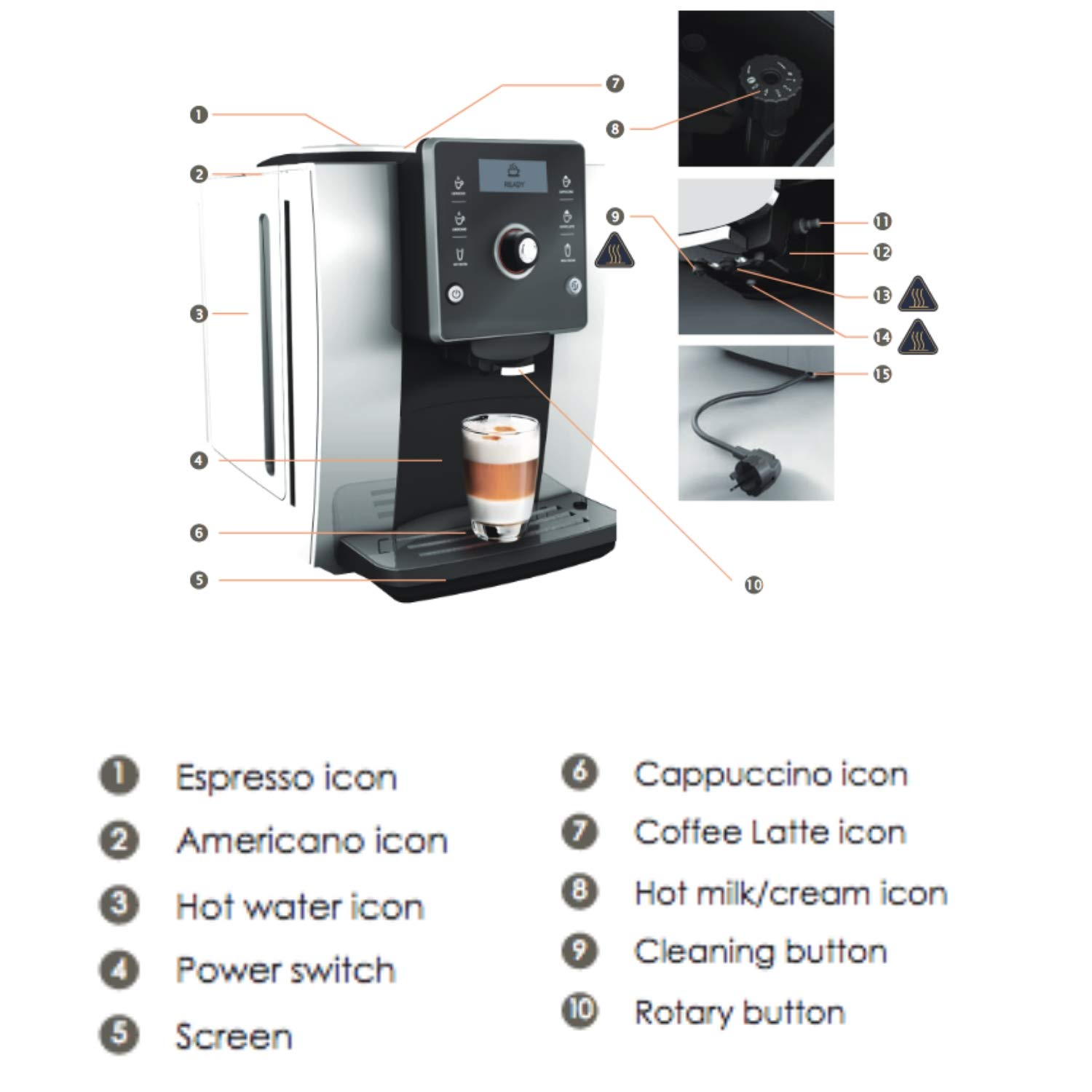
Image: Technical data table for the coffee machine.
| Specification | Value |
|---|---|
| Voltage/Frequency | 220V-240V~ 50 Hz / 60 Hz |
| Power | 1450 W |
| Pump pressure | 19 bar |
| Capacity of water tank | 1.8 L |
| Capacity of bean container | 250 g |
| Capacity of coffee grounds container | 15 cakes |
| Capacity of the brewing unit | 7-14 g |
| Adjusting height of coffee spout | 80-140 mm |
| Length of power cord | 1.5 m |
| Net weight | 13 kg |
| Dimensions (Length x Width x Height) | 450mm x 302mm x 370mm |
| Recommended Daily Servings | 60 cups |
| Material | Stainless Steel |
| Color | Black |
Performance Overview

Image: Visual representation of preparation times for various coffee types.
- Espresso: Approximately 43 seconds
- Americano: Approximately 80 seconds
- Cappuccino: Approximately 69 seconds
- Latte: Approximately 69 seconds
Warranty and Support
For warranty information, service, or technical support, please refer to the documentation provided with your purchase or contact KALERM customer service directly. The included components are the Automatic Coffee Machine itself.
Related Documents - 2601 Pro
 |
Kalerm E65(T)/E65L(T) Commercial Fully Automatic Coffee Machine User Manual User manual for the Kalerm E65(T)/E65L(T) commercial fully automatic coffee machine, detailing safety, installation, operation, maintenance, and troubleshooting for office and professional use. |
 |
Kalerm K95LT PLUS Fully Automatic Coffee Machine - HORECA Entry Model Discover the Kalerm K95LT PLUS, a HORECA entry-level fully automatic coffee machine featuring a 10.1-inch touchscreen, dual pump system, and high-efficiency brewing for up to 17+ customizable beverages. Ideal for commercial environments. |
 |
Ninja Luxe Café PRO SERIES ES700EU Series Coffee Machine User Manual Comprehensive user manual for the Ninja Luxe Café PRO SERIES ES700EU Series coffee machine, covering setup, operation, maintenance, troubleshooting, and warranty information. Includes instructions for espresso, filter coffee, and milk frothing. |
 |
Roastronix Pro X Cup 2025 Entry - Golden Bean The Americas Competition Guide Details for the Roastronix Pro X Cup 2025 coffee roasting competition, hosted by Roastronix in partnership with Golden Bean North America. Includes event dates, competition rules, judging criteria, and the official brewing recipe for participants. |
 |
Nespresso Momento Touchless: Features and Operation Guide Explore the Nespresso Momento Touchless coffee machine, detailing its hygienic features like Lock Screen, Automatic Brewing, and Remote Control. Includes instructions and a guide to Nespresso Professional capsules for optimal coffee brewing. |