
GUESS U1258G2
GUESS Men's Japanese Quartz Watch U1258G2 User Manual
Model: U1258G2 | Brand: GUESS
1. Introduction
This manual provides comprehensive instructions for the setup, operation, maintenance, and troubleshooting of your GUESS Men's Japanese Quartz Watch, Model U1258G2. Please read this manual carefully to ensure proper use and longevity of your timepiece.
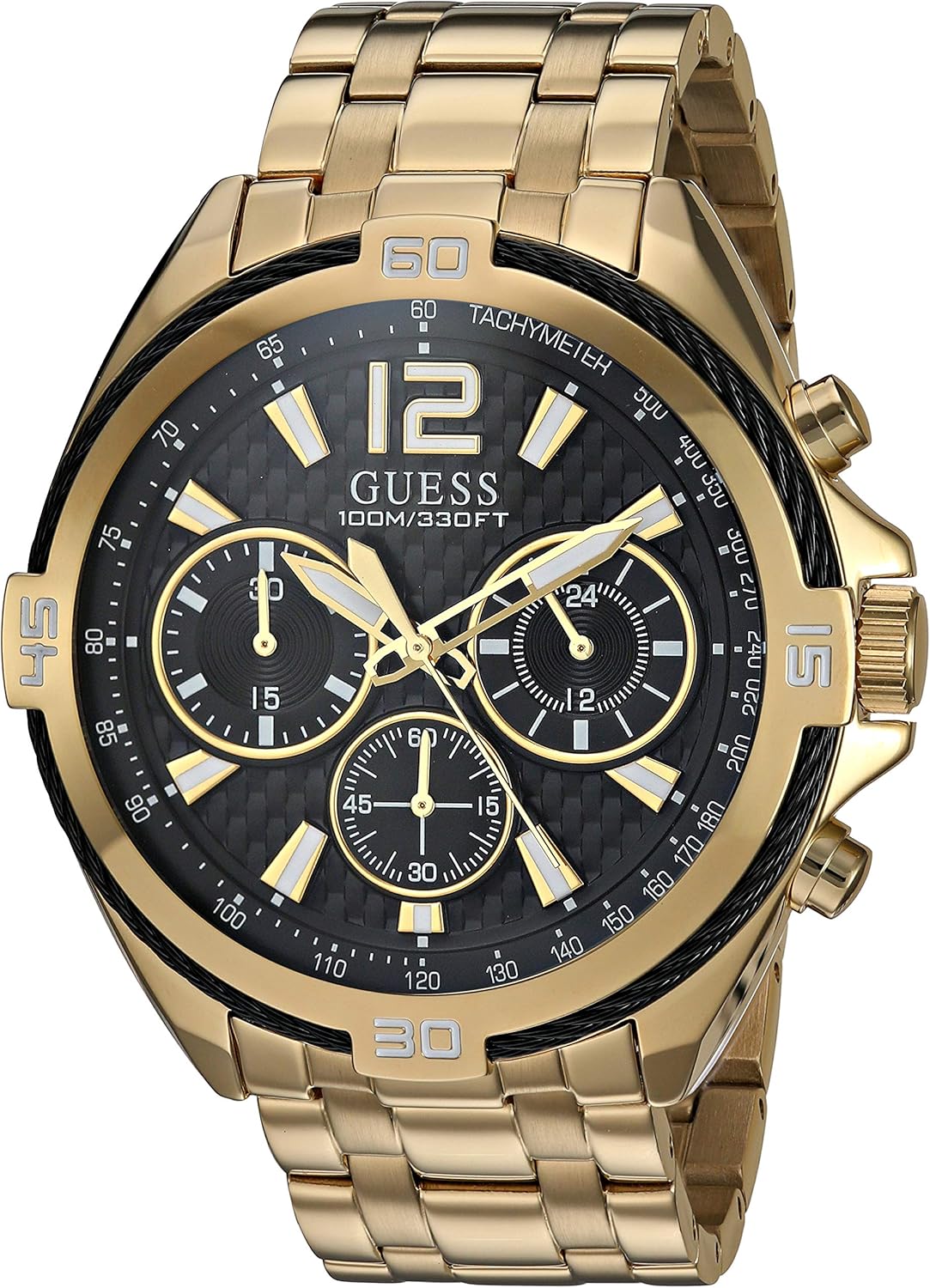
Image 1.1: Front view of the GUESS Men's Japanese Quartz Watch U1258G2, featuring a gold-tone stainless steel case, black chronograph dial, and gold-tone bracelet.
2. Setup
2.1 Unboxing
Carefully remove the watch from its packaging. Inspect the watch for any visible damage. The package should include the watch and this instruction manual.

Image 2.1: The GUESS watch box, typically included with your purchase.
2.2 Initial Time Setting
- Pull the crown (the knob on the side of the watch) out to the first or second click position (refer to specific movement instructions if provided with the watch, as some movements have multiple crown positions for date/time).
- Turn the crown clockwise or counter-clockwise to set the hour and minute hands to the correct time.
- Once the time is set, push the crown back into its normal position to start the watch movement.
2.3 Adjusting the Bracelet
The stainless steel bracelet may require adjustment to fit your wrist comfortably. This typically involves removing or adding links. It is highly recommended to have this adjustment performed by a qualified jeweler or watch technician to prevent damage to the bracelet or watch.

Image 2.2: The GUESS watch worn on a wrist, demonstrating typical fit.
3. Operating Your Watch
3.1 Time Display
Your watch displays time using hour, minute, and second hands. The main dial features clear markers and numerals for easy readability.
3.2 Chronograph Function
The U1258G2 model features a chronograph stopwatch function. This allows you to measure elapsed time independently of the main time display.
- Start/Stop: Press the top pusher (button) located at the 2 o'clock position to start and stop the chronograph.
- Reset: While the chronograph is stopped, press the bottom pusher (button) located at the 4 o'clock position to reset the chronograph hands to zero.
- The sub-dials on your watch indicate elapsed seconds, minutes, and hours for the chronograph function.
3.3 Water Resistance
This watch is water resistant to 100 meters (300 feet). This rating means the watch is suitable for recreational swimming and snorkeling, but not for diving. Avoid operating the crown or pushers when the watch is wet or submerged to prevent water ingress.
4. Maintenance and Care
4.1 Cleaning
To maintain the appearance of your watch, wipe it regularly with a soft, dry cloth. For the stainless steel components, a slightly damp cloth can be used, followed by a dry cloth. Avoid using harsh chemicals or abrasive materials.
4.2 Storage
When not in use, store your watch in a cool, dry place, away from direct sunlight and extreme temperatures. The original watch box provides excellent protection.
4.3 Battery Replacement
Your Japanese Quartz watch is powered by a battery. When the battery runs low, the watch may stop or the second hand may skip. Battery replacement should be performed by a qualified watchmaker to ensure proper sealing and maintain water resistance.
5. Troubleshooting
If you encounter any issues with your watch, please refer to the table below before seeking professional service.
| Issue | Possible Cause | Solution |
|---|---|---|
| Watch has stopped running. | Battery depleted. Crown is pulled out. | Replace battery (professional service recommended). Push crown fully in. |
| Time is inaccurate. | Incorrect time setting. Exposure to strong magnetic fields. | Reset time according to Section 2.2. Keep watch away from strong magnets. |
| Chronograph hands do not reset to zero. | Requires calibration. | Consult a watchmaker for chronograph hand calibration. |
| Condensation under crystal. | Water ingress. Sudden temperature change. | Seek immediate professional service to prevent damage. Allow watch to acclimate to temperature. |
6. Specifications
| Feature | Detail |
|---|---|
| Model Number | U1258G2 |
| Brand | GUESS |
| Movement | Japanese Quartz |
| Case Material | Polished Gold-Tone Stainless Steel |
| Case Size | 46 MM |
| Crystal Material | Durable Mineral Crystal |
| Dial | Black Chronograph Dial |
| Strap/Bracelet Material | Polished Stainless Steel Gold-Tone Bracelet |
| Clasp Type | Deployment Buckle Closure |
| Water Resistance | 100 Meters / 300 Feet |
| Functions | Chronograph Stopwatch Function |
| Package Dimensions | 9.65 x 9.4 x 8.64 cm |
| Item Weight | 164.43 g |
7. Warranty and Support
7.1 Limited Warranty
Your GUESS watch is covered by a limited warranty against manufacturing defects. The specific terms and duration of the warranty are typically provided on a separate warranty card included with your purchase. Please retain your proof of purchase for warranty claims.
7.2 Customer Support
For technical assistance, warranty service, or inquiries regarding your GUESS watch, please contact the authorized GUESS service center or the retailer from whom you purchased the watch. Contact information can usually be found on the warranty card or the official GUESS website.
Related documentsU1258G2


Ask a question about this manual
Ask about setup, troubleshooting, compatibility, parts, safety, or missing instructions. Manuals+ will review the question and use this page’s manual context to help answer it.