1. Introduction
The TID TD-V2 Walkie Talkies are designed for reliable and clear two-way communication. These license-free FRS radios are suitable for various applications, including business operations, family activities, and outdoor adventures. This manual provides essential information for setting up, operating, and maintaining your TD-V2 walkie talkies.

Figure 1: TID TD-V2 Walkie Talkies with accessories.
2. What's in the Box
Each TID TD-V2 package includes the following components:
- TID TD-V2 Walkie Talkie units (quantity varies by pack)
- Rechargeable Lithium Polymer Batteries (double the quantity of radios)
- Charging Bases (one per radio)
- Power Adapters for charging bases
- Acoustic Tube Earpieces (one per radio)
- Belt Clips (one per radio)
- Hand Straps (one per radio)
- User Manuals
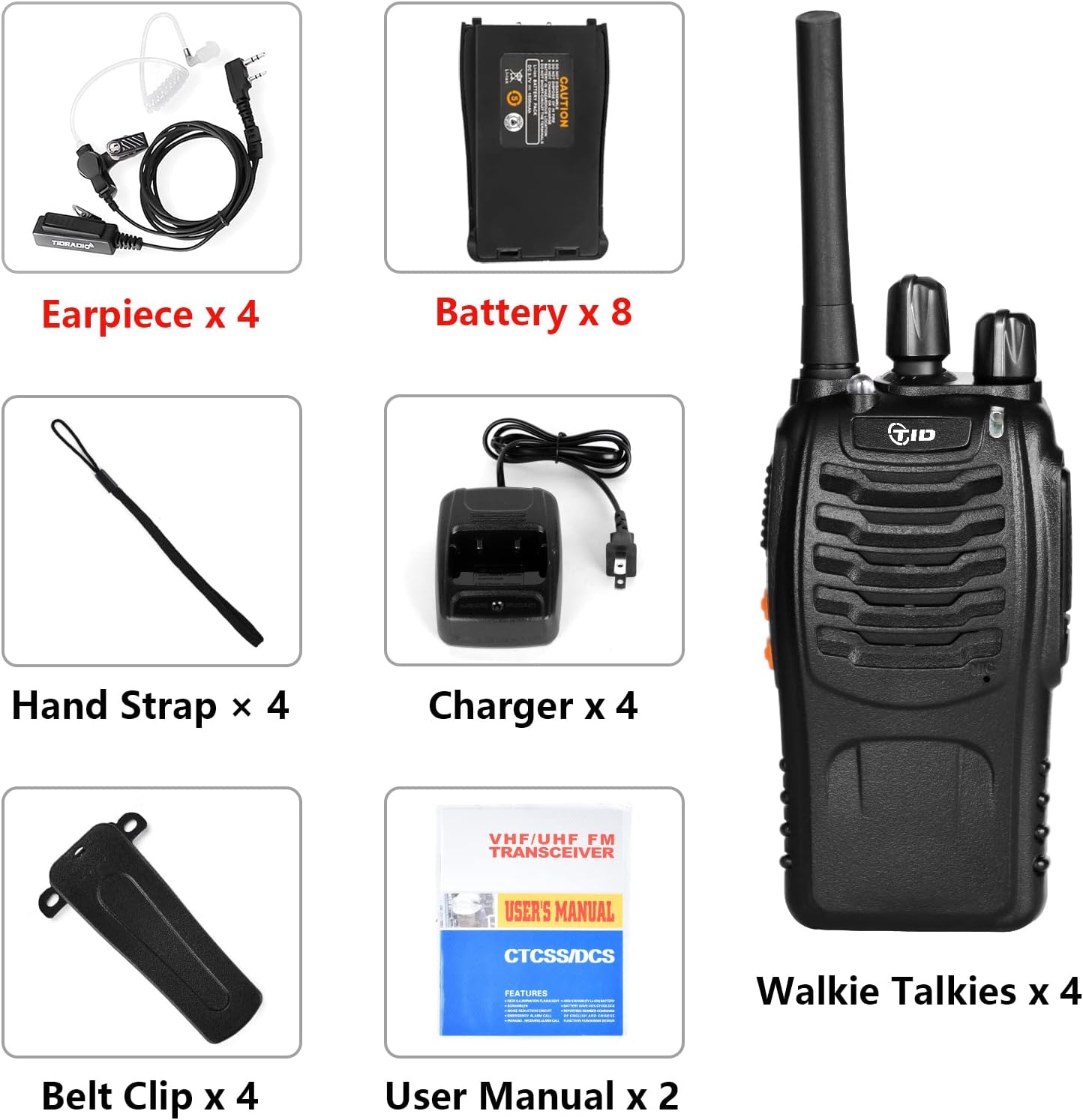
Figure 2: Contents of the TID TD-V2 Walkie Talkie package.
Video 1: Unboxing and overview of the TIDRADIO TD-V2 FRS radio 4-pack, highlighting the included double batteries and accessories.
3. Product Features
- Ready to Use: No complex setup or training required. Operates on 16 license-free FRS channels.
- Dual Rechargeable Batteries: Each radio comes with two batteries, allowing one for use and one for backup, providing up to 12 hours of continuous communication and 3 days of standby time per battery.
- Extended Range: Achieves up to 3 miles in open areas and 0.6-1 mile in typical business or daily usage environments (e.g., hotels, construction sites, schools). Actual distance may vary based on obstructions.
- Acoustic Tube Earpiece: Provides clear, static-free sound for private communication, even in noisy settings. Ergonomically designed for long-term wear.
- Customizable Privacy: Supports CTCSS/DCS with 155 privacy codes for secure conversations on your chosen channels.
- Wide Compatibility: Compatible with other FRS walkie-talkies, including models like Baofeng FRS baofeng bf-888s, baofeng bf-88a, Retevis H-777, RT22, and RT68.
- Integrated Flashlight: A built-in flashlight for use in low-light conditions.
- VOX Voice Control: Voice-activated transmission for hands-free operation.
- Scanning Function: Allows scanning of channels for active transmissions.

Figure 3: Clear Sound Quality.

Figure 4: Rugged Design for Durability.
4. Setup
4.1. Battery Installation
- Ensure the walkie talkie is powered off.
- Locate the battery compartment cover on the back of the radio.
- Slide the cover down or unclip it to open the compartment.
- Insert the rechargeable Lithium Polymer battery, ensuring the contacts align correctly.
- Replace the battery compartment cover and secure it.
4.2. Antenna Attachment
- Carefully screw the antenna onto the threaded connector at the top of the walkie talkie until it is finger-tight. Do not overtighten.
4.3. Belt Clip and Hand Strap Attachment
- Attach the belt clip to the designated screws on the back of the radio using a small screwdriver.
- Thread the hand strap through the loop located at the top or side of the radio for secure carrying.
4.4. Earpiece Connection
- Open the rubber cover on the side of the walkie talkie to reveal the K-port.
- Plug the acoustic tube earpiece into the K-port, ensuring a snug fit.

Figure 5: Detailed views of the walkie talkie for assembly.
Video 2: A durability test of the TD-V2 walkie talkie, including drop tests to demonstrate its robust construction.
5. Operating Instructions
5.1. Power On/Off and Volume Control
- Rotate the Power/Volume Switch (top-most knob) clockwise to turn the radio ON. You will hear a power-on tone.
- Continue rotating clockwise to increase the volume; rotate counter-clockwise to decrease it.
- Rotate the Power/Volume Switch counter-clockwise until you hear a click to turn the radio OFF.
5.2. Channel Selection
- Rotate the Channel Switch (second knob from top) to select one of the 16 available FRS channels.
- Ensure all radios intended for communication are set to the same channel.
5.3. Transmitting and Receiving (PTT)
- To transmit, press and hold the Push-to-Talk (PTT) button on the side of the radio. Speak clearly into the microphone. The LED indicator will turn red.
- Release the PTT button to stop transmitting and return to receive mode. The LED indicator will turn green when receiving a signal.
5.4. VOX (Voice Operated Exchange)
- The VOX function allows for hands-free transmission. When activated, the radio will automatically transmit when it detects your voice. Refer to the full user manual for activation and sensitivity settings.
5.5. Flashlight
- Press the dedicated Flashlight button on the side of the radio to turn the flashlight on or off.
5.6. Monitor Function (MONI)
- Press and hold the MONI button to temporarily disable squelch and listen for weak signals on the current channel.
5.7. Privacy Codes (CTCSS/DCS)
- To ensure private communication, you can set CTCSS (Continuous Tone-Coded Squelch System) or DCS (Digitally Coded Squelch) privacy codes. This allows you to hear only transmissions from radios set to the same channel and privacy code. Refer to the full user manual for detailed programming instructions.

Figure 6: TID TD-V2 Button Layout.

Figure 7: VOX Feature for Hands-Free Communication.
6. Charging
The TID TD-V2 walkie talkies come with double rechargeable batteries to ensure extended operation. Each battery provides up to 12 hours of non-stop communication and 3 days of standby time.
Charging Procedure:
- Place the walkie talkie (with battery installed) into its dedicated charging base.
- Connect the power adapter to the charging base and plug it into a standard electrical outlet.
- The indicator light on the charging base will typically show red during charging and turn green when fully charged.
- You can use the walkie talkie while it is charging.

Figure 8: Walkie Talkie in Charging Base with Double Batteries.
7. Range Information
The TID TD-V2 walkie talkies offer significant communication range:
- Open Area: Up to 3 miles (approximately 4 kilometers).
- Business/Daily Use: 0.6-1 mile in environments with some obstructions (e.g., hotels, construction sites, restaurants, schools).
Actual range may vary significantly depending on terrain, weather conditions, electromagnetic interference, and obstructions such as buildings or dense foliage.
Video 3: Demonstration of the long-range communication capabilities of the TD-V2 walkie talkies in an outdoor environment, testing up to 5.5 miles.
Video 4: A detailed range test video for the TD-V2 walkie talkie, illustrating its communication performance over a 5.5-mile distance.
8. Compatibility
The TD-V2 walkie talkies are designed for wide compatibility and can communicate with other brands of FRS walkie-talkies, including popular models such as:
- Baofeng FRS (e.g., BF-888s, BF-88a)
- Retevis (e.g., H-777, RT22, RT68)
This ensures seamless integration with your existing communication equipment.
9. Maintenance
To ensure the longevity and optimal performance of your TID TD-V2 walkie talkies, follow these maintenance guidelines:
- Cleaning: Use a soft, damp cloth to clean the exterior of the radio. Avoid using harsh chemicals or abrasive cleaners.
- Storage: Store the radios in a cool, dry place away from direct sunlight and extreme temperatures. If storing for extended periods, remove the batteries.
- Battery Care: Fully charge batteries before first use. Avoid overcharging or completely draining the batteries to prolong their lifespan.
- Antenna: Handle the antenna carefully to prevent bending or breaking.
10. Troubleshooting
If you encounter any issues with your TID TD-V2 walkie talkies, consider the following general troubleshooting steps:
- No Power: Ensure the battery is correctly installed and fully charged. Check the power/volume knob is turned ON.
- Cannot Transmit/Receive: Verify that all radios are on the same channel and have matching privacy codes (if enabled). Check that the PTT button is functioning correctly. Ensure the antenna is securely attached.
- Poor Audio Quality: Check volume levels. Ensure the earpiece (if used) is properly connected. Move to an area with fewer obstructions.
- Limited Range: Range is affected by terrain and obstructions. Try moving to a more open area.
For persistent issues, please refer to the Warranty & Support section for customer service contact information.
11. Specifications
| Feature | Specification |
|---|---|
| Model Number | TD-V2 |
| Brand | TID |
| Number of Channels | 16 |
| Talking Range Maximum | 4 Kilometers (approx. 3 miles) |
| Battery Type | Lithium Polymer (1500mAh, 3.7V) |
| Item Weight | 4 pounds (for 4-pack) |
| Package Dimensions | 9.6 x 9.5 x 5.4 inches |
| Special Features | Long Range, Rechargeable, VOX, Scanning, Flashlight, CTCSS/DCS |
| Water Resistance Level | Water Resistant |
| FCC ID | 2AWL3-TDV2 |

Figure 9: FCC ID and Model Number on the back of the radio.
12. Safety Information
This device complies with part 15 of the FCC Rules, FCC ID: 2AWL3TIDTD-V2; Operation is subject to the condition that this device does not cause harmful interference.
Legal Disclaimer: Restricted to occupational use to satisfy FCC RF exposure limits. See user manual for operating requirements. Modification of this device to receive cellular radiotelephone service signals is prohibited under FCC rules and federal law.
13. Warranty & Support
TIDRADIO provides 30 days return/replacement and lifetime customer service. If you have any problems or require assistance, please contact our professional support team for prompt resolution of your after-sales issues.


