
Elecbee GX20
Elecbee GX20 5 Pin Circular Connector User Manual
Model: GX20 | Part Number: B07KM1R488
1. Product Overview
The Elecbee GX20 5 Pin Circular Connector is a robust and reliable butt-joint type cable plug designed for secure electrical connections. It features a male and female pair, ideal for various applications requiring stable and durable connections.

Figure 1: Elecbee GX20 5 Pin Circular Connector (Male and Female components)
This connector is specifically designed for cable applications, ensuring a stable connection through its threaded mounting mechanism. Its construction emphasizes reliability and long-term performance for various electrical installations.
2. Key Features
- Type: GX20, Butt-Joint type, Cable Plug.
- Pin Configuration: 5-pin, Male and Female, Straight design.
- Mounting: Features screw fixation for secure and stable connections.
- Durability: Engineered for reliability and long-term performance in various installations.
- Connection Stability: Threaded design ensures a firm and stable connection, minimizing accidental disconnections.
3. Setup and Installation
This section provides general guidance for assembling and installing the GX20 circular connector. Always ensure power is disconnected before handling electrical components.
3.1 Component Identification
The GX20 connector consists of a male plug and a female socket, each with threaded components for secure assembly.
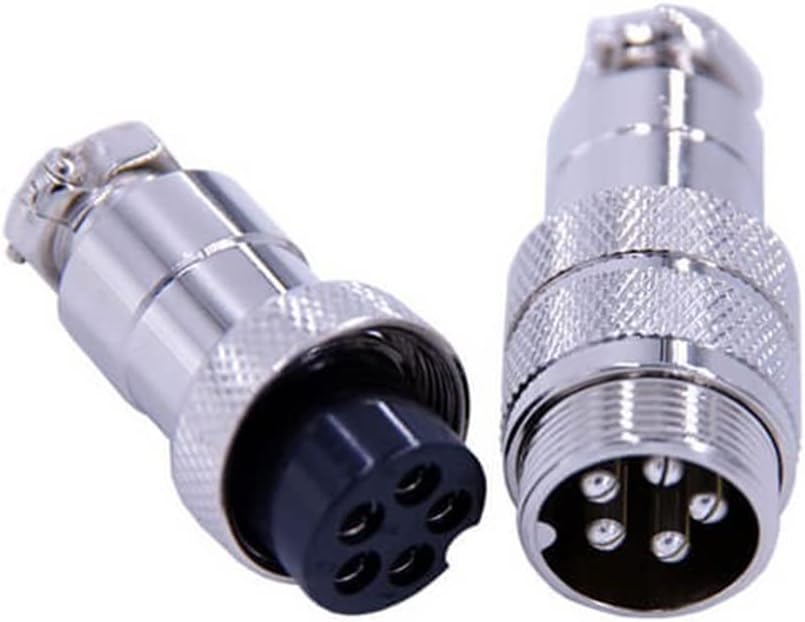
Figure 2: Disassembled GX20 Connector Components
3.2 Assembly Steps
- Prepare Cables: Strip the insulation from the cable ends to expose the conductors. Ensure proper length for soldering or crimping to the connector pins.
- Attach Conductors: Securely attach each conductor to its corresponding pin on both the male and female connector inserts. Follow any specific wiring diagrams if available for your application.
- Insert Inserts: Carefully insert the wired male and female pin inserts into their respective metal housings.
- Secure Housing: Thread the outer metal housing components onto the connector inserts. Tighten firmly to ensure a robust and stable connection. The threaded design provides mechanical stability.
For a visual guide on assembly, please refer to the following video:
Video 1: Assembly demonstration of a GX20 circular connector, showing how to connect the male and female parts securely.
4. Operation
The GX20 circular connector is designed for straightforward operation. Once properly assembled and wired, connect the male plug to the female socket by aligning the pins and rotating the threaded collar until fully tightened. This ensures a secure electrical and mechanical connection.
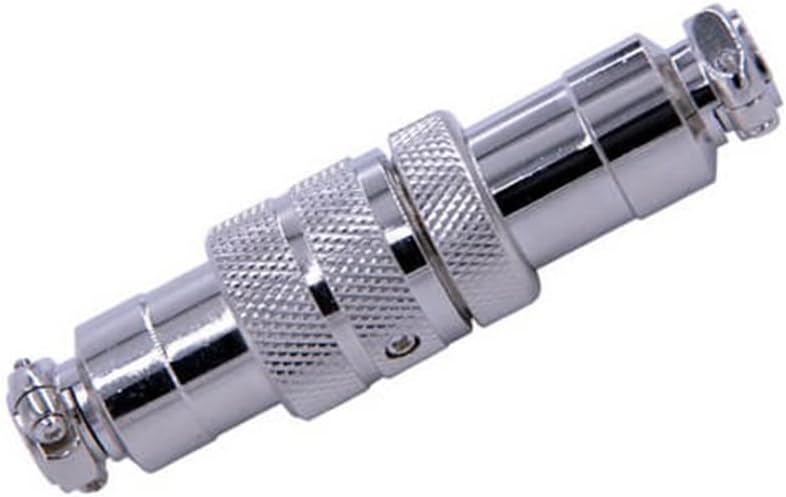
Figure 3: Fully Assembled GX20 Connector
To disconnect, simply unscrew the threaded collar and pull the two halves apart. Avoid pulling on the cables directly to prevent damage to the wiring or connector.
5. Maintenance
Regular maintenance helps ensure the longevity and optimal performance of your GX20 circular connectors.
- Cleaning: Periodically inspect connectors for dust, dirt, or corrosion. Clean with a dry, lint-free cloth. For stubborn grime, use a small amount of electrical contact cleaner, ensuring the connector is completely dry before re-connection.
- Inspection: Check for any signs of physical damage, such as bent pins, cracked insulation, or loose components. Ensure the threaded collar operates smoothly and provides a tight seal.
- Storage: When not in use, store connectors in a clean, dry environment to prevent oxidation and damage.
6. Troubleshooting
If you encounter issues with your GX20 circular connector, consider the following troubleshooting steps:
| Problem | Possible Cause | Solution |
|---|---|---|
| Intermittent Connection | Loose wiring, dirty pins, damaged pins. | Check wiring connections, clean pins, inspect for damage and replace if necessary. |
| Difficulty Connecting/Disconnecting | Misalignment, damaged threads, debris in threads. | Ensure proper alignment, clean threads, check for thread damage. |
| No Signal/Power | Incorrect wiring, open circuit, short circuit. | Verify wiring against diagram, test continuity of wires and pins. |
If problems persist, contact customer support or a qualified technician.
7. Specifications
| Attribute | Detail |
|---|---|
| Model | GX20 |
| Pin Configuration | 5 Pin (Male and Female) |
| Type | Circular Connector, Butt-Joint, Cable Plug |
| Mounting Type | Screw Fixation |
| Package Dimensions | 9.84 x 7.87 x 3.94 inches |
| Item Weight | 1.44 ounces |
| Manufacturer | Elecbee |
| Country of Origin | China |
8. Manufacturer Information and Quality Assurance
Elecbee is a professional manufacturer specializing in electronic components, including circular connectors, electric vehicle connectors, RF connectors, antennas, and cable assemblies. The company operates with a strong focus on research, development, production, selling, and service.
Video 2: An overview of Elecbee's manufacturing facilities and quality control processes.
Elecbee's production facilities span over 3,000 square meters, featuring well-equipped workshops and automated production lines. With over 20 production lines for connectors and cable assemblies, Elecbee maintains a daily production capacity of 10,000 sets of related products.

Figure 4: Elecbee's assembly line, demonstrating the manual assembly process for various components.
All products adhere to RoHS and CE standards. The company has implemented a standardized management system in accordance with ISO 9001 International Quality Management System standards, ensuring consistent quality and reliability.
Elecbee supports OEM and ODM services, offering product design and custom project solutions. With 15 years of experience, their staff is available to discuss requirements and ensure customer satisfaction.
9. Warranty and Support
This product comes with a 30-day money-back guarantee. For any inquiries, technical assistance, or warranty claims, please contact Elecbee customer support through your purchase platform.
For additional product information and support, you may visit the official Elecbee store on Amazon: Elecbee Store.
Ask a question about this manual
Ask about setup, troubleshooting, compatibility, parts, safety, or missing instructions. Manuals+ will review the question and use this page’s manual context to help answer it.