
1. Introduction
This manual provides detailed instructions for the setup, operation, and maintenance of your Barlus Mini Underwater IP Camera, model UW-S5ZP-C. Designed for various underwater observation tasks, this camera offers high-definition video capture and robust performance in challenging environments. Please read this manual thoroughly before using the product to ensure proper function and longevity.

Image 1.1: The Barlus Mini Underwater IP Camera, model UW-S5ZP-C, shown with water splashing around its lens, highlighting its waterproof design.
2. Product Features
The Barlus Mini Underwater IP Camera UW-S5ZP-C is engineered with advanced features for superior underwater imaging:
- Compact Design: Only 50mm in diameter and approximately 300g in weight, making it suitable for ROVs and diver exploration without adding significant burden.
- High-Definition Video: Captures 1080p HD video at 50 frames per second (FPS) for clear and smooth underwater footage.
- Wide-Angle Lens: Features a 140° ultra-wide-angle lens to capture a broader field of view, enhancing spatial depth and visual impact.
- Deep Water Resistance: Constructed from lightweight titanium, capable of withstanding water pressure up to 500 meters (1640 feet) depth.
- IP68 Waterproof Rating: Ensures permanent operation underwater with high dust and water resistance.
- Integrated Memory: Equipped with 128GB internal memory to prevent image loss during network interruptions.
- Live Streaming Capability: Supports RTMP live streaming for real-time observation and sharing.
- Night Vision Function: Utilizes low light technology for clear imaging in dark underwater conditions without disturbing marine life.
- Connectivity: Supports both direct Ethernet connection to a computer and connection via a router for Wi-Fi access to PCs and mobile devices.

Image 2.1: The camera's compact size and lightweight titanium construction, shown attached to a diver's helmet.

Image 2.2: Visual comparison demonstrating the expanded field of view provided by the 140° wide-angle lens.

Image 2.3: The camera's IP68 waterproof rating and ability to operate at depths up to 500 meters.

Image 2.4: Examples of 1080p HD video quality and the camera's night vision capability.
3. Package Contents
Verify that all items listed below are present in your package:
- Barlus Mini Underwater IP Camera (UW-S5ZP-C) with 10m cable
- Power Adapter (DC24V)
- USB Flash Drive (containing instructions and software)
- Lens Cap
- Camera Mount
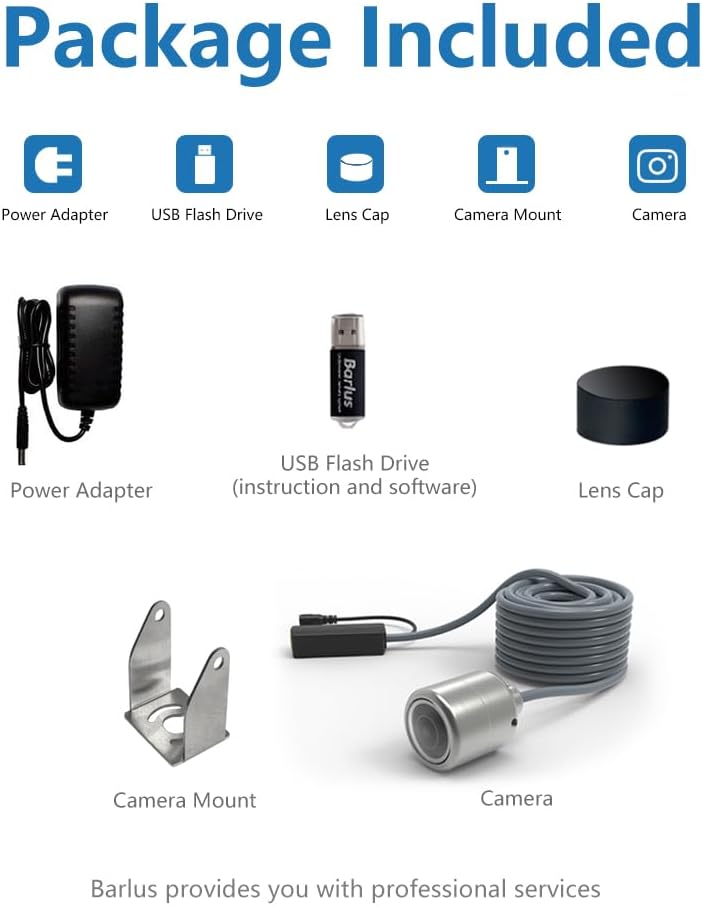
Image 3.1: All components included in the Barlus Mini Underwater IP Camera package.
4. Setup and Connection
The Barlus Mini Underwater IP Camera offers flexible connection options:
4.1 Power Connection
Connect the provided DC24V Power Adapter to the camera's cable. The camera does not require internal charging and operates continuously when connected to power.
4.2 Data Connection Methods
Choose one of the following methods to connect the camera for data transmission:
- Direct Connection to Computer: Connect the camera's Ethernet cable directly to your computer's Ethernet port.
- Connection via Router: Connect the camera's Ethernet cable to a router. This allows you to access the camera feed from a computer, smartphone, or tablet connected to the same network (via Wi-Fi or Ethernet).

Image 4.1: Illustration of direct connection to a computer and connection through a router.

Image 4.2: Basic connection types for accessing the camera feed from PC, mobile, or tablet.
5. Operating Instructions
Once connected, the Barlus Mini Underwater IP Camera is ready for operation. Refer to the software provided on the USB flash drive for detailed instructions on accessing the live feed, recording, and configuring settings.
5.1 Live Streaming and Recording
The camera supports RTMP live streaming, allowing you to view real-time underwater footage on connected devices. You can also record video directly to the camera's internal 128GB memory. The provided software will guide you through initiating live streams and managing recordings.

Image 5.1: Live streaming the camera feed to a smartphone.
5.2 Night Vision
The camera's night vision function automatically activates in low-light conditions, providing clear images without the need for external illumination. This feature is designed to be unobtrusive to marine life.
5.3 Applications
The camera is suitable for a variety of underwater applications, including:
- ROV integration for remote underwater observation.
- Diver-mounted observation for personal or professional use.
- Deep-sea research and studies.
- Monitoring in aquariums or swimming pools.

Image 5.2: Diverse applications of the Barlus Mini Underwater IP Camera.
6. Care and Maintenance
To ensure the longevity and optimal performance of your Barlus Mini Underwater IP Camera, follow these care and maintenance guidelines:
- Cleaning: After each use in saltwater, rinse the camera and cable thoroughly with fresh water to prevent salt buildup and corrosion. Use a soft cloth to gently wipe the lens. Avoid abrasive materials or harsh chemicals.
- Storage: Store the camera in a cool, dry place away from direct sunlight and extreme temperatures. Ensure the lens cap is in place to protect the lens from scratches.
- Inspection: Regularly inspect the cable for any signs of wear, cuts, or damage. Check the camera housing for cracks or deformities that could compromise its waterproof integrity.
- Handling: Despite its robust titanium construction, avoid dropping or subjecting the camera to severe impacts.

Image 6.1: The camera's durable titanium material and IP68 waterproof rating ensure long-term performance.
7. Troubleshooting
If you encounter issues with your Barlus Mini Underwater IP Camera, refer to the following common troubleshooting steps:
- No Power: Ensure the power adapter is securely connected to both the camera cable and a functional power outlet. Verify the power outlet is active.
- No Video Feed: Check all Ethernet cable connections. If connecting via a router, ensure the router is powered on and functioning correctly, and your viewing device (PC, phone) is connected to the same network. Restart the viewing software.
- Poor Image Quality: Ensure the camera lens is clean and free from debris. Verify that the camera is operating within its specified depth and environmental conditions.
- Network Connection Issues: If using a router, try connecting the camera directly to a computer to isolate the issue. Check your network settings and firewall configurations on your computer.
- Software Problems: Reinstall the viewing software from the provided USB flash drive. Ensure your operating system is up to date.
For persistent issues, please contact Barlus customer support.
8. Technical Specifications
| Feature | Specification |
|---|---|
| Model Number | UW-S5ZP-C |
| Video Capture Resolution | 1080p |
| Effective Still Resolution | 1080 MP (2 MP Maximum Webcam Image Resolution) |
| Video Capture Format | MPEG-4 |
| Photo Sensor Technology | CMOS |
| Viewing Angle / Field Of View | 140 Degrees |
| Connectivity Technology | Ethernet |
| Connectivity Protocol | Wi-Fi (via router) |
| Control Method | Remote (via software) |
| Material | Titanium |
| Water Resistance Level | Waterproof (IP68) |
| Maximum Operating Depth | 500 meters |
| Item Dimensions (L x W x H) | 5.51 x 2.76 x 2.76 inches |
| Item Weight | 6.61 Pounds (approx. 300g for camera body) |
| Included Components | USB Cable (for data/software), Power Adapter |
| Power Input | 24 Volts |
| Flash Memory Type | SD (internal 128GB capacity) |
| Low Light Technology | Night Color |
9. Warranty and Support
Barlus is committed to providing high-quality underwater camera products. For information regarding warranty coverage, technical support, or service, please refer to the documentation included on the USB flash drive or visit the official Barlus website. Contact details for customer support are typically available through your purchase platform or the manufacturer's website.