
Introduction
This manual provides instructions for the Easytry123 replacement remote control, designed for use with various Sanyo LCD HDTV television models. This remote offers essential functions for operating your compatible Sanyo television.
Important Note:
- This is a replacement remote control. While it provides core functionality, some advanced or specific features of your original Sanyo remote may not be supported.
- Ensure your television model is listed in the compatibility section to guarantee proper function.
Package Contents
The package includes:
- 1 x Easytry123 Replacement Remote Control (Model: Easytry4382)
Batteries and an instruction manual are not included with this product.
Setup
Battery Installation
The remote control requires two (2) AA batteries (not included) for operation. Follow these steps to install the batteries:
- Locate the battery compartment cover on the back of the remote control.
- Press down on the tab and slide the cover downwards to remove it.
- Insert two AA batteries, ensuring the positive (+) and negative (-) terminals align correctly with the markings inside the compartment. Incorrect installation can prevent the remote from functioning.
- Slide the battery compartment cover back into place until it clicks securely.
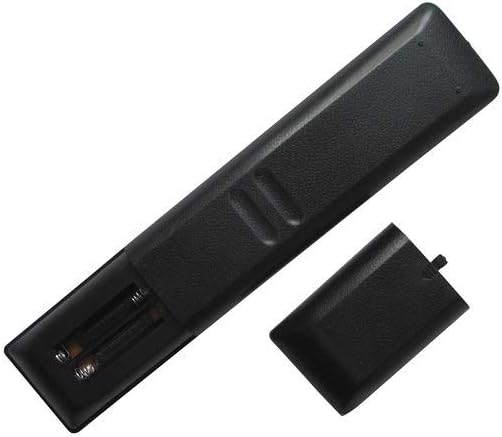
Image: Rear view of the remote control with the battery cover open, revealing the battery slots.
Operating Instructions
Point the remote control directly at your Sanyo television's infrared sensor. Ensure there are no obstructions between the remote and the TV.

Image: Front view of the remote control, displaying all buttons.
Basic Functions
- POWER: Turns the television on or off.
- NUMBER BUTTONS (0-9): Directly select channels.
- CH +/-: Changes channels sequentially.
- VOL +/-: Adjusts the volume level.
- MUTE: Silences or restores the television audio.
- INPUT: Cycles through available input sources (e.g., HDMI, AV).
- MENU: Accesses the television's main menu.
- DIRECTIONAL PAD (Up, Down, Left, Right): Navigates through menu options.
- ENTER: Confirms a selection in the menu.
- EXIT: Exits the current menu or on-screen display.
- INFO: Displays information about the current program or input.
Additional Functions
Depending on your specific Sanyo TV model, the following buttons may provide additional functionality:
- PICTURE: Accesses picture settings.
- SOUND: Accesses sound settings.
- SLEEP: Sets a timer for the TV to turn off automatically.
- ON TIMER: Sets a timer for the TV to turn on automatically.
- PLAY/PAUSE/STOP/REW/FF: Controls for media playback if your TV supports it (e.g., USB media).
- SUB CH: Sub-channel selection.
- RECALL: Returns to the previously viewed channel.
- HELP: Accesses on-screen help.
Maintenance
Cleaning
To clean the remote control, use a soft, dry cloth. For stubborn dirt, lightly dampen the cloth with water or a mild, non-abrasive cleaner. Avoid using harsh chemicals or abrasive materials, as these can damage the remote's surface or buttons.
Battery Replacement
Replace batteries when the remote's response becomes sluggish or stops working. Always replace both AA batteries at the same time with new ones. Do not mix old and new batteries, or different types of batteries.
Storage
If the remote control will not be used for an extended period, remove the batteries to prevent leakage, which can damage the remote's internal components.
Troubleshooting
- Remote not responding:
- Check if the batteries are installed correctly with the correct polarity.
- Replace old batteries with new AA batteries.
- Ensure there is a clear line of sight between the remote control and the TV's infrared sensor. Remove any obstructions.
- Try operating the remote closer to the TV.
- Some functions do not work:
- As a replacement remote, it may not support all advanced or specific functions of your original Sanyo remote. Refer to your TV's original manual for specific feature compatibility.
- Verify that your TV model is listed as compatible with this remote.
Specifications
| Model Number | Easytry4382 |
| Brand | Easytry123 |
| Compatible Devices | Sanyo LCD HDTV Televisions (Models: FXVF, FXVB, FXVC, FXVG, FXVL, FXVM, AVM3651, AVM3651G, DS27510, DS27820, DS31820, DS32830, DS32830H) |
| Connectivity Technology | Infrared (IR) |
| Controller Type | Button Control |
| Power Source | 2 x AA Batteries (not included) |
Warranty and Support
For warranty information and customer support, please refer to the seller or manufacturer directly. This product is typically covered by a limited warranty against manufacturing defects. Keep your purchase receipt as proof of purchase.
For further assistance or inquiries, please contact the Easytry123 customer service or the retailer from whom you purchased this remote control.