
1. Introduction
Thank you for choosing the Easytry123 Replacement Remote Control. This remote is designed to operate various Sanyo LED HDTV TV models, offering a convenient solution for controlling your television. Please note that as a replacement unit, it may not support all advanced functions present on your original remote control. This manual provides essential information for setup, operation, and maintenance.
2. Setup: Battery Installation
Before using your new remote control, you must install batteries. The remote requires two (2) AA batteries (not included).
- Locate the battery compartment on the back of the remote control.
- Press down on the latch and slide the battery cover downwards to open it.
- Insert two AA batteries, ensuring the positive (+) and negative (-) terminals align correctly with the markings inside the compartment.
- Slide the battery cover back into place until it clicks securely.
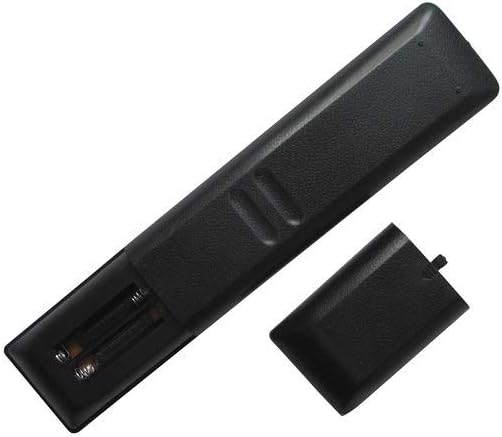
Figure 2.1: Rear view of the remote control with the battery compartment open, illustrating the correct orientation for AA battery insertion.
Important: Always use new batteries and replace both batteries at the same time. Do not mix old and new batteries or different types of batteries.
3. Operating Instructions
The Easytry123 remote control uses infrared (IR) technology. Ensure there is a clear line of sight between the remote control and your television's IR receiver for optimal performance.

Figure 3.1: Front view of the Easytry123 remote control, displaying the layout of its 25 buttons.
Basic Functions:
- POWER: Turns the TV on or off.
- VOL +/-: Increases or decreases the volume level.
- CH +/- (or PRESET +/-): Changes the television channel.
- MUTE: Silences the TV audio.
- INPUT/SOURCE: Selects the input source (e.g., HDMI, AV).
- MENU: Accesses the TV's main menu.
- Navigation Buttons (Up, Down, Left, Right, ENTER): Used to navigate through menus and confirm selections.
- HOME: Returns to the TV's home screen or main menu.
- BACK/RETURN: Goes back to the previous screen or menu.
- Playback Controls (PLAY, PAUSE, STOP, SKIP): Controls media playback if supported by the TV.
For specific advanced functions, refer to your Sanyo TV's original user manual, as this replacement remote focuses on primary operational controls.
4. Maintenance
Proper care will extend the life of your remote control.
- Cleaning: Wipe the remote with a soft, dry cloth. Do not use liquid cleaners or abrasive materials.
- Battery Replacement: Replace batteries when the remote's response becomes sluggish or stops working. Remove batteries if the remote will not be used for an extended period to prevent leakage.
- Storage: Store the remote in a cool, dry place away from direct sunlight and extreme temperatures.
5. Troubleshooting
If you experience issues with your remote control, try the following steps:
- Remote not responding:
- Ensure batteries are installed correctly with the correct polarity.
- Replace old batteries with new ones.
- Check for any obstructions between the remote control and the TV's IR receiver.
- Ensure you are within the maximum operating range (approximately 10 meters).
- Some functions do not work:
- As a replacement remote, it may not support all functions of your original TV remote. Verify that the function you are trying to use is a basic TV control.
- Ensure your TV model is listed as compatible in the product description.
6. Specifications
| Brand | Easytry123 |
| Model Number | Easytry4397 |
| Compatible Devices | Television (Sanyo LED HDTV) |
| Connectivity Technology | Infrared (IR) |
| Number of Buttons | 25 |
| Maximum Range | 10 Meters (approx. 33 feet) |
| Battery Type | 2 x AA batteries (not included) |
| Color | Black |
| Special Feature | Ergonomic design |
7. Warranty and Support
For any questions or support regarding your Easytry123 Replacement Remote Control, please contact the seller directly through your purchase platform. Please retain your proof of purchase for any warranty claims, if applicable.