
1. Introduction
This manual provides instructions for the Easytry123 replacement remote control, designed for use with various Sanyo LCD HDTV models. This remote offers a convenient way to operate your television's primary functions. Please note that while this remote is a functional replacement, some advanced or specific functions of your original remote may not be fully supported.
2. Safety Information
Please read and follow these safety guidelines to ensure proper operation and prevent damage:
- Do not mix old and new batteries.
- Do not mix alkaline, standard (carbon-zinc), or rechargeable (nickel-cadmium) batteries.
- Always remove exhausted batteries promptly to prevent leakage and damage.
- Dispose of used batteries according to local regulations.
- Keep the remote control away from moisture, heat, and direct sunlight.
3. Package Contents
The package includes:
- 1 x Easytry123 Replacement Remote Control
Please note: Batteries and a printed instruction manual are not included.
4. Setup: Battery Installation
To begin using your remote control, you must install two AA batteries (not included).
- Locate the battery compartment on the back of the remote control.
- Press down on the tab and slide the battery cover off.
- Insert two AA batteries, ensuring the positive (+) and negative (-) terminals align correctly with the markings inside the compartment.
- Slide the battery cover back into place until it clicks securely.
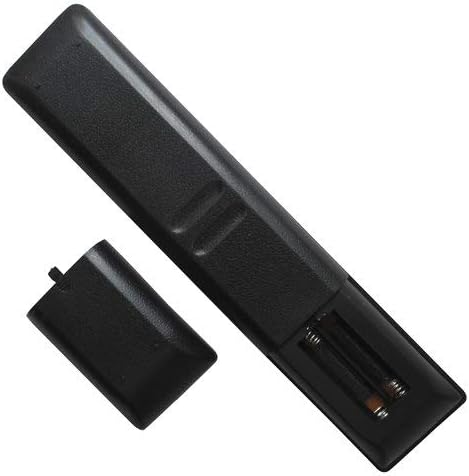
Image: Back of the remote control with the battery compartment open, illustrating where to insert AA batteries.
5. Operation
Once batteries are installed, the remote control is ready for use. Point the remote directly at your Sanyo HDTV's infrared receiver.

Image: Front view of the remote control, displaying the layout of all buttons.
Key Functions Overview:
- POWER: Turns the TV on or off.
- Number Buttons (0-9): Directly select channels.
- INPUT: Cycles through available input sources (HDMI, AV, etc.).
- VOL +/-: Adjusts the volume level.
- CH +/-: Changes the channel up or down.
- MUTE: Mutes or unmutes the TV audio.
- MENU: Accesses the TV's main menu.
- Navigation Buttons (Up, Down, Left, Right, ENTER): Navigate through menus and confirm selections.
- EXIT: Exits the current menu or screen.
- INFO: Displays information about the current program or input.
- PLAY/PAUSE/STOP/REW/FF: Control media playback (if supported by TV).
- CAPTION: Toggles closed captions.
- AUDIO: Selects audio tracks or modes.
- SLEEP: Sets a sleep timer.
- Note: Specific button functions may vary slightly depending on your Sanyo TV model. Some advanced features of your original remote may not be replicated.
6. Compatibility
This Easytry123 replacement remote control is compatible with the following Sanyo LCD HDTV models:
- FW50D36F
- NH316UD
- FW40D06FB
- FW43D25F-B
- FW50D36F-B
- NH311UD
- FW32D06F
- FW40D06F
If your TV model is not listed above, this remote may not be fully compatible.
7. Maintenance
- Cleaning: Use a soft, dry cloth to clean the remote control. Do not use liquid cleaners or abrasive materials.
- Storage: When not in use for extended periods, remove the batteries to prevent leakage. Store the remote in a cool, dry place.
- Battery Replacement: Replace batteries when the remote's response becomes sluggish or stops working.
8. Troubleshooting
If you experience issues with your remote control, please refer to the following common solutions:
- Remote not responding:
- Ensure batteries are inserted correctly with the correct polarity (+/-).
- Replace old batteries with new AA batteries.
- Make sure there are no obstructions between the remote control and the TV's infrared sensor.
- Point the remote directly at the TV.
- Some functions do not work:
- This replacement remote may not support all advanced or specific functions of your original TV remote. Refer to the "Operation" section for general functions.
- Verify your TV model is listed in the "Compatibility" section.
9. Specifications
| Feature | Detail |
|---|---|
| Brand | Easytry123 |
| Model Number | Easytry4384 |
| Connectivity Technology | Infrared |
| Compatible Devices | Television (Sanyo LCD HDTVs) |
| Controller Type | Button Control |
| Special Feature | Ergonomic |
| Batteries Required | 2 AA batteries (not included) |
10. Warranty and Support
This product is a replacement remote control. Specific warranty information is typically provided by the seller at the time of purchase. For any issues or questions regarding this remote control, please contact the seller directly through your purchase platform.
As per product information, no separate manual is included with the remote.