
1. Introduction
Thank you for choosing the Comfee Mobile Air Conditioner MPPHA-07CRN7. This appliance is designed to provide comfort through its versatile 3-in-1 functionality: cooling, dehumidifying, and ventilating. This manual provides essential information for the safe and efficient operation, installation, maintenance, and troubleshooting of your new air conditioner. Please read this manual thoroughly before use and keep it for future reference.
2. Safety Information
Always adhere to basic safety precautions when using electrical appliances to reduce the risk of fire, electric shock, or injury.
- Ensure the power supply matches the voltage specified on the unit's rating label.
- Do not operate the unit with a damaged cord or plug.
- Keep the unit away from heat sources and direct sunlight.
- Do not block air inlets or outlets.
- This appliance uses R290 refrigerant, which is a natural and environmentally friendly refrigerant with low global warming potential (GWP). Due to its flammability, any work on the refrigerant circuit, including installation, servicing, and repair, must be performed by qualified personnel only. Do not attempt to disassemble or repair the unit yourself.
- Ensure proper ventilation when operating the unit.
- Do not insert objects into the air vents.
3. Product Overview
The Comfee MPPHA-07CRN7 is a compact and portable air conditioning unit designed for ease of use and mobility.

Front view of the Comfee Mobile Air Conditioner MPPHA-07CRN7.

Dimensions of the Comfee Mobile Air Conditioner: 32.9 cm (depth) x 31.8 cm (width) x 63.4 cm (height).
3.1. Components and Accessories
The package includes the following items:
- Mobile Air Conditioner Unit
- Exhaust Hose (Length 130 or 150 cm)
- Remote Control with Battery
- Window Slider Kit
- Wall Outlet Adapter
- Foam Seals
- Drain Hose
- Screws, Bolts, Anchors for installation

Overview of included accessories: exhaust hose, unit adapter, window slider, foam sealing, exhaust hose adapter, wall outlet adapter, non-adhesive foam sealing, screws/bolts/anchors, remote control, drain hose.
3.2. Control Panel and Remote Control
The unit can be controlled via the intuitive control panel on top of the unit or the included remote control.

Illustration of the control panel and remote control with numbered functions: 1. On/Off, 2. 3 Modes Control, 3. Fan Speed Control, 4. Sleep Mode Control, 5. Temperature Control, 6. DIY Mode Control, 7. Timer Control, 8. LED Light Control, 9. Follow Me Control.
4. Setup
Follow these steps for proper installation of your mobile air conditioner:
- Positioning: Place the unit on a flat, stable surface near a window or wall opening for the exhaust hose. The unit is equipped with caster wheels for easy movement.
- Window Kit Installation:
- Open the window.
- Install the window slider adapter into the window opening.
- Seal and secure the adapter to ensure no air leakage.
- Exhaust Hose Connection:
- Attach the exhaust hose to the adapter on the unit.
- Connect the other end of the exhaust hose to the window slider adapter or wall outlet adapter.
- Power Connection: Plug the power cord into a grounded electrical outlet.

The image shows the mobile air conditioner connected to a window via the exhaust hose, illustrating easy installation.

Detailed steps for window kit installation: 1. Open the window, 2. Install the window slider adapter, 3. Seal and secure the adapter, 4. Install the exhaust hose to the adapter, 5. Attach the exhaust hose to the unit, 6. Power on and activate the unit.
5. Operating Instructions
Your Comfee mobile air conditioner offers multiple operating modes to suit your comfort needs.
5.1. Operating Modes
- Cooling Mode: Provides powerful cooling for rooms up to 25 m² (68 m³). Set your desired temperature between 17°C and 35°C.
- Ventilating Mode: Circulates air without cooling, offering two selectable fan speeds.
- Dehumidifying Mode: Removes excess moisture from the air, with a dehumidification capacity of 46.56 liters per 24 hours. A drain hose must be connected for continuous drainage in this mode.

The three operating modes: Cooling Mode, Ventilating Mode, and Dehumidifying Mode. Note: In dehumidifying mode, a hose for water drainage is required.
5.2. Special Functions
- 24-Hour Timer: Program the unit to turn on or off automatically at a set time, allowing you to return to a comfortable environment.
- Smart Cooling / Follow Me Function: The remote control monitors the temperature at its location and adjusts the unit's operation for optimal comfort around you.
- Automatic Restart with Memory Function: In case of a power outage, the unit will automatically resume operation with the last settings once power is restored.
- Sleep Mode: Adjusts temperature and fan speed for quiet and comfortable sleep.

The 24-hour timer function allows you to set desired operating times.

Automatic restart with memory function ensures the unit resumes previous settings after a power interruption.
6. Maintenance
Regular maintenance ensures optimal performance and longevity of your air conditioner.
- Filter Cleaning: The unit features a washable filter. Clean the filter regularly (e.g., every two weeks or as needed) to maintain air quality and cooling efficiency. Refer to the filter removal instructions in the detailed manual.
- Unit Cleaning: Wipe the exterior of the unit with a soft, damp cloth. Do not use harsh chemicals or abrasive cleaners.
- Water Drainage: In dehumidifying mode, ensure the drain hose is properly connected for continuous drainage. Periodically check and empty the internal water tank if not using continuous drainage.
7. Troubleshooting
If you encounter issues with your air conditioner, refer to the following common troubleshooting tips:
| Problem | Possible Cause | Solution |
|---|---|---|
| Unit does not turn on | No power supply; Power cord not plugged in; Circuit breaker tripped. | Check power connection; Reset circuit breaker. |
| Insufficient cooling | Air filter dirty; Exhaust hose not properly installed; Room size too large; Doors/windows open. | Clean air filter; Ensure exhaust hose is sealed; Close doors/windows; Consider unit capacity for room size. |
| Unit is noisy | Unit not on a level surface; Air filter dirty; Obstruction in fan. | Place unit on a flat surface; Clean air filter; Check for obstructions. |
| Water leakage | Drain hose not connected or blocked (in dehumidifying mode); Water tank full. | Ensure drain hose is properly connected and clear; Empty water tank. |
If the problem persists after attempting these solutions, please contact customer support.
8. Specifications
Key technical specifications for the Comfee Mobile Air Conditioner MPPHA-07CRN7:
- Model Number: MPPHA-07CRN7
- Cooling Capacity: 7000 BTU (2.0 kW/h)
- Recommended Room Size: Up to 25 m² (68 m³)
- Dehumidification Capacity: 46.56 L/24h
- Power Consumption: 790 Watts
- Voltage: 230 Volts
- Energy Efficiency Class: A
- Energy Efficiency Ratio (EER): 2.6
- Refrigerant: R290 (Propane)
- Noise Level: 62 dB (A)
- Product Dimensions (L x W x H): 32.9 x 31.8 x 63.4 cm
- Weight: 21 Kilograms
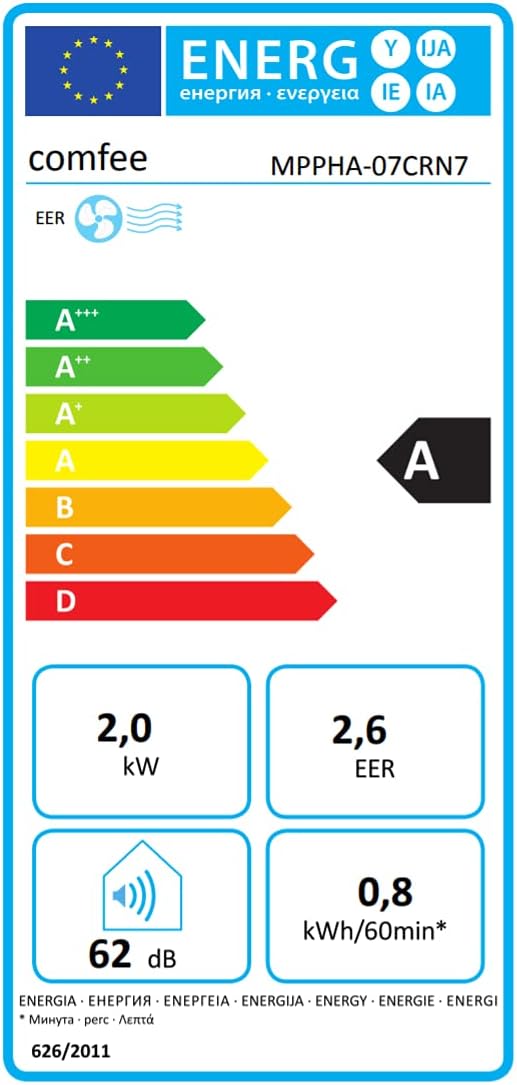
Energy label indicating Energy Efficiency Class A, 2.0 kW cooling, 2.6 EER, and 62 dB noise level.

Product data sheet showing specifications including refrigerant type R290 and its low GWP.
9. Warranty and Support
Comfee products are designed for reliability and performance. For warranty information, please refer to the warranty card included with your product or visit the official Comfee website. If you require technical assistance, have questions about operation, or need to report a defect, please contact Comfee customer support. Ensure you have your model number (MPPHA-07CRN7) and purchase details ready when contacting support.
You can visit the Comfee store for more information: Comfee Store


