
1. Introduction
This manual provides essential information for the safe and effective use of your PK Power 6ft/1.8m AC Power Cord Cable. This cable is designed to provide reliable power to compatible devices, including the QFX PBX-61126 Battery Powered PA Speaker RGB Light. Please read this manual thoroughly before use and retain it for future reference.
2. Safety Information
To ensure safe operation and prevent damage, observe the following safety precautions:
- Voltage Compatibility: Ensure the device you are connecting is compatible with the power cord's input specifications (100-240V 50-60Hz).
- Indoor Use Only: This power cord is intended for indoor use in dry locations. Do not expose it to moisture, rain, or extreme temperatures.
- Proper Connection: Always insert the plugs fully into the outlets and devices. A loose connection can cause overheating or electrical hazards.
- Avoid Damage: Do not bend, twist, or crimp the cable excessively. Avoid placing heavy objects on the cord. Regularly inspect the cord for any signs of damage, such as frayed wires or cracked insulation.
- Unplug Safely: When disconnecting, always grasp the plug, not the cable. Pulling the cable can damage the internal wiring.
- Children and Pets: Keep the power cord out of reach of children and pets to prevent accidental injury or damage.
- Overload Protection: Do not overload electrical outlets. Connect the power cord to an appropriate power source.
3. Product Features
The PK Power AC Power Cord Cable offers the following features:
- Universal Input: Supports 100-240V AC input at 50-60Hz, suitable for various regions.
- Safety Certifications: CE, FCC, and RoHS certified, ensuring compliance with safety and environmental standards.
- Advanced Protection: Features Over Voltage Protection (OVP), Over Current Protection (OCP), and Short Circuit Protection (SCP) to safeguard your devices.
- Optimal Length: 6 feet (1.8 meters) / 70.87 inches length provides flexibility in placement.
- Compatibility: Specifically designed to be compatible with devices such as the QFX PBX-61126 Battery Powered PA Speaker RGB Light, and other devices requiring a similar 2-slot non-polarized power cord.
4. Setup
Setting up your PK Power AC Power Cord Cable is straightforward:
- Inspect the Cable: Before connecting, visually inspect the power cord for any signs of damage. Do not use if damaged.
- Connect to Device: Locate the power input port on your compatible device (e.g., QFX PBX-61126 speaker). Insert the 2-slot connector end of the power cord firmly into the device's power input.
- Connect to Power Outlet: Insert the 2-prong AC plug end of the power cord firmly into a standard wall outlet or surge protector.
- Verify Connection: Ensure both ends of the cable are securely connected.

Image 1: Close-up of the power cord's plug and connector ends.
5. Operating Instructions
Once the power cord is properly connected as described in the Setup section:
- The power cord will supply AC power to your device.
- Turn on your device using its power switch, if applicable.
- The cable is designed for continuous use within its specified voltage and current limits.
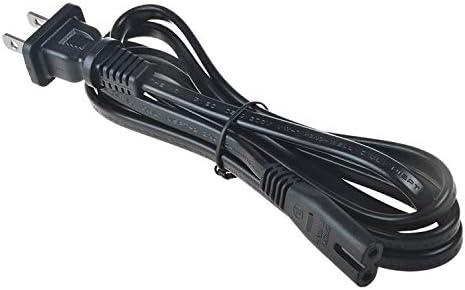
Image 2: The PK Power AC power cord, coiled.
6. Maintenance
Proper maintenance extends the life of your power cord:
- Cleaning: Disconnect the power cord from both the wall outlet and the device before cleaning. Wipe the cable with a dry, soft cloth. Do not use liquid cleaners or solvents.
- Storage: When not in use, coil the cable loosely. Avoid tight coiling or kinking, which can damage the internal wires. Store in a cool, dry place away from direct sunlight and extreme temperatures.
- Regular Inspection: Periodically check the entire length of the cord, including the plugs and connectors, for any signs of wear, cuts, or damage. Replace the cord immediately if any damage is found.
7. Troubleshooting
If you encounter issues with your power cord, consider the following:
- No Power to Device:
- Ensure both ends of the power cord are securely plugged into the wall outlet and the device.
- Check if the wall outlet is functional by plugging in another device.
- Verify that the device's power switch is in the "ON" position.
- Inspect the power cord for any visible damage. If damaged, discontinue use and replace.
- Intermittent Power:
- Ensure connections are tight and not loose.
- Avoid bending or stressing the cable near the connectors.
If troubleshooting steps do not resolve the issue, please contact customer support.
8. Specifications
| Attribute | Detail |
|---|---|
| Brand | PKPOWER |
| Model | 6ft/1.8m Listed AC Power Cord Cable |
| Input Voltage | 100-240V AC |
| Frequency | 50-60Hz |
| Item Length | 6 feet (1.8 meters) / 70.87 Inches |
| Total Power Outlets | 1 (device side) |
| Certifications | CE, FCC, RoHS |
| Protection Features | OVP (Over Voltage Protection), OCP (Over Current Protection), SCP (Short Circuit Protection) |
| UPC | 757631564820 |
9. Warranty and Support
PKPOWER products are manufactured to high standards and undergo rigorous testing. This product is covered by our customer service policy.
- Customer Service: Our friendly and reliable customer service team is available to assist you. We aim to respond to all inquiries within 24 hours.
- For support, please refer to the contact information provided with your purchase or visit the official PKPOWER website.