1. Introduction
This manual provides comprehensive instructions for the safe and effective use of your SIRUI AM-225 Carbon Fiber Camera Tripod with the B-00K Ball Head. Please read this manual thoroughly before operating the product to ensure optimal performance and longevity.

Image 1.1: The SIRUI AM-225 Carbon Fiber Camera Tripod with B-00K Ball Head.
2. Package Contents
Verify that all items listed below are included in your package:
- SIRUI AM-225 Carbon Fiber Tripod Legs
- SIRUI B-00K Ball Head
- Quick Release Plate
- Instruction Manual (this document)
- Storage Bag
- Adjustment Wrench
- Stainless Steel Spikes (for interchangeable feet)

Image 2.1: All components included in the SIRUI AM-225+B-00K package.
3. Setup
3.1 Attaching the Ball Head
- Ensure the tripod's mounting platform is clean and free of debris.
- Align the B-00K ball head's base with the tripod's 3/8-inch mounting screw.
- Rotate the ball head clockwise until it is securely fastened. Do not overtighten.

Image 3.1: Detaching or attaching the B-00K ball head from the tripod legs.
3.2 Adjusting Leg Angles
Each leg features a semi-automatic leg angle adjustment button. Press this button to release the leg and adjust it to one of the available angle positions. Ensure the leg locks into place before use.

Image 3.2: Illustration of leg angle adjustment and twist lock operation.
3.3 Extending and Retracting Legs
The tripod legs consist of 5 sections. To extend a leg section, twist the leg lock counter-clockwise to loosen, pull the section to the desired length, and then twist clockwise to secure. Repeat for all sections and legs. Ensure all leg locks are firmly tightened before placing equipment on the tripod.
3.4 Changing Feet (Rubber to Spikes)
The tripod comes with non-slip rubber feet installed. For increased stability on soft ground or ice, these can be replaced with the included stainless steel spikes. To change, loosen and remove the rubber feet by twisting them counter-clockwise. Then, screw in the stainless steel spikes clockwise until secure.
4. Operating Instructions
4.1 Mounting Your Camera
- Attach the quick release plate to the bottom of your camera by screwing the 1/4-inch thread into the camera's tripod socket. Ensure it is tight.
- Open the quick release plate clamp on the B-00K ball head.
- Slide the camera with the attached quick release plate into the clamp.
- Close the quick release plate clamp and engage the safety lock to prevent accidental release.
4.2 Ball Head Controls
The B-00K ball head features several controls for precise camera positioning:
- Ball Lock Knob: Loosen to adjust the camera's angle (tilt and swivel). Tighten to secure the camera in position.
- Base Lock Knob: Loosen to rotate the entire ball head 360 degrees for panoramic shots. Tighten to lock the rotation.
- Quick Release Plate Clamp: Secures the quick release plate to the ball head.
- Safety Lock: A secondary mechanism to prevent the quick release plate from accidentally detaching.
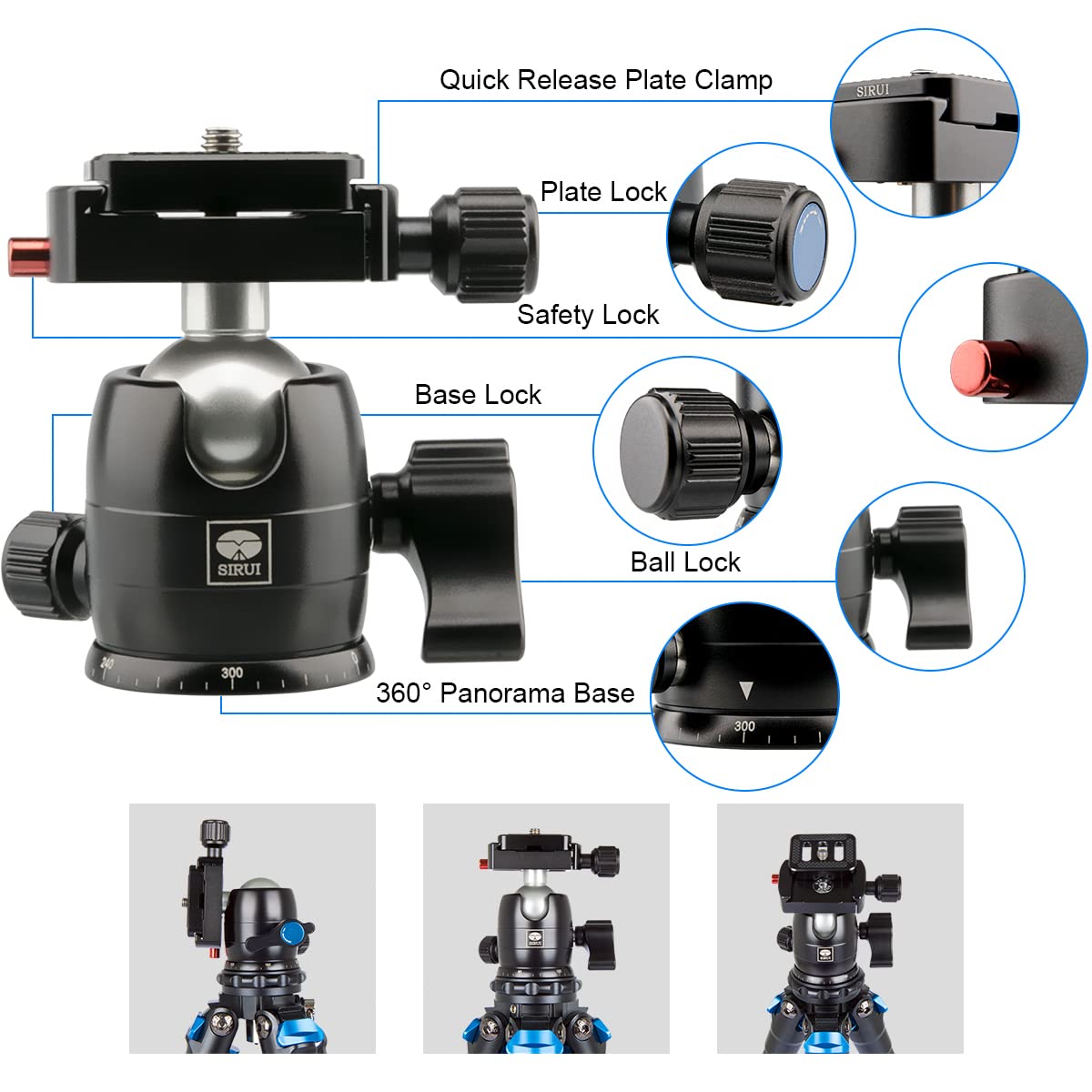
Image 4.1: Key controls and features of the B-00K ball head.

Image 4.2: Ball head functionality including 360° rotation and 90° tilt range.
4.3 Low Angle Shooting
To achieve low-angle shots, spread the tripod legs out to their widest angle. This allows the tripod to sit very close to the ground, providing stability for macro photography or unique perspectives.

Image 4.3: Tripod configured for low-angle shooting.
5. Maintenance
Regular maintenance ensures the longevity and optimal performance of your SIRUI tripod.
- Cleaning: After use, especially in dusty, sandy, or wet environments, wipe down the tripod with a soft, damp cloth. For stubborn dirt, use a mild soap solution. Ensure all parts are thoroughly dried before storage.
- Leg Locks: Periodically check the twist leg locks for smooth operation. If they become stiff, clean any accumulated dirt. Avoid applying lubricants that may attract more dust.
- Ball Head: Keep the ball head clean. Avoid disassembling the ball head unless you are familiar with its internal components, as this may void the warranty.
- Storage: Store the tripod in its provided storage bag in a dry, cool place away from direct sunlight.
6. Troubleshooting
- Tripod Instability: Ensure all leg sections are fully extended and all twist locks are securely tightened. Verify that the leg angle adjustment buttons have clicked into place for each leg.
- Ball Head Slipping: If the camera slips after positioning, ensure the ball lock knob is fully tightened. For heavier camera setups, confirm the quick release plate is securely attached to both the camera and the ball head clamp, and the safety lock is engaged.
- Stiff Leg Locks: If leg locks are difficult to turn, they may have accumulated dirt or sand. Clean the leg sections and locks thoroughly as described in the Maintenance section.
- Difficulty with Quick Release Plate: Ensure the quick release plate is correctly aligned and fully inserted into the clamp before tightening. Check for any obstructions in the clamp mechanism.
7. Specifications
| Feature | Specification |
|---|---|
| Model | AM-225 |
| Material | Carbon Fiber |
| Weight (Tripod + Ball Head) | 2.05 lbs (0.93 kg) |
| Maximum Load Capacity | 13.2 lbs (6 kg) |
| Leg Sections | 5 |
| Minimum Working Height | 2.76 inches (7 cm) |
| Maximum Working Height | 47.2 inches (120 cm) |
| Folded Length | 18.23 inches (46.3 cm) |
| Ball Head Model | B-00K |
| Mounting Screw | 1/4" and 3/8" (interchangeable) |

Image 7.1: Visual representation of 5-section design and carbon fiber construction.

Image 7.2: Compact and lightweight design for travel.
8. Warranty and Support
SIRUI products are manufactured to high-quality standards. For specific warranty details, please refer to the warranty card included with your product or visit the official SIRUI website. For technical support or service inquiries, please contact SIRUI customer service through their official channels.


