Digoo DG-FR100 SmartSet Digital Alarm Clock
User Manual
Model: DG-FR100 | Brand: Digoo
Introduction
Thank you for purchasing the Digoo DG-FR100 SmartSet Digital Alarm Clock. This device combines a digital alarm clock with an FM radio, weather forecast display, and indoor temperature/humidity monitoring. This manual provides detailed instructions to help you set up and operate your new alarm clock effectively.
Safety Information
- Do not expose the device to extreme temperatures, direct sunlight, or high humidity.
- Avoid dropping or subjecting the device to strong impacts.
- Do not disassemble or attempt to repair the device yourself. Refer all servicing to qualified personnel.
- Use only the specified power source (USB cable or 3x AA batteries).
- Keep out of reach of children.
Package Contents
Please check the package contents to ensure all items are present:
- 1 x Digoo DG-FR100 SmartSet Digital Alarm Clock with FM Radio
- 1 x USB Power Cable
- 1 x English User Manual (This document)
Product Overview
The Digoo DG-FR100 features a multifunctional colorful screen and intuitive controls for easy operation.
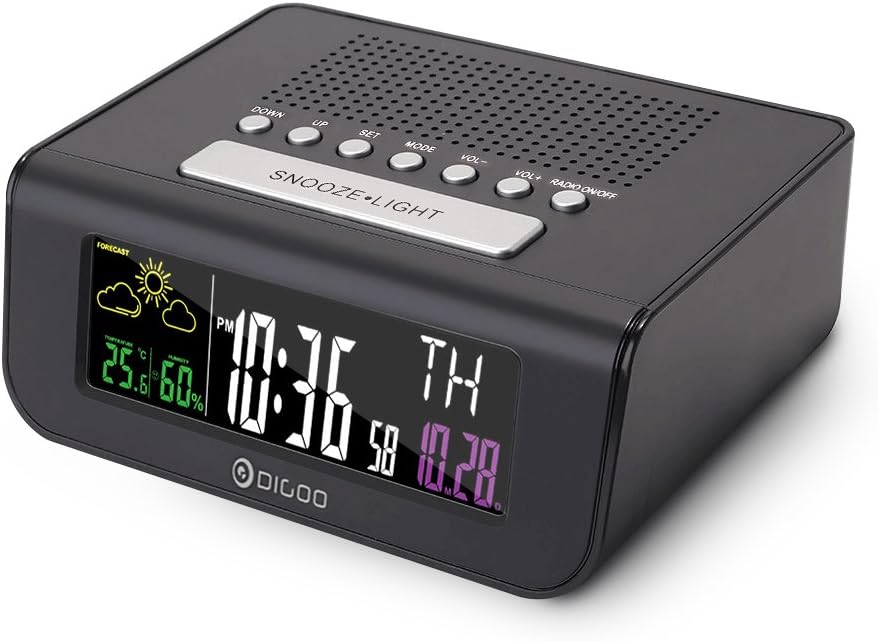
Figure 1: Front-right view of the Digoo DG-FR100 alarm clock, showing the colorful display and sleek design.

Figure 2: Top view of the Digoo DG-FR100, highlighting the control buttons: DOWN, UP, SET, MODE, VOL-, VOL+, RADIO ON/OFF, and SNOOZE•LIGHT.
Control Buttons:
- DOWN: Decrease value, navigate down.
- UP: Increase value, navigate up.
- SET: Enter setting mode, confirm selection.
- MODE: Switch between display modes (Time, Alarm, Radio).
- VOL- / VOL+: Adjust volume for FM radio.
- RADIO ON/OFF: Turn FM radio on or off.
- SNOOZE•LIGHT: Activate snooze, adjust backlight brightness.
Display Features:
- Time Display: Large digital display in 12/24 hour format.
- Date & Day of Week: Shows current date and day of the week.
- Weather Forecast: Icons for Sunny, Partly Sunny, Partly Cloudy, Cloudy, Rainy.
- Indoor Temperature: Displays temperature in °C or °F.
- Indoor Humidity: Displays humidity percentage.
- Comfort Level Indicator: Shows Dry, Comfortable, or Wet.
- Alarm Indicators: Icons for active alarms.
- FM Radio Frequency: Displays current radio station frequency.
- Low Power Indicator: Alerts when batteries are low.
Setup
1. Powering the Device:
The Digoo DG-FR100 can be powered by either the included USB cable or 3 x AA batteries (not included).
- USB Power: Connect the provided USB cable to the DC 5V port on the back of the clock and plug the other end into a USB power adapter (not included) or a powered USB port.
- Battery Power: Open the battery compartment on the back of the clock. Insert 3 x AA batteries, ensuring correct polarity (+/-). Batteries provide backup power and allow for portable use, but the display may dim to conserve power.
It is recommended to use USB power for continuous display brightness and full functionality.
2. Initial Power On:
Once powered, the clock will automatically turn on and display the default time and date. The indoor temperature and humidity will also begin to register.
Operating Instructions
1. Setting Time and Date:
- Press and hold the SET button for 3 seconds to enter time setting mode. The hour digit will flash.
- Use the UP or DOWN buttons to adjust the hour.
- Press SET again to move to the minute setting. Adjust with UP or DOWN.
- Continue pressing SET to cycle through and set: Year → Month → Day → 12/24 Hour Format → Temperature Unit (°C/°F).
- After setting the last item, press SET to exit setting mode, or wait 15 seconds for it to automatically exit.
2. Setting Alarms (Dual Alarm):
The clock supports two independent alarms (AL1 and AL2).
- Press the MODE button repeatedly until "AL1" or "AL2" is displayed.
- Press and hold the SET button for 3 seconds to enter alarm setting mode. The alarm hour will flash.
- Use UP or DOWN to adjust the alarm hour.
- Press SET to move to alarm minute setting. Adjust with UP or DOWN.
- Press SET again to select alarm type: BUZZ (standard alarm sound) or RADIO (wake up to FM radio).
- Press SET to confirm and exit.
- To enable/disable an alarm, short press the UP button when "AL1" or "AL2" is displayed. An alarm icon will appear/disappear on the main screen.
3. FM Radio Operation:
- Press the RADIO ON/OFF button to turn the FM radio on or off.
- When the radio is on, use VOL+ or VOL- to adjust the volume.
- Short press UP or DOWN to fine-tune the frequency.
- Press and hold UP or DOWN to automatically scan for the next available station.
- Radio Sleep Time Function: While the radio is playing, press the MODE button repeatedly to cycle through sleep timer options (e.g., 90, 60, 30, 15 minutes, OFF). The radio will automatically turn off after the selected time.
4. Snooze and Backlight:

Figure 3: A hand pressing the large SNOOZE•LIGHT button located on the top of the Digoo DG-FR100.
- Snooze Function: When an alarm sounds, press the large SNOOZE•LIGHT button to activate snooze. The alarm will pause for approximately 5-10 minutes (default) and sound again.
- Backlight Adjustment: In normal time display mode, short press the SNOOZE•LIGHT button to cycle through different backlight brightness levels.
5. Language Setting:
The clock supports 8 languages for the weekly display (English, German, French, Spanish, Italian, Dutch, Demark, Russian).
- In normal time display mode, press the MODE button until the language setting appears (usually after alarm settings).
- Use the UP or DOWN buttons to select your desired language.
- Press SET to confirm and exit.
Maintenance
- Cleaning: Use a soft, dry cloth to clean the surface of the clock. Do not use abrasive cleaners or solvents.
- Battery Replacement: If using batteries, replace all three AA batteries when the low power indicator appears on the display. Ensure correct polarity.
- Storage: If storing the device for an extended period, remove the batteries to prevent leakage.
Troubleshooting
| Problem | Possible Cause | Solution |
|---|---|---|
| Display is blank or dim. | No power, low batteries, or in power-saving mode (on battery). | Ensure USB cable is properly connected. Replace AA batteries. If on battery, press SNOOZE•LIGHT to temporarily brighten. |
| Alarm does not sound. | Alarm not enabled, alarm volume too low, or incorrect alarm time. | Check if alarm icon is displayed. Adjust alarm volume (if radio alarm). Verify alarm time setting. |
| FM radio static or poor reception. | Weak signal, antenna not extended, or interference. | Adjust the position of the clock. Extend the FM antenna (if applicable). Try a different location. |
| Weather forecast is inaccurate. | Weather forecast is based on internal barometric pressure changes, not external data. | The forecast is an approximation based on local atmospheric pressure trends and may not match official weather reports. Allow time for calibration. |
Specifications
| Feature | Detail |
|---|---|
| Model | Digoo DG-FR100 |
| Dimensions | 140mm x 52mm x 140mm |
| Display Type | Multifunctional Colorful Digital Screen |
| FM Radio Frequency | 87.0MHz - 108.0MHz |
| Temperature Range | 0°C ~ 50°C (32°F ~ 122°F) |
| Humidity Range | 20% ~ 90% RH |
| Power Source | 3 x AA Batteries (not included) or USB Power Cable (included) |
| Language Support | 8 Languages (English, German, French, Spanish, Italian, Dutch, Demark, Russian) |
| Special Features | Weather Forecast, Dual Alarm, Snooze, Radio Sleep Timer, Comfort Level Indicator |
Warranty and Support
This product is covered by a standard manufacturer's warranty. For detailed warranty information or technical support, please refer to the warranty card included with your purchase or contact your retailer.
For further assistance, please visit the official Digoo website or contact their customer service.


