
1. Introduction
Thank you for choosing the ORICO 7-Port USB 3.0 Transparent Desktop Hub. This manual provides essential information for the proper setup, operation, and maintenance of your device. Please read it thoroughly before use to ensure optimal performance and longevity.
2. Product Overview
The ORICO 7-Port USB 3.0 Transparent Desktop Hub expands your computer's connectivity with seven high-speed USB 3.0 ports. Its transparent design allows visibility of internal components, complemented by a blue indicator light when connected. The hub features dual-port power supply capability for enhanced stability with power-hungry devices.

Image: The ORICO 7-Port USB 3.0 Transparent Desktop Hub, showcasing its transparent casing and multiple USB ports.
Key Features:
- Transparent Design: Offers a clear view of the internal circuitry, with a blue LED light illuminating the bottom when active.
- 7 USB 3.0 Ports: Provides ample connectivity for various peripherals, supporting data transfer speeds up to 5Gbps.
- Dual-Port Power Supply: Includes a micro USB input port for optional external power, crucial for devices like external hard drives that require more power. (Micro USB cable not included for power).
- Compact and Portable: Designed with rounded corners and a compact size (5.31 x 1.3 x 0.74 inches) for easy transport.
- Plug and Play: No driver installation required for Windows, macOS, and Linux systems.
3. Package Contents
Please verify that all items are present in your package:
- 1 x ORICO 7-Port USB 3.0 Transparent Desktop Hub
- 1 x USB-A to USB 3.0 Micro-B Data Cable (1 meter)
- 1 x User Manual (this document)
4. Setup Instructions
- Connect to Computer: Use the provided USB-A to USB 3.0 Micro-B data cable to connect the hub's Micro-B port to a USB-A port on your computer (desktop, laptop, etc.).
- Optional External Power (for high-power devices): If you plan to connect multiple high-power devices (e.g., external hard drives, multiple USB-powered accessories), connect a standard Micro USB cable (not included) from a 5V power adapter (like a smartphone charger) to the hub's dedicated Micro USB power input port. This provides additional power for stable operation.
- Device Recognition: Your operating system (Windows, macOS, Linux) should automatically detect and install the necessary drivers. The hub is plug-and-play, requiring no manual driver installation.
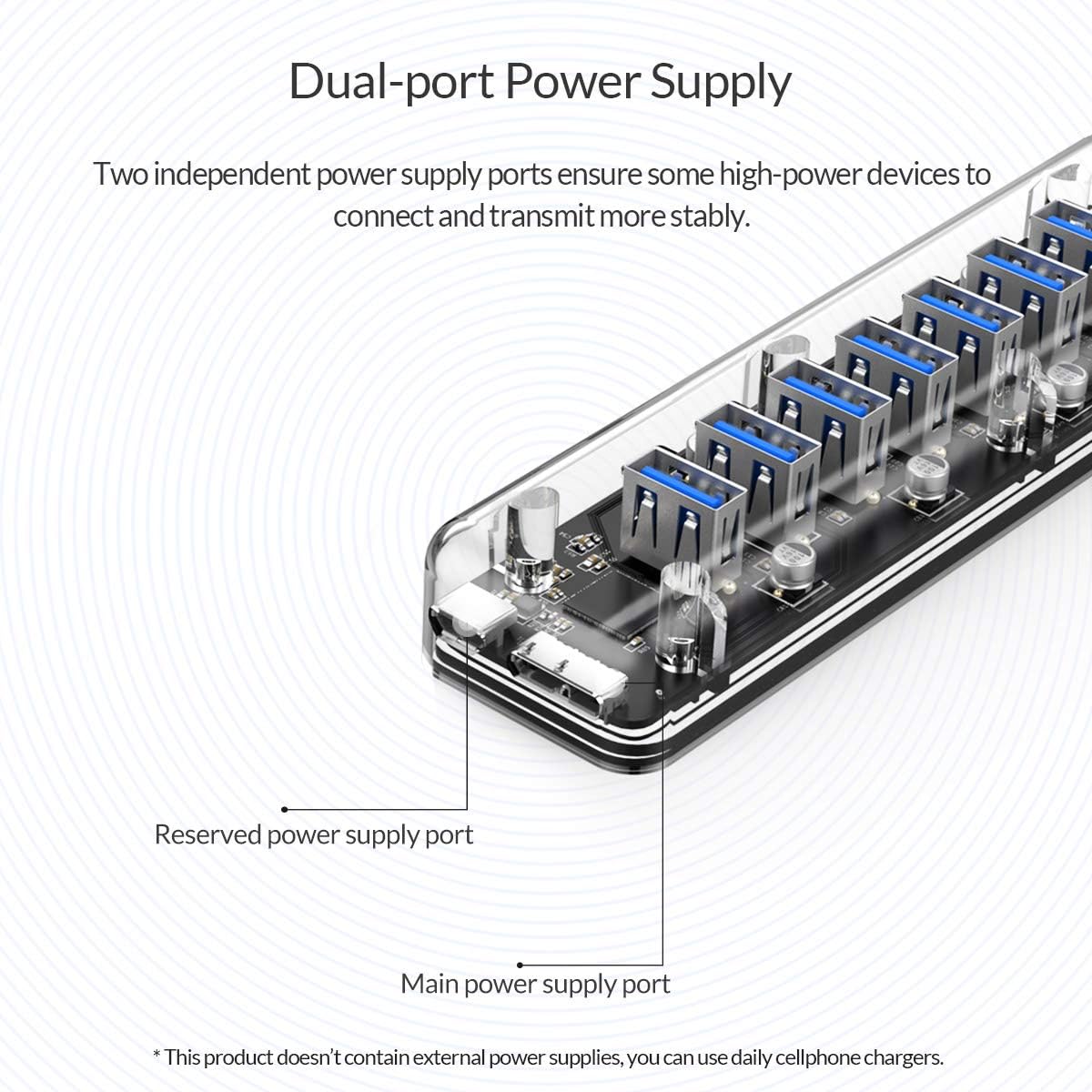
Image: Close-up view of the ORICO hub highlighting the main power supply port and the reserved power supply port for optional external power.

Image: Diagram illustrating the ORICO hub's compatibility with Windows, Linux, and Mac operating systems, emphasizing plug-and-play functionality.
5. Operating Instructions
- Connecting USB Devices: Insert your USB devices (e.g., flash drives, keyboards, mice, external hard drives) into any of the seven available USB 3.0 ports on the hub.
- Data Transfer: The hub supports USB 3.0 speeds up to 5Gbps, allowing for fast data transfer with compatible devices.
- Blue Indicator Light: When the hub is connected and powered, the bottom of the device will illuminate with a blue light, indicating active operation.
- Mobile Device Connectivity (OTG Function): To connect the hub to a smartphone or tablet, ensure your mobile device supports OTG (On-The-Go) functionality. An OTG adapter (not included) may be required. External power for the hub is recommended when connecting multiple peripherals to a mobile device.

Image: The ORICO hub connected to a laptop, expanding ports for peripherals like a mouse, keyboard, and external hard drive.

Image: The ORICO hub demonstrating connectivity with a smartphone and a tablet, showing the use of an external power supply for expanded functionality.

Image: Multiple scenarios showing the ORICO hub in use for multi-port expansion, including office work, entertainment, and study setups.

Image: The ORICO hub illuminated with its special blue indicator light when connected and active.
6. Maintenance
- Keep the hub clean by wiping it with a soft, dry cloth. Avoid using liquid cleaners or solvents.
- Store the hub in a cool, dry place away from direct sunlight and extreme temperatures.
- Avoid dropping the device or subjecting it to strong impacts.
- Do not attempt to disassemble or repair the hub yourself, as this will void the warranty.
7. Troubleshooting
- Device Not Recognized / Unstable Connection:
- Ensure the hub is securely connected to your computer's USB port.
- If connecting high-power devices (e.g., multiple external hard drives), ensure an external 5V power adapter is connected to the hub's Micro USB power input. Insufficient power is a common cause of instability.
- Try connecting the device directly to your computer's USB port to rule out hub-specific issues.
- Test the hub with a different USB port on your computer.
- Slow Data Transfer Speeds:
- Ensure both the hub and the connected device support USB 3.0 for optimal speeds. Connecting a USB 2.0 device will result in USB 2.0 speeds.
- Verify that the hub is connected to a USB 3.0 port on your computer (often identified by a blue port or SS symbol).
- Wireless Peripherals (Mouse/Keyboard) Not Working:
- Some wireless peripheral dongles may experience interference or compatibility issues when connected through a hub. If you encounter problems, try connecting the wireless dongle directly to a USB port on your computer.
8. Specifications
| Feature | Detail |
|---|---|
| Model | B07KBVRV5H |
| Brand | ORICO |
| Ports | 7 x USB 3.0 Type-A |
| Hardware Interface | USB 3.0 |
| Data Transfer Rate | Up to 5Gbps (USB 3.0) |
| Power Supply | USB Bus-powered, optional Micro USB 5V external power input |
| Compatible Devices | Desktops, Laptops, Smartphones (with OTG support) |
| Operating Systems | Windows, macOS, Linux |
| Special Feature | Plug and Play, Transparent Design, Blue Indicator Light |
| Product Dimensions | 5.31 x 1.3 x 0.74 inches (13.5 x 3.3 x 1.9 cm) |
| Item Weight | 6 ounces (170 grams) |
| Manufacturer | ORICO Technologies Co.,Ltd |
| Date First Available | January 3, 2019 |
9. Warranty and Support
The ORICO 7-Port USB 3.0 Transparent Desktop Hub comes with an 18-month warranty from the date of purchase. ORICO also provides lifetime technical support for this product.
For warranty claims, technical assistance, or any inquiries, please contact ORICO customer support through their official website or the retailer where the product was purchased. Please have your purchase receipt and product model number (B07KBVRV5H) ready when contacting support.

