1. Introduction
This manual provides detailed instructions for the installation, operation, and maintenance of your Tonton Wireless All-in-One Ultra HD Security Camera System. This system features a 16-inch 5MP IPS monitor, a 10-channel NVR with a 1TB hard drive, and four 3MP outdoor bullet IP floodlight cameras with PIR detection. Please read this manual thoroughly before using the product to ensure proper setup and functionality.

Image 1.1: Overview of the Tonton Wireless Security Camera System, including the 16-inch monitor, four bullet cameras, and the 1TB hard drive.
2. Package Contents
Verify that all items listed below are included in your package. If any components are missing or damaged, please contact customer support.

Image 2.1: Visual representation of all items included in the product package.
- 1 x 16-inch Monitor with 1TB HDD (Network Video Recorder integrated)
- 4 x 3MP Cameras
- 1 x 1.8M Power Supply for Monitor
- 4 x 12V 1A 3M Power Supplies for Cameras
- 1 x USB Mouse
- 1 x Network Cable
- 1 x HDMI Cable
- 4 x Packs of Screws for mounting
- 1 x Wall Sticker
- 1 x User Manual (this document)
3. System Overview
The Tonton Wireless Security Camera System is designed for ease of use and reliable surveillance. The system consists of a Network Video Recorder (NVR) with an integrated 16-inch IPS monitor and wireless IP cameras. The NVR manages video recording, storage, and display, while the cameras capture high-definition footage.
3.1 Camera Features
- Resolution: 3MP (2304*1296) for clear images.
- Lens: 3.6mm fixed lens with a 110° wide-angle view.
- Night Vision: Up to 100ft (30M) with 3pcs spotlights and 3pcs IR LEDs for color night vision.
- Audio: Built-in microphone and speaker for two-way audio communication.
- Detection: PIR sensor and AI Human Detection for accurate motion alerts.
- Weatherproof: IP66 rated metal housing for indoor and outdoor use (-30°C to 60°C / -14°F to 140°F).
- Connectivity: Wireless (Wi-Fi) with an optional RJ45 port for wired connection.
- Mounting: 360° rotatable bracket.
3.2 NVR with Monitor Features
- Display: 16-inch 5MP IPS monitor.
- Channels: 10-channel expandable system (supports up to 10 cameras).
- Storage: Pre-installed 1TB security hard drive, expandable up to 6TB.
- Video Compression: H.265+ for efficient storage and smoother playback.
- Connectivity: Dual WiFi technology (built-in WiFi and RJ45 port for Ethernet).
- Ports: USB 2.0, HDMI, LAN.

Image 3.1: Detailed view of the camera and NVR, highlighting key components and ports such as the lens, microphone, speaker, power input, USB, HDMI, and LAN ports.
4. Setup Guide
The Tonton system is designed for plug-and-play installation. Follow these steps for initial setup.
4.1 Initial Power-On
- Connect the NVR monitor to a power outlet using its dedicated power adapter.
- Connect each camera to a power outlet using the provided 12V 1A power adapters.
- The cameras and NVR are pre-paired. Once powered, the cameras will automatically connect to the NVR, and live video feeds will appear on the monitor.
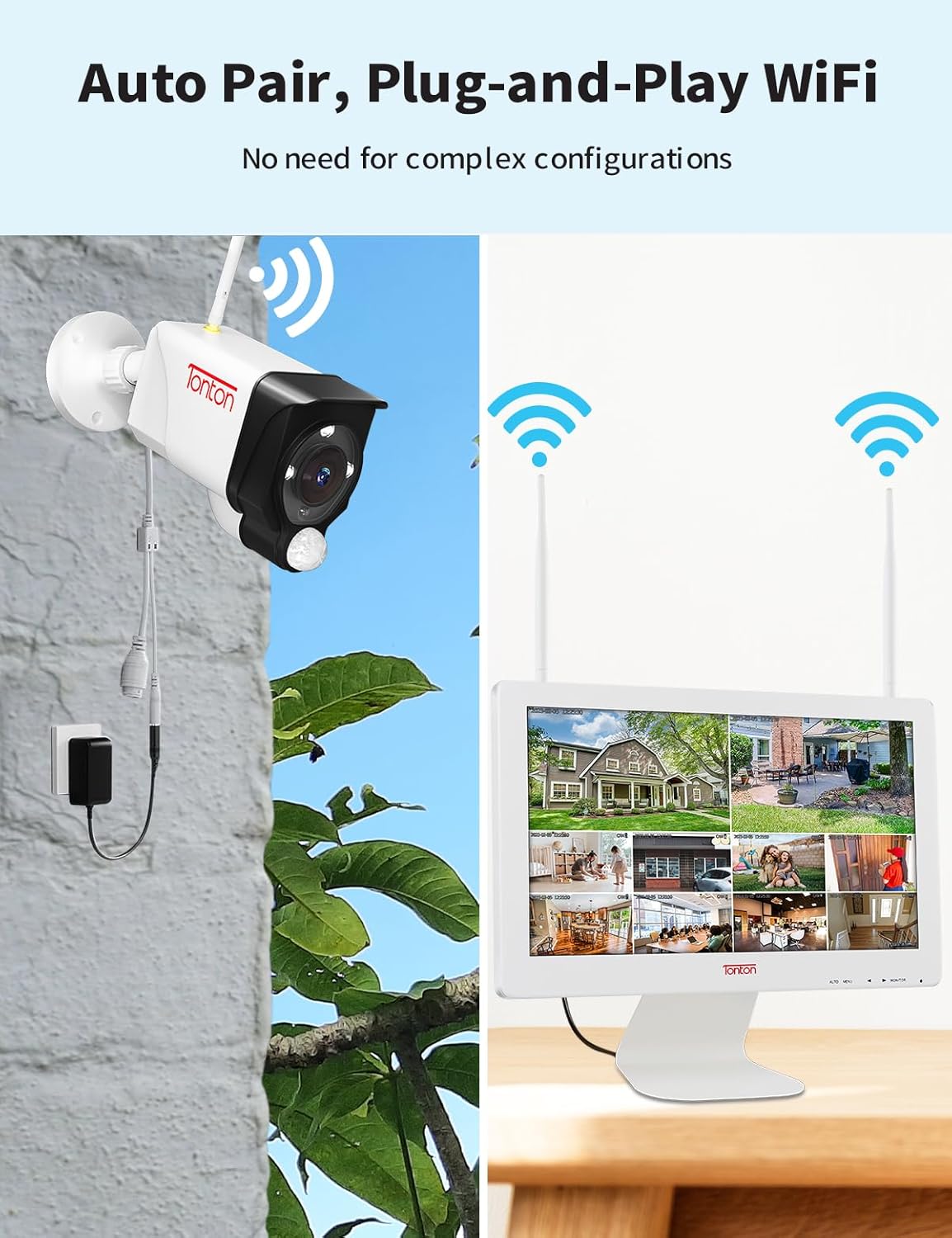
Image 4.1: Illustration of a camera connected to power and the NVR monitor displaying multiple camera views, demonstrating the auto-pair and plug-and-play functionality.
4.2 Network Connection for Remote Access
To enable remote viewing via smartphone or PC, the NVR needs an internet connection.
- Wireless Connection: The NVR has built-in WiFi. Navigate to the NVR's network settings (right-click with the USB mouse on the monitor, then select 'System Setup' > 'Network'). Select your WiFi network and enter the password.
- Wired Connection: Alternatively, connect the NVR to your router using the provided Ethernet cable via the RJ45 port.

Image 4.2: The NVR monitor establishing a wireless connection with a home router.
4.3 Remote Viewing Setup (EseeCloud App)
For remote access on your smartphone or PC, download the 'EseeCloud' application.
- Download the 'EseeCloud' app from your device's app store (available on App Store for iOS and Google Play for Android).
- Open the app and register an account.
- Scan the device QR code displayed on the NVR monitor (right-click > 'System Setup' > 'Network' > 'Cloud ID') or manually enter the Cloud ID.
- Add the device to your account. You can now view live feeds and recordings remotely.
For PC software ('ismkit'), please contact Tonton customer support for download links and instructions.

Image 4.3: Demonstrates remote viewing capabilities across various devices (smartphone, tablet, laptop, desktop) using the EseeCloud application. Download the app from http://www.dvr163.com/download/indexm.php.
5. Operating Instructions
5.1 Live View and Playback
The 16-inch monitor displays live feeds from all connected cameras. Use the USB mouse to navigate the NVR interface. Right-click to access the main menu for options like playback, system setup, and channel management.
5.2 Two-Way Audio
Each camera is equipped with a microphone and speaker, enabling two-way audio communication through the EseeCloud app. This allows you to listen to the camera's surroundings and speak through the camera's speaker.

Image 5.1: A user communicating with a delivery person at their door using the camera's two-way audio function.
5.3 Motion Detection and Alerts
The system utilizes PIR (Passive Infrared) sensors and AI Human Detection to minimize false alarms and provide accurate alerts.
- PIR Activated Floodlight: When motion is detected, the camera's floodlight can automatically activate, illuminating the area and deterring intruders.
- Siren Alarm: Cameras can be configured to trigger an audible siren upon detection.
- Notifications: Receive instant alerts via the EseeCloud app (push notifications) and email notifications with snapshots of detected events.

Image 5.2: An example of AI Human Intelligent Detection, showing a person being identified by the camera and an EseeCloud app notification being received.

Image 5.3: Demonstrates the alert system, including app push notifications and email alerts for detected events.
5.4 Night Vision Modes
The cameras offer enhanced night vision capabilities with multiple modes:
- Full Color Mode: Utilizes spotlights to provide full-color video even in low-light conditions.
- Infrared Mode: Standard black and white night vision using IR LEDs.
- Smart Mode: Automatically switches between IR and color night vision based on detected motion.

Image 5.4: An outdoor area illuminated by the camera's floodlights, showcasing enhanced color night vision capabilities.

Image 5.5: A smartphone displaying the EseeCloud app interface with options to select different night vision modes: Full Color, Infrared, and Smart Mode.
5.5 H.265+ Video Compression
The system uses advanced H.265+ video compression technology, which significantly reduces file sizes while maintaining video quality. This saves hard drive space and ensures smoother video playback.

Image 5.6: A visual comparison illustrating the efficiency of H.265+ video compression over H.264 in terms of storage space and bandwidth usage.
5.6 Alexa Integration
Tonton security cameras support integration with Amazon Alexa. You can use voice commands to view camera feeds on compatible Alexa-enabled devices.

Image 5.7: An example of Alexa integration, where a user can view camera feeds on an Alexa-enabled smart display.
6. Maintenance
6.1 Hard Drive Management
The 1TB hard drive provides continuous 24/7 recording. When the hard drive is full, older footage is automatically overwritten to make space for new recordings. To prolong recording time before overwriting, utilize the Motion+AI Humanbody detection mode, which records only when relevant activity is detected.
6.2 Camera Care
The cameras are IP66 weatherproof, suitable for various outdoor conditions. Periodically clean the camera lenses with a soft, damp cloth to ensure clear image quality. Avoid using harsh chemicals.

Image 6.1: A Tonton camera installed outdoors in winter, demonstrating its IP66 weatherproof design for year-round use.
7. Troubleshooting
This section addresses common issues you might encounter.
7.1 "Disconnect" Message on Monitor
If a camera displays a "Disconnect" message, it indicates a loss of connection between the camera and the NVR.
- Check Power: Ensure the camera is properly powered. Verify the power adapter is securely connected to both the camera and a working power outlet.
- Signal Strength: Wireless signal can be affected by distance, obstacles (thick walls, metal structures), or interference. Try repositioning the camera or NVR to improve signal.
- Re-pair Camera: If the issue persists, you may need to manually re-pair the camera with the NVR. Refer to the NVR's on-screen menu for camera management and pairing options.
- NVR Reboot: Reboot the NVR by unplugging it from power, waiting 10 seconds, and plugging it back in.
7.2 No Remote Access
If you cannot access the system via the EseeCloud app:
- NVR Internet Connection: Ensure the NVR is connected to the internet (either via WiFi or Ethernet cable). Check the network status in the NVR's system settings.
- App Login: Verify you are logged into the EseeCloud app with the correct account.
- Cloud ID: Confirm the Cloud ID entered in the app matches the one displayed on the NVR.
- Router Settings: Ensure your router is functioning correctly and not blocking the NVR's internet access.
7.3 Inconsistent Time Display
If the system time is inconsistent, ensure the NVR is connected to the internet. The NVR typically synchronizes its time automatically when connected to a network. You can also manually set the time in the NVR's system settings.
8. Specifications
| Feature | Specification |
|---|---|
| Brand | Tonton |
| Model Number | M1560HNW8 |
| Connectivity Technology | Wireless |
| Video Capture Resolution | 2K, 3MP (2304*1296) |
| Special Features | Image, Motion Sensor, Night Vision, Waterproof, 2-Way Audio, Spotlight, AI Human Detection |
| Number of Channels | 10 |
| Memory Storage Capacity | 1 TB (expandable up to 6 TB) |
| Power Source | Corded Electric |
| Item Dimensions (L x W x H) | 13.55 x 17.53 x 7.8 inches |
| Compatible Devices | Cameras, Personal Computers, Smartphones, TV, Tablets |
| Low Light Technology | Night Color |
| Focal Length | F=3.6mm |
| Night Vision Range | 100 Feet (30 Meters) |
| Frame Rate | 15fps |
| Total USB Ports | 1 |
| Hardware Interface | HDMI, LAN, USB 2.0 |
| Lens Type | Wide Angle |
| Viewing Angle | 110 Degrees |
| Item Weight | 7.05 pounds |
| UPC | 654913789271 |
9. Warranty and Support
Tonton is committed to customer satisfaction and provides comprehensive support for its products.
- Warranty: The product comes with a 1-year warranty. Defective products will be replaced.
- Technical Support: Lifetime technical support is available.
- Email Support: Contact via email at sales@tontonsecurity.com for a response within 10 hours.
- WhatsApp Support: Reach out via WhatsApp at +86 137-2786-5870 during specified hours (PST 17:00 PM-20:00 PM, 21:00 PM-01:00 AM).

Image 9.1: Scan this QR code with your smartphone to access Tonton support resources.


