Introduction
This manual provides essential information for the installation, operation, and maintenance of your Aquaguard Superb RO+UV+MTDS Water Purifier. Please read these instructions carefully before using the appliance to ensure safe and efficient operation. Keep this manual for future reference.
The Aquaguard Superb is designed to provide safe and pure drinking water through its advanced Reverse Osmosis (RO), Ultraviolet (UV), and Mineral Guard (MTDS) purification technologies, featuring a 7-liter storage capacity.
Safety Information
- Ensure the purifier is installed by a qualified service technician.
- Do not expose the appliance to direct sunlight or extreme temperatures.
- Use only genuine Aquaguard spare parts for maintenance and filter replacement.
- Do not attempt to open or repair the appliance yourself. Contact customer service for assistance.
- Keep the appliance away from flammable materials.
- Ensure the power supply meets the specifications mentioned on the product label.
Product Overview
The Aquaguard Superb RO+UV+MTDS Water Purifier combines multiple purification stages to deliver clean and healthy drinking water. Key features include:
- RO (Reverse Osmosis): Removes dissolved salts, heavy metals, and pesticides.
- UV (Ultraviolet): Deactivates bacteria, viruses, and other microorganisms.
- MTDS (Mineral Guard): Retains essential natural minerals in the purified water.
- 7-Liter Storage Tank: Provides ample purified water on demand.
The front panel features indicator lights for easy monitoring of the purifier's status:
- Tank Full: Illuminates when the storage tank is full.
- Filter Alarm: Indicates that filters are nearing their end of life and require replacement.
- Service: Lights up to indicate that the appliance requires servicing.
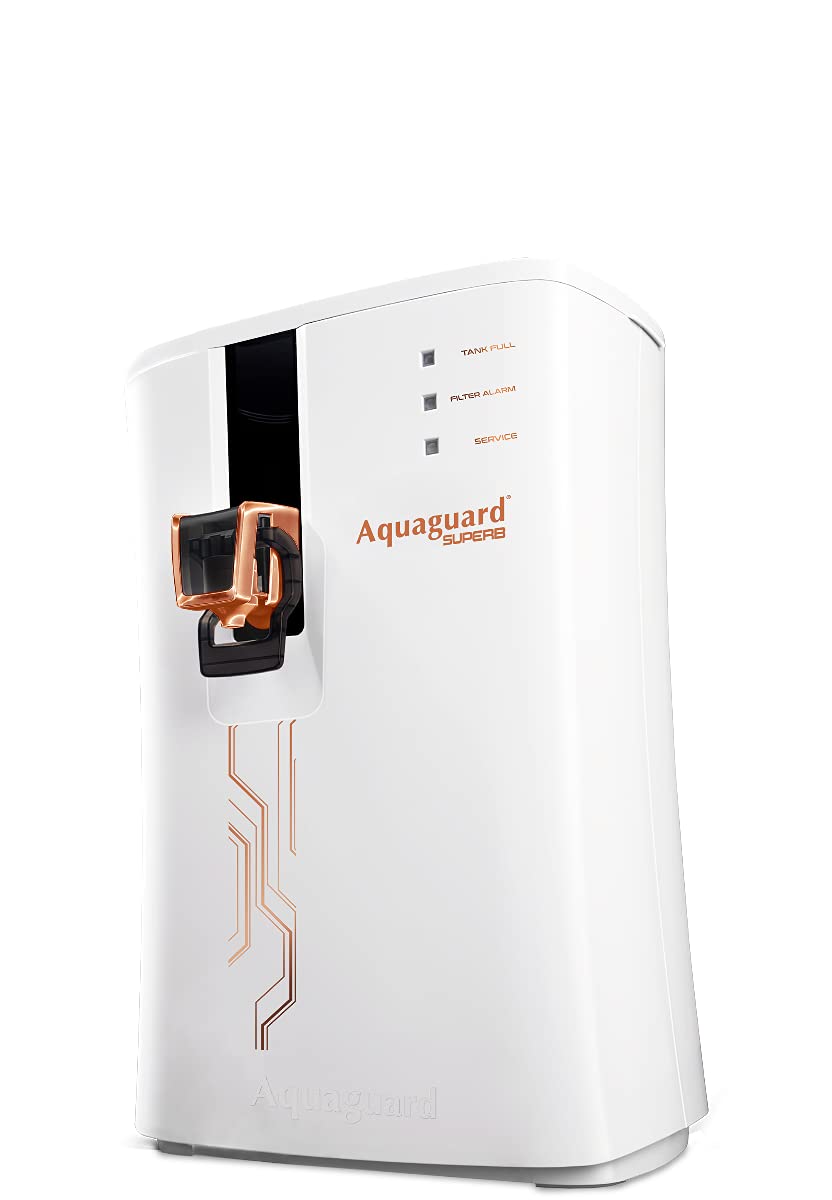
Image: Front view of the Aquaguard Superb RO+UV+MTDS Water Purifier, white in color, with water being dispensed into a glass. The indicator lights for 'Tank Full', 'Filter Alarm', and 'Service' are visible on the upper right side of the unit.
Setup
Unpacking
Carefully remove the water purifier from its packaging. Ensure all components, including the installation kit, are present and undamaged. Retain the packaging for future transport or service needs.
Installation
The Aquaguard Superb is designed for countertop installation. Professional installation by an authorized service technician is highly recommended to ensure proper functioning and to validate the warranty. The installation kit is provided with the product.
- Choose a suitable location near a water source and an electrical outlet.
- Ensure the surface is flat and stable to support the weight of the purifier when full.
- Connect the inlet water supply as per the technician's instructions.
- Connect the drain line to a suitable drainage point.
- Plug the power cord into a grounded electrical outlet.
Operating Instructions
Initial Start-up
- After installation, turn on the main water supply to the purifier.
- Switch on the power supply to the unit. The purification process will begin automatically.
- Allow the storage tank to fill completely. The 'Tank Full' indicator will illuminate.
- For the first use, dispense and discard the first 2-3 liters of purified water to flush the system.
Dispensing Water
Place a clean container under the water dispensing nozzle. Gently push the lever or press the button (depending on model variant) to dispense purified water. Release the lever/button to stop the flow.
Indicator Lights
- Tank Full: Green light indicates the storage tank is full and purification has stopped.
- Filter Alarm: A blinking or red light indicates that the filters are due for replacement. Contact customer service.
- Service: A steady red light or specific pattern indicates a need for service. Contact customer service immediately.
Maintenance
Regular maintenance is crucial for the optimal performance and longevity of your water purifier. Always disconnect the power supply before performing any maintenance.
Cleaning the Exterior
Wipe the exterior of the purifier with a soft, damp cloth. Do not use harsh chemicals, abrasive cleaners, or solvents, as these can damage the surface.
Filter Replacement
The filters in your Aquaguard Superb have a limited lifespan and require periodic replacement. The 'Filter Alarm' indicator will alert you when replacement is due. Filter replacement should only be performed by an authorized Aquaguard service technician to ensure proper installation and to maintain the warranty.
Storage Tank Cleaning
The internal storage tank should be cleaned periodically by an authorized service technician during routine maintenance visits.
Troubleshooting
If you encounter any issues with your Aquaguard Superb, refer to the table below. For problems not listed or if the issue persists, contact Aquaguard customer service.
| Problem | Possible Cause | Solution |
|---|---|---|
| No water dispensing | No power; Water supply off; Tank empty; Clogged filters. | Check power connection; Turn on water supply; Wait for tank to fill; Contact service for filter check. |
| Slow water flow | Partially clogged filters; Low inlet water pressure. | Contact service for filter check/replacement; Check household water pressure. |
| Filter Alarm light on | Filters require replacement. | Contact authorized service for filter replacement. |
| Service light on | System malfunction; Scheduled service due. | Contact authorized service immediately. |
Specifications
- Brand: Aquaguard
- Model: Superb RO+UV+MTDS
- Special Feature: RO, UV, MTDS
- Product Dimensions: 32L x 32W x 43H Centimeters
- Installation Type: Countertop
- Power Source: Corded Electric
- Item Weight: 5 kg 700 g (approx. 12.58 Pounds)
- Supported Water TDS Level Maximum: 1000 PPM
- Capacity: 7 Liters
- Material: Plastic
- Manufacturer: Eureka Forbes
Warranty and Support
Your Aquaguard Superb RO+UV+MTDS Water Purifier is manufactured by Eureka Forbes and comes with a standard manufacturer's warranty. For details regarding the warranty period and terms, please refer to the warranty card provided with your product or visit the official Aquaguard website.
For any service requests, technical assistance, or to purchase genuine spare parts, please contact Aquaguard customer support:
- Customer Service: Refer to your product documentation or the manufacturer's website for contact numbers and email.
- Online Support: www.aquaguard.com (This is a placeholder link, please refer to actual product documentation for correct URL)
Always ensure that service is performed by authorized Aquaguard technicians to maintain product warranty and safety standards.


