
Introduction
Welcome to your new MIFA F6 Portable Bluetooth Speaker. This manual provides detailed instructions for the proper setup, operation, and maintenance of your device. Please read this manual thoroughly before using the product to ensure optimal performance and longevity.
Safety Information
To ensure safe and proper use of your MIFA F6 speaker, please observe the following guidelines:
- Do not expose the speaker to extreme temperatures (hot or cold) or direct sunlight for extended periods.
- While the speaker is IP56 dust-proof and water-resistant, do not submerge it in water or expose it to strong jets of water.
- Do not attempt to disassemble, repair, or modify the speaker yourself. This may void the warranty and cause damage.
- Keep the speaker away from medical devices, as it contains magnets that may interfere with their operation.
- Use only the provided Micro USB cable for charging.
- Keep out of reach of children.
Package Contents
Please check the box for the following items:
- MIFA F6 Portable Bluetooth Speaker
- Micro USB Charging Cable
- User Manual
Product Overview
Familiarize yourself with the components and controls of your MIFA F6 speaker.
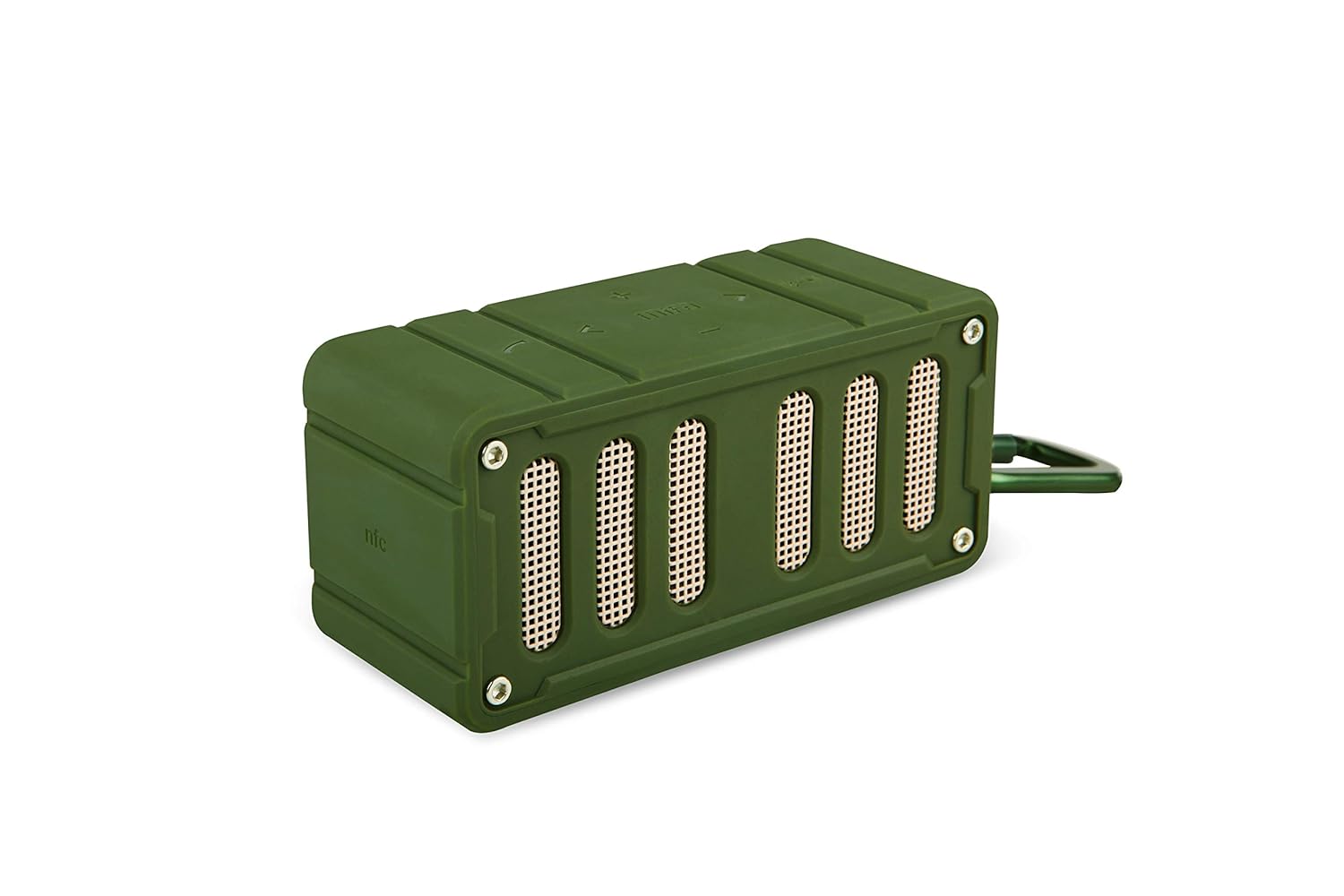
This image displays the MIFA F6 speaker in green, highlighting the front speaker grille and the control buttons located on the side panel.

This image shows the MIFA F6 speaker from a side angle, emphasizing its compact size and the detachable alloy metal loop hook (carabiner) for portability.
Controls and Ports
- Power Button: Press and hold to turn on/off.
- Volume Up / Next Track Button (+): Press to increase volume. Press and hold for next track.
- Volume Down / Previous Track Button (-): Press to decrease volume. Press and hold for previous track.
- Play/Pause / Call Answer Button: Press to play/pause music. Press to answer/end calls.
- Microphone: For hands-free calling.
- Micro USB Charging Port: For charging the speaker.
- Micro SD Card Slot: For playing music directly from a Micro SD card (up to 32GB).
Setup
Charging the Speaker
Before first use, fully charge your MIFA F6 speaker.
- Connect the Micro USB charging cable to the speaker's charging port.
- Connect the other end of the cable to a USB power source (e.g., computer USB port, USB wall adapter).
- The LED indicator will illuminate to show charging status. It takes approximately 3 hours for a full charge.
Powering On/Off
- To Power On: Press and hold the Power button for a few seconds until you hear an audible prompt and the LED indicator lights up.
- To Power Off: Press and hold the Power button for a few seconds until you hear an audible prompt and the LED indicator turns off.
Operating Instructions
Bluetooth Pairing
To connect your MIFA F6 speaker to a Bluetooth-enabled device:
- Ensure the speaker is powered on and within 33 feet (10 meters) of your device. The speaker will automatically enter Bluetooth pairing mode, indicated by a flashing LED.
- On your smartphone, tablet, or other Bluetooth device, enable Bluetooth and search for available devices.
- Select "MIFA F6" from the list of devices.
- Once successfully paired, the speaker will provide an audible confirmation, and the LED indicator will stop flashing. The speaker will automatically reconnect to the last-used device when powered on, if available.
Playing Music
- Via Bluetooth: After successful pairing, play music from your connected device. Use the speaker's Play/Pause button or your device's controls.
- Via Micro SD Card: Insert a Micro SD card (up to 32GB) containing audio files into the designated slot. The speaker will automatically detect the card and begin playing music.
Call Function
The MIFA F6 speaker features a built-in microphone for hands-free calling.
- Answering a Call: When an incoming call is received, press the Play/Pause button once to answer.
- Ending a Call: During a call, press the Play/Pause button once to end the call.
Volume and Track Control
- Volume Adjustment: Press the "+" button to increase volume, and the "-" button to decrease volume.
- Next Track: Press and hold the "+" button to skip to the next track.
- Previous Track: Press and hold the "-" button to go to the previous track.
Maintenance
Cleaning
To keep your speaker in good condition:
- Wipe the exterior of the speaker with a soft, slightly damp cloth.
- Do not use abrasive cleaners, alcohol, or harsh chemicals, as these can damage the surface.
- Ensure all ports are dry before charging or connecting other devices.
Storage
When not in use for extended periods:
- Store the speaker in a cool, dry place, away from direct sunlight and extreme temperatures.
- Charge the battery periodically (e.g., every 3 months) to maintain battery health.
Troubleshooting
If you encounter issues with your MIFA F6 speaker, refer to the following common problems and solutions:
- Speaker won't turn on: Ensure the battery is charged. Connect the speaker to a power source using the Micro USB cable.
- Cannot pair via Bluetooth:
- Make sure the speaker is in pairing mode (flashing LED).
- Ensure Bluetooth is enabled on your device and it's within range (33 feet/10 meters).
- Forget "MIFA F6" from your device's Bluetooth settings and try pairing again.
- Restart both the speaker and your device.
- No sound or low volume:
- Check the volume levels on both the speaker and your connected device.
- Ensure the speaker is properly paired and connected.
- If using a Micro SD card, ensure the audio files are in a compatible format and the card is inserted correctly.
- Poor sound quality:
- Move the speaker closer to your Bluetooth device to reduce interference.
- Ensure there are no obstructions between the speaker and your device.
- Check if the audio source quality is high.
Specifications
Detailed technical specifications for the MIFA F6 Portable Bluetooth Speaker:
| Feature | Detail |
|---|---|
| Model Name | MIFA F6 |
| Speaker Type | 3D |
| Special Features | Built-in Microphone, Portable, Micro SD Card Support, USB Port |
| Recommended Uses | Volume control, Music Playback |
| Compatible Devices | Smartphone, Tablet |
| Wireless Communication Technology | Bluetooth 4.0 |
| Power Source | Battery Powered (1200 mAh Lithium Polymer) |
| Waterproof Rating | IP56 (Dust-proof & Water-resistant) |
| Playtime | Up to 10 hours (at 75% volume) |
| Charging Time | Approximately 3 hours |
| Dimensions | 3.8 x 3.4 x 1.4 inches |
| Weight | 5.9 oz |
| Material | Aluminum |
| Audio Output Mode | Stereo |
| Control Method | Touch |
Warranty and Support
Warranty Information
This MIFA F6 Portable Bluetooth Speaker comes with a 30-day warranty from the date of purchase. Please retain your proof of purchase for any warranty claims. The warranty covers manufacturing defects under normal use. It does not cover damage caused by misuse, accidents, unauthorized modifications, or normal wear and tear.
Customer Support
For further assistance, technical support, or warranty inquiries, please contact MIFA customer support through the retailer where you purchased the product or visit the official MIFA website for contact information.


