
Esperanza EV106R
Contents
ESPERANZA DVB-T2 H.265 / HEVC Tuner EV106R User Manual
Model: EV106R
1. Introduction
Thank you for purchasing the Esperanza DVB-T2 H.265 / HEVC Tuner EV106R. This device is designed to receive digital terrestrial television broadcasts, supporting the latest DVB-T2 standard with H.265/HEVC encoding for high-quality video and audio. This manual provides essential information for the proper installation, operation, and maintenance of your tuner. Please read this manual thoroughly before using the device and keep it for future reference.
2. Important Safety Information
- Do not expose the device to rain or moisture to prevent fire or electric shock.
- Do not open the casing. Refer all servicing to qualified personnel.
- Ensure proper ventilation around the device. Do not block ventilation openings.
- Place the device on a stable, flat surface.
- Disconnect the power plug from the wall outlet during lightning storms or when unused for long periods.
- Keep the device away from direct sunlight, heat sources, and strong magnetic fields.
3. Package Contents
Please check that all items are present and in good condition:
- Esperanza DVB-T2 H.265 / HEVC Tuner EV106R
- Remote Control
- User Manual (this document)
- Power Cable
4. Product Overview
4.1 Front Panel

Image: Front view of the Esperanza EV106R DVB-T2 H.265/HEVC Tuner. It features a central LED display showing time or channel number, power button, menu button, USB port, and channel/volume control buttons on the right.
- Power Button: Turns the device on/off or to standby mode.
- Menu Button (M): Accesses the main menu.
- USB Port: For connecting USB storage devices for media playback or PVR functions.
- Channel/Volume Buttons: Navigate channels or adjust volume.
- LED Display: Shows current time, channel number, or menu information.
4.2 Rear Panel
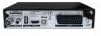
Image: Rear view of the Esperanza EV106R DVB-T2 H.265/HEVC Tuner. From left to right, it shows ANT IN, COAXIAL, USB, HD OUT (HDMI), SCART, and AC IN power connection.
- ANT IN: Connects to your terrestrial antenna.
- COAXIAL: Digital audio output.
- USB: Additional USB port for external devices.
- HD OUT (HDMI): Connects to your TV or display for high-definition video and audio.
- SCART: Connects to older TVs or VCRs.
- AC IN: Power input for the device.
4.3 Remote Control

Image: The remote control for the Esperanza EV106R DVB-T2 H.265/HEVC Tuner. It features standard buttons for power, channel navigation, volume, menu, OK, numeric keypad, and media playback controls.
The remote control allows full operation of the tuner. Insert two AAA batteries (not included) into the battery compartment, ensuring correct polarity.
5. Setup Guide
5.1 Connecting the Tuner
- Connect Antenna: Connect your terrestrial antenna cable to the ANT IN port on the rear panel of the tuner.
- Connect to TV:
- For High Definition: Use an HDMI cable (not included) to connect the HD OUT (HDMI) port on the tuner to an HDMI input on your TV.
- For Standard Definition: Use a SCART cable (not included) to connect the SCART port on the tuner to the SCART input on your TV.
- Connect Power: Plug the power cable into the AC IN port on the tuner, then plug the other end into a wall power outlet.
5.2 First Time Installation
Upon first power-on, the tuner will guide you through the initial setup process:
- Turn on your TV and select the correct HDMI or SCART input source that the tuner is connected to.
- Press the Power button on the tuner or remote control to turn on the device.
- The First Time Installation menu will appear. Follow the on-screen prompts to select your preferred language, country, and time zone.
- Initiate the automatic channel scan. The tuner will search for available digital terrestrial channels. This process may take several minutes.
- Once the scan is complete, the tuner will save the channels and display the first available channel.
6. Operating Instructions
6.1 Basic Functions
- Power On/Off: Press the POWER button on the remote control.
- Channel Selection: Use the CH+/CH- buttons to change channels sequentially, or enter the channel number directly using the numeric keypad.
- Volume Control: Use the VOL+/VOL- buttons to adjust the volume.
- Mute: Press the MUTE button to temporarily turn off the sound. Press again to restore.
- Menu Access: Press the MENU button to access the main menu for settings and features. Use arrow keys to navigate and OK to confirm.
- Electronic Program Guide (EPG): Press the EPG button to view program information for upcoming broadcasts.
6.2 Media Playback (USB)
The tuner supports media playback from a USB storage device.
- Insert a USB flash drive or external hard drive into the USB port on the front or rear panel.
- Press the USB or MEDIA button on the remote control (or navigate through the main menu to the Multimedia section).
- Select the desired media type (e.g., Movie, Music, Photo) and browse your files.
- Press OK to play the selected file.
6.3 PVR (Personal Video Recorder) Function
If your USB device has sufficient storage, you can record TV programs.
- Ensure a USB storage device is connected and formatted correctly (FAT32 recommended).
- While watching a program, press the REC button on the remote control to start recording immediately. Press STOP to end recording.
- To schedule a recording, access the EPG, select the desired program, and press the REC button (or equivalent) to set a timer recording.
- Recorded programs can be accessed via the Multimedia menu.
7. Maintenance and Care
- Cleaning: Use a soft, dry cloth to clean the exterior of the tuner. Do not use liquid cleaners or aerosols.
- Ventilation: Ensure the ventilation slots are not blocked to prevent overheating.
- Storage: If storing the device for an extended period, disconnect it from power and store it in a cool, dry place.
8. Troubleshooting
| Problem | Possible Cause | Solution |
|---|---|---|
| No picture/No sound | Incorrect TV input selected; Loose cable connections; Tuner not powered on. | Check TV input source; Ensure all cables (HDMI/SCART, antenna, power) are securely connected; Power on the tuner. |
| No signal/Poor signal quality | Antenna not connected or positioned incorrectly; Weak broadcast signal. | Check antenna connection; Adjust antenna position; Perform a new channel scan. Consider an amplified antenna if signal is consistently weak. |
| Remote control not working | Batteries are dead or inserted incorrectly; Obstruction between remote and tuner. | Replace batteries, ensuring correct polarity; Remove any obstructions; Point remote directly at the tuner's front panel. |
| Cannot find channels | Antenna issue; Incorrect country/region setting; Channel scan not performed. | Verify antenna connection and position; Check country/region settings in the menu; Perform an automatic channel scan. |
9. Specifications
| Feature | Detail |
|---|---|
| Brand | Esperanza |
| Model Name | EV106R |
| Product Dimensions | 2.79 x 24.64 x 16.51 cm |
| Item Weight | 2.15 Kilograms |
| Compatible Devices | Television |
| Additional Features | Tangle-free (likely refers to cable management or design) |
| Included Components | Film (likely protective film) |
| Cable Type | Coaxial |
| Connector Type | RCA |
| Recommended Uses | For TV and video use |
10. Warranty and Support
Specific warranty details are not provided within this manual. For information regarding warranty coverage, technical support, or service, please refer to the product packaging or contact the manufacturer directly via their official website or customer service channels.
Documents and downloads
Ask a question about this manual
Ask about setup, troubleshooting, compatibility, parts, safety, or missing instructions. Manuals+ will review the question and use this page’s manual context to help answer it.