
ZIHNIC WH-816
Contents
ZIHNIC Bluetooth Headphones (Model WH-816) User Manual
Model: WH-816 | Brand: ZIHNIC
Introduction
Thank you for choosing ZIHNIC Bluetooth Over-Ear Headphones. These headphones are designed to provide an exceptional audio experience with versatile connectivity options and superior comfort. This manual will guide you through the features and functions of your new headphones.
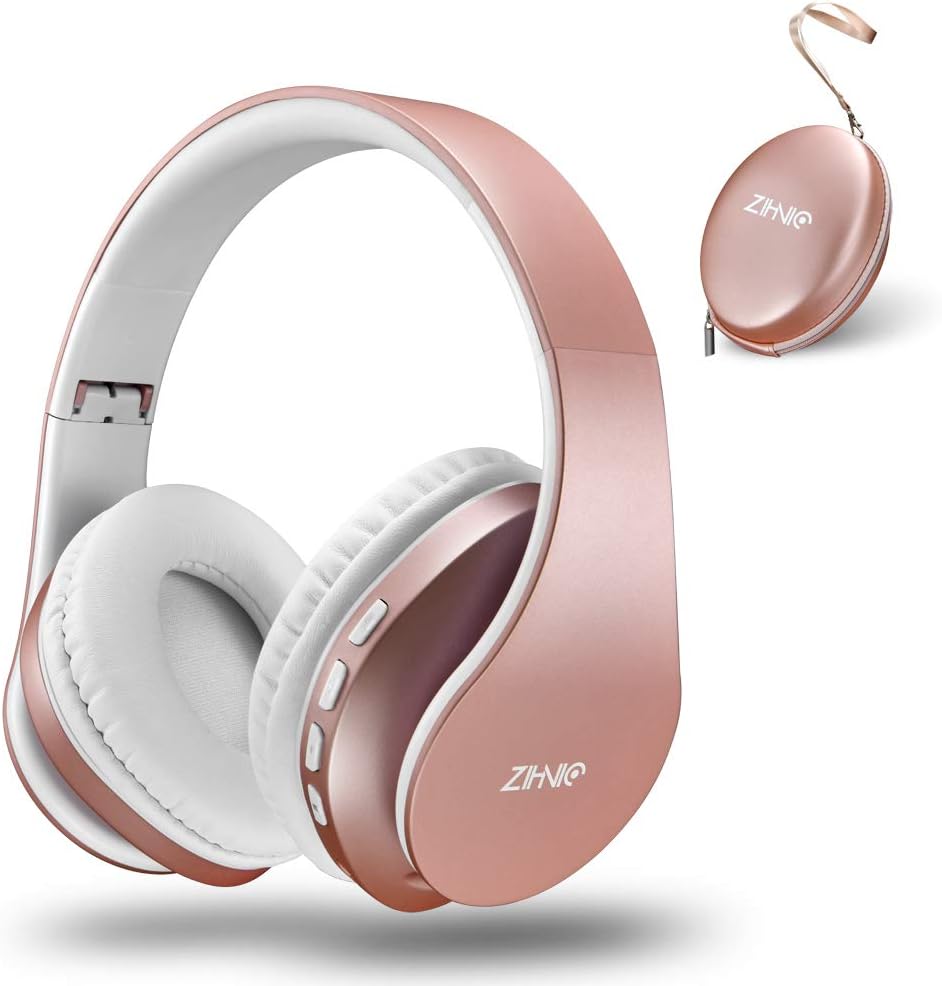
Image: ZIHNIC Bluetooth Over-Ear Headphones in Rose Gold, showcasing the headphones and their protective carrying case.
Key Features:
- Astonishing Sound Production: High Definition Stereo with noise reduction technology designed to prevent ambient noises and focus on what you want to hear.
- Built for Comfortability: Artificial leather earmuffs, foldable and stretchable design for a perfect fit.
- Seamless Bluetooth Connection: Quick and stable pairing with all Bluetooth-enabled devices.
- Ergonomic Design: Premium outlook with super soft memory-protein foam leather earmuffs and headbands.
- Long Battery Life & Dual Mode: Up to 14 hours of music time, with wired mode option for continuous use.
Setup
1. What's Included:
Before you begin, please ensure all components are present in the package:
- ZIHNIC Bluetooth Headphones
- Protective Premium Case
- USB Charging Cable
- 3.5mm Audio Cable
- User Manual (this document)

Image: The ZIHNIC headphones, their protective case, charging cable, audio cable, and user manual, as included in the package.
2. Charging the Headphones:
For optimal performance, fully charge your headphones before first use.
- Connect the small end of the USB charging cable to the USB Charging Port on the headphones.
- Connect the larger end of the USB charging cable to a USB power adapter (not included) or a computer's USB port.
- The LED Indicator will illuminate during charging. It takes approximately 2.5 hours for a full charge.
- Once fully charged, the LED Indicator will change color or turn off (refer to specific model indicator behavior).
A full charge provides up to 14 hours of music playback.
3. Bluetooth Pairing:
Follow these steps to pair your headphones with a Bluetooth-enabled device:
- Ensure the headphones are charged.
- Slide the ON/OFF button to the "ON" position. The headphones will enter pairing mode, indicated by a flashing LED light.
- On your device (smartphone, tablet, PC), enable Bluetooth and search for available devices.
- Select "ZIHNIC" from the list of found devices.
- Once connected, the LED light will stop flashing and remain solid, indicating a successful pairing.
- If prompted for a password, enter "0000".
The headphones will automatically attempt to reconnect to the last paired device when powered on.
Operating Instructions
Controls Overview:

Image: A detailed diagram illustrating the location and function of the ON/OFF switch, Multifunction button, Volume/Previous, Volume/Next, MP3/FM Mode button, Micro SD/TF card slot, LED Indicator, USB Charging Port, Built-in microphone, and Headphone jack.
| Button/Port | Function |
|---|---|
| ON/OFF Switch | Powers the headphones on or off. |
| Multifunction Button (▶▶/▶) |
|
| Vol+/Previous |
|
| Vol-/Next |
|
| M (MP3/FM Mode) | Switches between Bluetooth, Micro SD/TF card, and FM radio modes. |
| Micro SD/TF Card Slot | Insert a Micro SD/TF card to play music directly. |
| Headphone Jack (3.5mm) | Connect the 3.5mm audio cable for wired listening. |
| Built-in Microphone | Enables hands-free communication during calls (works only in wireless/Bluetooth mode). |
Using Dual Mode (Wireless & Wired):
Your ZIHNIC headphones offer both wireless Bluetooth connectivity and a wired option for continuous listening.

Image: The ZIHNIC headphones demonstrating their wireless functionality with a battery icon, and their wired functionality connected via a 3.5mm audio cable.
- Wireless Mode: Connect via Bluetooth as described in the "Bluetooth Pairing" section. Enjoy freedom of movement.
- Wired Mode: If the battery runs low or you prefer a wired connection, simply plug the included 3.5mm audio cable into the headphone jack and the other end into your audio source. The headphones will automatically switch to wired mode.
Maintenance
Proper care and maintenance will extend the life of your ZIHNIC headphones.
- Cleaning: Use a soft, dry cloth to wipe the headphones. Do not use abrasive cleaners or solvents.
- Storage: When not in use, store the headphones in the provided protective premium case to prevent dust and damage. The foldable design makes them compact for storage.
- Battery Care: Avoid fully discharging the battery frequently. Charge the headphones regularly, even if not used for extended periods, to maintain battery health.
- Environmental Conditions: Keep headphones away from extreme temperatures, humidity, and direct sunlight.

Image: The ZIHNIC headphones in their folded state, positioned beside their protective carrying case, highlighting their portability and ease of storage.
Troubleshooting
If you encounter issues with your headphones, refer to the following common problems and solutions:
| Problem | Solution |
|---|---|
| Headphones do not power on. | Ensure the headphones are fully charged. Connect to a power source and check the LED indicator. |
| Cannot pair via Bluetooth. |
|
| No sound or low volume. |
|
| Poor sound quality or distortion. |
|
| Microphone not working. | Ensure headphones are in wireless (Bluetooth) mode. The microphone does not function in wired mode. Check device settings to ensure ZIHNIC is selected as the audio input. |
If the problem persists, please contact customer support.
Specifications
| Feature | Detail |
|---|---|
| Model Name | WH-816 |
| Connectivity Technology | Wireless (Bluetooth), Wired (3.5mm Jack) |
| Wireless Communication Technology | Bluetooth 5.0 |
| Bluetooth Range | 10 Meters |
| Ear Placement | Over Ear |
| Noise Control | Sound Isolation |
| Frequency Response | 20 Hz - 20 KHz |
| Impedance | 32 Ohm |
| Battery Life | 14-15 Hours (Music Time) |
| Charging Time | 2.5 Hours |
| Material | Leather (Earmuffs) |
| Item Weight | 0.3 Milligrams |
| Product Dimensions | 6.7 x 6.7 x 3.35 inches |
| Compatible Devices | All Bluetooth or 3.5mm plug cable enabled devices (phones, tablets, PCs, etc.) |
Warranty and Support
ZIHNIC stands behind the quality of its products.
- Warranty: Your ZIHNIC headphones are covered by a 12-month warranty from the date of purchase. This warranty covers manufacturing defects and ensures 100% customer satisfaction.
- Customer Support: For any questions, concerns, or technical assistance, please contact our 24/7 Customer Support service. Refer to your purchase documentation or the ZIHNIC official website for contact details.
We are committed to providing you with an excellent experience.
Ask a question about this manual
Ask about setup, troubleshooting, compatibility, parts, safety, or missing instructions. Manuals+ will review the question and use this page’s manual context to help answer it.