
1. Introduction
The King Gates DYNAMOS24/2400 is a robust motorization kit designed for automating sliding gates with a maximum weight of 400 kg. This system provides reliable and efficient operation, enhancing the convenience and security of your property. The motor operates on a 24V power supply, ensuring safe and consistent performance.
The complete kit includes the following components:
- One DYNAMOS 24/400 motor unit.
- A pair of NOVOPH180 swivel photocells with metal protection for enhanced safety.
- Two STYLO 4K remote controls (433.92 MHz) for convenient operation.
- One NOVOLT24PLUS 24W flashing light with an integrated antenna to signal gate movement.
- An information plate.
Key features of the DYNAMOS24/2400 system include durable construction, smooth-running ball bearings mounted on die-cast aluminum for quiet operation, and an internal gear transmission system designed for high efficiency and minimal wear. A key-operated release system is also integrated, allowing for manual gate operation during power outages or emergencies.
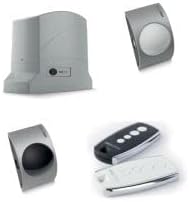
This image displays the main components of the King Gates DYNAMOS24/400 motorization kit, including the central motor unit, the pair of safety photocells, and the handheld remote controls for operation.
2. Setup and Installation
Installation of the King Gates DYNAMOS24/2400 system should be performed by qualified personnel to ensure safety and proper functionality. Always disconnect the main power supply before beginning any installation or maintenance work.
2.1 Safety Precautions
- Ensure the gate structure is sound and moves freely before installing the motor.
- All electrical connections must comply with local regulations and standards.
- Keep children and pets away from the gate area during installation and operation.
- Install safety devices such as photocells to prevent accidental closure.
2.2 Mounting the Motor
- Prepare a stable, level concrete base for the motor unit adjacent to the gate.
- Securely fasten the motor unit to the base using appropriate anchor bolts.
- Ensure the motor's gear rack aligns correctly with the gate's rack, maintaining a small clearance.
2.3 Installing Photocell Sensors
- Mount the NOVOPH180 photocells on opposite sides of the gate opening, ensuring they are at an appropriate height (typically 50-60 cm from the ground).
- Align the transmitter and receiver photocells precisely to ensure an uninterrupted beam.
- Connect the photocells to the control unit as per the wiring diagram provided in the full installation manual.
2.4 Electrical Connections
- Connect the main power supply (230 V AC) to the control unit, ensuring proper grounding.
- Connect the motor, flashing light (NOVOLT24PLUS), and any other accessories to the designated terminals on the control board.
- Verify all connections are secure and insulated.
2.5 Remote Control Programming
- Refer to the control unit's specific instructions for programming the STYLO 4K remote controls.
- Typically, this involves pressing a programming button on the control board and then a button on the remote control.
- Test each remote control to ensure it operates the gate correctly.
3. Operating Instructions
Once installed and configured, operating your King Gates DYNAMOS24/2400 system is straightforward.
3.1 Standard Operation
- Press any programmed button on your STYLO 4K remote control to initiate gate movement (open or close).
- Pressing the button again during gate movement will typically stop the gate. A third press will reverse its direction.
- The NOVOLT24PLUS flashing light will activate during gate movement to alert pedestrians and vehicles.
3.2 Manual Release (Emergency Operation)
In case of a power failure or system malfunction, the gate can be operated manually using the key release system.
- Locate the key release mechanism on the motor unit.
- Insert the provided key into the lock and turn it to disengage the motor.
- The gate can now be pushed open or closed by hand.
- To re-engage the motor, turn the key back to its original position and remove it. Ensure the gate is fully closed or open before re-engaging to prevent damage.
4. Maintenance
Regular maintenance ensures the longevity and optimal performance of your King Gates DYNAMOS24/2400 system. Always disconnect power before performing any maintenance.
4.1 Monthly Checks
- Clean Photocell Lenses: Wipe the lenses of the NOVOPH180 photocells with a soft, clean cloth to remove dirt or debris that could obstruct the beam.
- Inspect Gate Movement: Manually operate the gate (using the key release) to check for any obstructions, stiffness, or unusual noises. Ensure the gate moves freely.
- Check Rack and Pinion: Inspect the gate's gear rack and the motor's pinion for wear or damage. Clean any accumulated debris.
4.2 Bi-Annual Checks (Recommended by a professional)
- Lubrication: Apply a suitable lubricant to the gate's wheels, hinges, and any other moving parts as recommended by the gate manufacturer.
- Electrical Connections: Verify all electrical connections are tight and free from corrosion.
- Safety Device Test: Test the functionality of the photocells by obstructing the beam while the gate is closing. The gate should stop or reverse.
- Motor Housing: Inspect the motor housing for any signs of damage or water ingress. Ensure all seals are intact.
5. Troubleshooting
This section addresses common issues you might encounter with your King Gates DYNAMOS24/2400 system. For complex problems, contact a qualified technician.
| Problem | Possible Cause | Solution |
|---|---|---|
| Gate does not move. | No power supply. Remote control battery flat. Photocells obstructed or misaligned. Motor in manual release mode. | Check main power supply and circuit breaker. Replace remote control battery. Clean and align photocells. Remove any obstructions. Re-engage the motor using the key. |
| Gate stops unexpectedly during movement. | Obstruction detected by photocells. Overload protection activated. Mechanical friction. | Check for obstructions in the gate path and clear them. Allow motor to cool down. Check for excessive friction in gate movement. Lubricate gate components. |
| Remote control not working. | Flat battery. Out of range. Remote not programmed. | Replace battery. Move closer to the gate. Reprogram the remote control (refer to section 2.5). |
| Flashing light not working. | Bulb faulty. Wiring issue. | Check and replace bulb if necessary. Inspect wiring connections to the control unit. |
6. Specifications
Below are the technical specifications for the King Gates DYNAMOS24/2400 sliding gate motorization system:
- Model: DYNAMOS24/2400
- Maximum Gate Weight: 400 kg
- Power Supply: 230 V AC
- Motor Voltage: 24 V DC
- Opening Speed: 0.34 m/s
- Maximum Power Consumption: 250 W
- Motor Unit Weight: 9 kg
- Protection Class: IP44 (Protected against solid objects over 1mm and splashing water from any direction)
- Manufacturer: King Gates
- ASIN: B07K4X8WSP
7. Warranty and Support
Specific warranty details for the King Gates DYNAMOS24/2400 system are typically provided at the point of purchase or within the product packaging. Please refer to your purchase documentation for information regarding warranty coverage and duration.
For technical support, spare parts, or professional assistance, please contact your authorized King Gates dealer or the installer of your system. They can provide specialized guidance and service for your motorization unit.
8. Official Product Videos
No official product videos from the seller were found to be relevant for inclusion in this manual.


