
1. Introduction
This manual provides essential instructions for the installation, operation, and maintenance of your Rollerhouse ERB25 Battery Roller Shade Motor. Please read this guide thoroughly before installation and retain it for future reference. This motor is designed to convert manual roller blinds into motorized, battery-operated systems, compatible with standard 1.5 inch (38mm) roller shade tubes.
2. Product Overview & Package Contents
The ERB25 motor offers a convenient solution for automating your window coverings. It features a rechargeable lithium-ion battery and is designed for simple DIY installation without the need for complex wiring.
What's Included:
- 1 × ERB25 shade motor unit
- 1 × 1.5 inch / 38mm Rubber Drive Fittings
Important Note:
- Remote control, charger, and power supply are NOT included and must be purchased separately.
- Requires an ERB25-compatible remote (will not pair with other systems).
- Needs a separate ERB25 charger (not USB-chargeable).
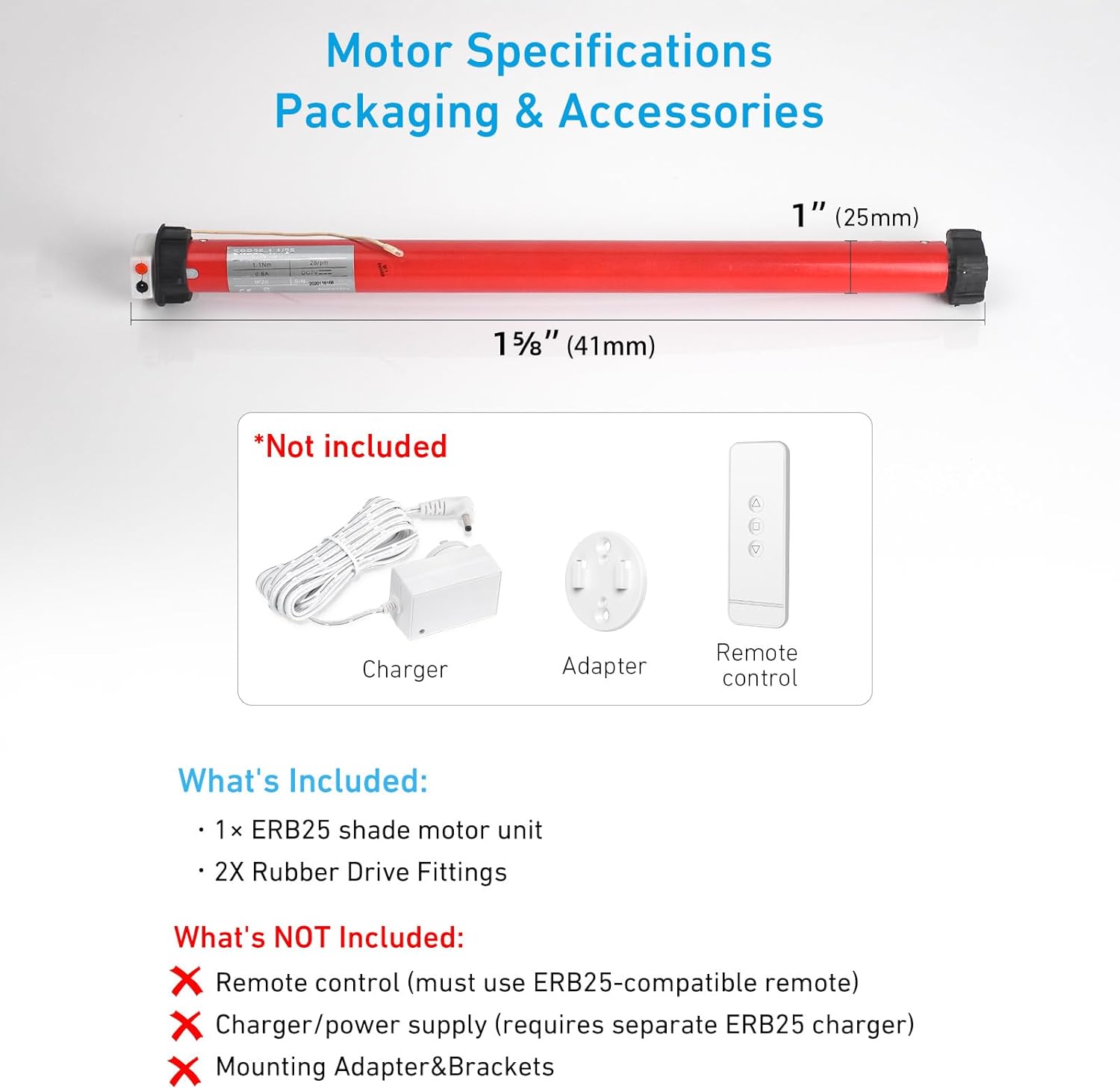
Figure 1: ERB25 Motor and Included Accessories (Note: Remote, charger, and power supply are not included).
3. Compatibility
This motor is specifically designed for roller shade tubes with an inner diameter (ID) of approximately 1.5 inches (38mm or 40mm). It is crucial to verify your tube size before purchase to ensure proper fit and function.
Tube Size Verification:
- You MUST measure the Inner Diameter (ID) of your roller tube.
- It MUST measure 1.5 inches (which is approximately 38mm or 40mm).
- Ordering the wrong size is the primary reason for returns. Please measure carefully.

Figure 2: Visual guide for measuring roller shade tube inner diameter for ERB25 motor compatibility.
Bracket Compatibility:
The ERB25 motor is compatible with various bracket types. Ensure your existing brackets are compatible or use the bracket adapter provided with the motor. If you are unsure, contact Rollerhouse support with pictures of your current setup before ordering.

Figure 3: Common bracket types compatible with the ERB25 motor.
4. Installation
Follow these steps to install your ERB25 motor into your existing roller shade.
- Step 1: Remove Existing Components. Unclip your manual roller blind from its brackets. Remove the old chain drive and any associated clutch mechanisms from the shade tube.
- Step 2: Prepare the Motor. Attach the appropriate crown and drive wheel to the ERB25 motor shaft. Ensure they are securely clipped into place.
- Step 3: Insert Motor into Tube. Slowly and gently push the ERB25 motor into the roller shade tube. Ensure the motor head with the programming button and charging port is accessible.
- Step 4: Re-mount the Shade. Secure the shade back into its original brackets. If necessary, use the provided bracket adapter to ensure a proper fit.
Video 1: Detailed guide on how to install the Smart Blinds Motor into a Roller Shade.
Video 2: Step-by-step installation of the Roller Shade Motor.
Video 3: Overview of DIY Retrofit Solutions for Automating Window Coverings.
5. Operation
5.1 Remote Control Pairing & Limit Setting
After installation, you need to pair the remote control with the motor and set the upper and lower limits for the shade's travel.
- Pairing: Press the program button on the motor head briefly. The motor will jog once. Then, press the UP button on your ERB25-compatible remote. The motor will jog again, confirming successful pairing.
- Set Upper Limit: Use the remote's UP/DOWN buttons to move the shade to your desired uppermost position. Press the program button on the back of the remote. The motor will jog once.
- Set Lower Limit: Use the remote's UP/DOWN buttons to move the shade to your desired lowermost position. Press the program button on the back of the remote. The motor will jog once.
- Confirm Limits: Press the program button on the back of the remote again. The motor will jog twice, confirming both upper and lower limits are saved.
Video 4: Instructions on how to program the remote to operate motorized blinds.
5.2 App & Voice Control Integration
For smart home integration with platforms like Google Assistant or Alexa, you will need a compatible Wi-Fi Bridge (sold separately).
- Connect Wi-Fi Bridge: Follow the instructions provided with your Wi-Fi Bridge to connect it to your home network.
- Pair Motor to Bridge: Use the Smart Life app (or equivalent) to add the ERB25 motor to your Wi-Fi Bridge. This typically involves putting the motor into pairing mode (refer to bridge instructions) and discovering it via the app.
- Link to Voice Assistant: Once the motor is added to your smart home app, link the app to your Alexa or Google Assistant account to enable voice commands.
Video 5: Guide for Zigbee and Bluetooth Motor Installation and APP Setup Method.
Video 6: Network setup for PDM25 Tubular Motor (Tuya-Wifi).
Video 7: How to connect an RF Shade Motor to an RF hub such as Broadlink.
6. Maintenance
6.1 Charging the Motor
The ERB25 motor is battery-powered and rechargeable. Use the compatible ERB25 charger (sold separately) to recharge the motor when the LED indicator shows low battery. A solar panel option is also available for sustainable charging.
6.2 General Care
Keep the motor and shade components clean and free from dust. Avoid exposing the motor to excessive moisture or extreme temperatures. Spot clean the motor unit only.
7. Troubleshooting
7.1 Common Issues & Solutions
- Motor not responding: Ensure the motor is charged and the remote is paired correctly. Check for any obstructions in the shade's path.
- Incorrect direction: If the shade moves in the opposite direction of the remote command, follow the remote programming instructions to reverse the motor direction.
- Shade not stopping at desired limits: Re-program the upper and lower limits as described in the Operation section.
- Motor not fitting tube: Double-check your tube's inner diameter. This motor is for 1.5 inch (38mm/40mm) ID tubes only.
- Remote not pairing: Ensure you are using an ERB25-compatible remote. Repeat the pairing process carefully.
7.2 Factory Reset
Performing a factory reset will erase all existing settings (pairing, limits, etc.) on your motor. This is useful if you encounter persistent issues or wish to reconfigure the motor entirely.
- Press the program button on the motor head 5 times, with 1 second between each press.
- On the 5th press, hold the button for 3 seconds until the motor jogs twice.
- The motor memory and all presets have now been deleted. You can now re-pair the motor and set new limits.
Video 8: Guide on performing a factory reset for the motor.
8. Specifications
| Feature | Specification |
|---|---|
| Model | ERB25 |
| Material | Metal+plastic |
| Compatible Tube Size | 1.5 inch (38mm/40mm) Outer Diameter (OD) shade tube |
| Power | Rechargeable Lithium-ion Battery |
| Max Load | Up to 8.8 lb (4 kg) |
| Control Type | Upper, Stop and lower limit Position |
| Operation Mode | Single and group control can be realized by remote or Alexa (with Wifi Bridge) |
| Special Feature | Electric motor to raise and lower a shade, Powerful lifting capacity, Rechargeable, Wireless, Wifi Bridge for integration into "Home automation" systems with Google, Alexa |
| Item Weight | 1 pounds (16 Ounces) |
| Product Dimensions | 2"L x 1"W |
| Manufacturer | Rollerhouse |
| UPC | 612289936002 |
| ASIN | B07K4T4MT3 |
9. Warranty & Support
For warranty information, technical support, or further assistance, please contact Rollerhouse customer service through your purchase platform or visit the official Rollerhouse website. Please have your product model and purchase details ready when contacting support.
