
1. Introduction and Safety Information
Thank you for choosing the UlTiMa AC-3500 Treadmill. This manual provides essential information for the safe and effective use, assembly, operation, and maintenance of your new fitness equipment. Please read this manual thoroughly before operating the treadmill and retain it for future reference.
Important Safety Precautions:
- Consult a physician before starting any exercise program.
- Keep children and pets away from the treadmill during operation.
- Place the treadmill on a flat, stable surface with adequate clearance around it.
- Wear appropriate athletic footwear and clothing.
- Do not operate the treadmill if it is damaged or malfunctioning.
- Always use the safety key during operation.
- Do not attempt to lubricate or adjust the belt while the treadmill is in motion.
- Unplug the treadmill from the power outlet when not in use or before cleaning/maintenance.
2. Product Overview
The UlTiMa AC-3500 is a home-use treadmill designed for effective cardiovascular exercise. It features a robust motor, adjustable speed, and manual incline settings.
Key Features:
- Motor: 2.75 hp DC motor
- Speed Range: 1-14 km/h
- Running Belt Dimensions: 126 x 43 cm
- Incline: 3-level manual incline
- Maximum User Weight: 110 kg
- Additional Features: Foldable design, automatic lubrication, portable.
Components:
Familiarize yourself with the main components of your treadmill:
- Console with display and control buttons
- Handrails with integrated speed/incline controls (if applicable)
- Running belt
- Motor cover
- Frame and base
- Safety key
- Transport wheels

Image 2.1: The control console of the UlTiMa AC-3500 treadmill, showing the display, speed, and program buttons, along with cup holders.

Image 2.2: Close-up view of the handlebar controls on the UlTiMa AC-3500 treadmill, featuring speed adjustment buttons.
3. Setup and Assembly
Before assembly, ensure all parts are present and undamaged. It is recommended to have two people for assembly.
Assembly Steps:
- Unpack: Carefully remove all components from the packaging.
- Position: Place the main frame on a clear, level surface.
- Unfold (if applicable): If the treadmill is in a folded position, carefully unfold the running deck until it locks into place.
- Attach Uprights: Secure the upright posts to the main frame using the provided bolts and tools.
- Install Console: Attach the console to the top of the upright posts, ensuring all cables are connected correctly.
- Check Connections: Verify all bolts are tightened and cables are securely connected.
- Power Connection: Plug the power cord into a grounded electrical outlet.
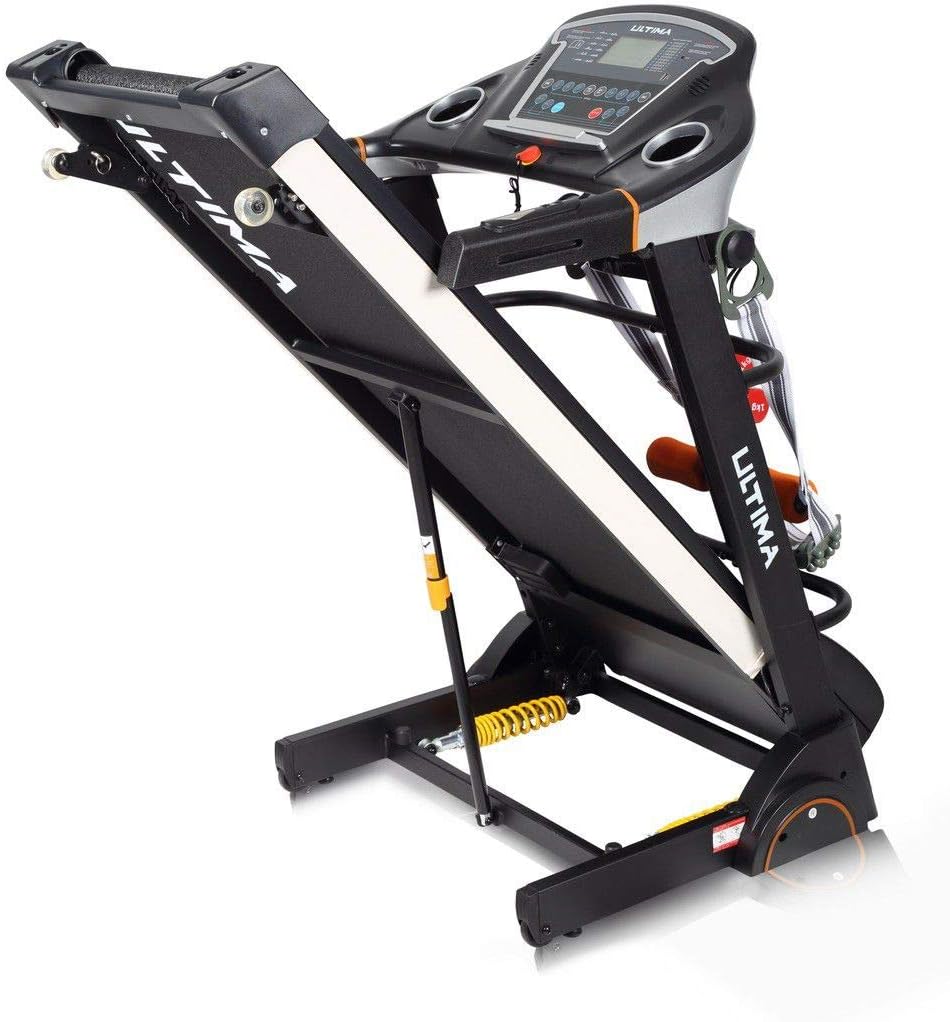
Image 3.1: The UlTiMa AC-3500 treadmill in its unfolded, ready-to-use position, showing the running deck and console.

Image 3.2: The UlTiMa AC-3500 treadmill in its folded position, demonstrating its space-saving design for storage.
4. Operating Instructions
Before each use, ensure the safety key is properly attached to the console and your clothing.
Basic Operation:
- Power On: Plug the treadmill into a grounded outlet and flip the main power switch (usually located near the front of the treadmill base).
- Attach Safety Key: Clip the safety key to your clothing and place the magnetic end onto the designated area on the console. The display will illuminate.
- Start Exercise: Press the "START" button. The belt will begin to move at a low speed after a short countdown.
- Adjust Speed: Use the "SPEED +" and "SPEED -" buttons on the console or handrails to increase or decrease the running speed.
- Adjust Incline: The AC-3500 features a 3-level manual incline. To adjust, stop the treadmill, lift the running deck, and manually adjust the incline pins at the rear of the treadmill. Ensure both sides are set to the same level before resuming exercise.
- Stop Exercise: Press the "STOP" button to gradually slow down and stop the belt. In an emergency, pull the safety key to immediately stop the treadmill.
- Power Off: After your workout, remove the safety key, and turn off the main power switch. Unplug the treadmill if it will not be used for an extended period.
5. Maintenance
Regular maintenance ensures the longevity and optimal performance of your treadmill.
Cleaning:
- Wipe down the console and other surfaces with a damp cloth after each use.
- Do not use abrasive cleaners or solvents.
- Keep the area around the treadmill clean and free of dust.
Belt Lubrication:
The UlTiMa AC-3500 features automatic lubrication. Refer to the specific instructions provided with your treadmill for details on how to check and refill the lubrication system. Generally, check the lubrication level every 3-6 months depending on usage.
Belt Adjustment:
The running belt may require occasional adjustment to ensure it remains centered and properly tensioned. If the belt slips or drifts to one side, consult the detailed instructions in the full manual or contact customer support.
6. Troubleshooting
This section addresses common issues you might encounter. For problems not listed here, contact customer support.
| Problem | Possible Cause | Solution |
|---|---|---|
| Treadmill does not power on. | Power cord unplugged, main switch off, safety key not in place, circuit breaker tripped. | Check power cord, turn on main switch, ensure safety key is correctly placed, reset circuit breaker. |
| Running belt slips. | Belt too loose, worn belt, insufficient lubrication. | Adjust belt tension (refer to full manual), lubricate belt, contact support for belt replacement. |
| Unusual noise during operation. | Loose components, motor issues, belt friction. | Check and tighten all bolts, lubricate belt, contact customer support if noise persists. |
| Console display not working correctly. | Loose cable connection, console malfunction. | Check console cable connections, power cycle the treadmill, contact customer support. |
7. Specifications
| Feature | Detail |
|---|---|
| Brand | UlTiMa |
| Model | AC-3500 |
| Motor | 2.75 hp DC |
| Speed Range | 1-14 km/h |
| Running Belt Size | 126 x 43 cm |
| Incline | 3-level Manual |
| Maximum User Weight | 110 kg |
| Product Class | Home use |
| Key Features | Foldable, Manual Incline, Automatic Lubrication, Portable |
| Recommended Use | Exercise |
| Target Audience | Young, Adult |
8. Warranty and Support
For warranty information, please refer to the warranty card included with your product or visit the official UlTiMa website. If you require technical assistance, spare parts, or have any questions regarding your UlTiMa AC-3500 treadmill, please contact UlTiMa customer support. Have your model number and purchase date ready when contacting support.
Contact information for UlTiMa customer support can typically be found on the manufacturer's website or on your purchase receipt.
