Introduction
This manual provides instructions for the VINABTY RM-YD056 replacement remote control, designed for use with various Sony TV models. Please read this guide carefully to ensure proper setup and operation of your new remote control.
Setup: Battery Installation
The RM-YD056 remote control requires two AAA batteries for operation. Follow these steps to install the batteries:
- Locate the battery compartment cover on the back of the remote control.
- Slide the cover downwards or press the latch (if present) to open the compartment.
- Insert two AAA batteries, ensuring that the positive (+) and negative (-) terminals align correctly with the markings inside the compartment.
- Slide the battery compartment cover back into place until it clicks securely.
No additional programming or setup is required. The remote is ready for use once batteries are installed.
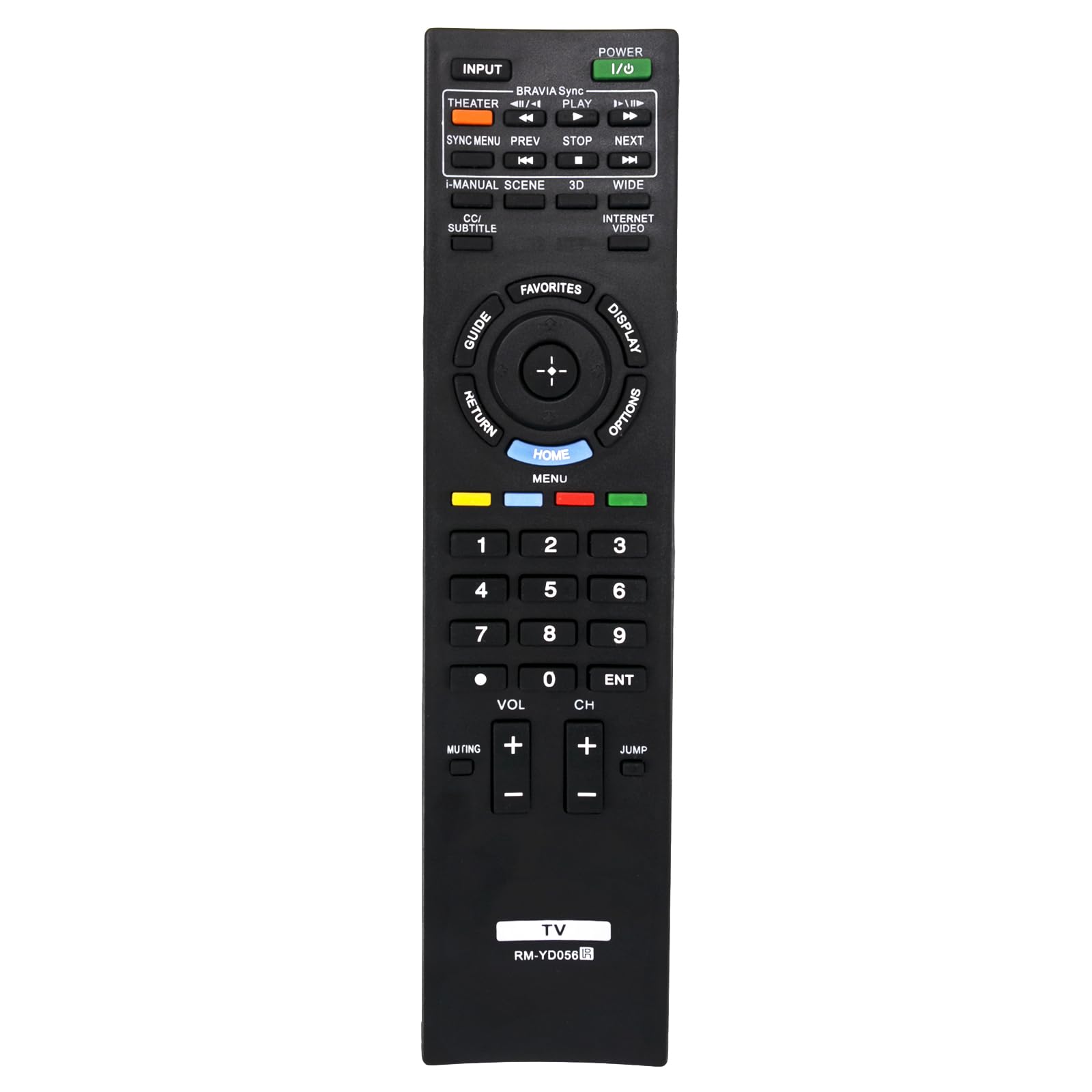
Image: Front view of the VINABTY RM-YD056 remote control, showing all buttons and their labels. This image helps identify the battery compartment on the reverse side (not visible here) and the general layout of the remote.
Operating Instructions
This remote control provides full functionality for compatible Sony TV models. Below is a general guide to common buttons and their functions:
- POWER (I/O): Turns the TV on or off.
- INPUT: Selects the input source (e.g., HDMI 1, AV, Component).
- THEATER / BRAVIA Sync / PLAY: Accesses Theater mode, controls BRAVIA Sync compatible devices, or plays media.
- SYNC MENU / PREV / STOP / NEXT: Controls BRAVIA Sync menu, navigates media playback (previous, stop, next).
- I-MANUAL / SCENE / 3D / WIDE: Accesses the TV's i-Manual, selects scene modes, activates 3D display, or adjusts screen aspect ratio.
- CC/SUBTITLE / INTERNET VIDEO: Toggles Closed Captions/Subtitles or accesses internet video services.
- GUIDE / RETURN / HOME / DISPLAY / OPTIONS: Navigation and menu access buttons.
- GUIDE: Displays the electronic program guide.
- RETURN: Goes back to the previous screen or menu.
- HOME / MENU: Opens the TV's main menu or home screen.
- DISPLAY: Shows information about the current program or input.
- OPTIONS: Displays context-sensitive options.
- Directional Pad (Up, Down, Left, Right) and ENTER: Navigates menus and confirms selections.
- FAVORITES: Accesses favorite channels or content.
- Colored Buttons (Red, Green, Yellow, Blue): Functionality varies depending on the TV menu or application.
- Number Buttons (0-9): Directly selects channels or enters numerical input.
- VOL (+/-): Adjusts the volume up or down.
- CH (+/-): Changes channels up or down.
- Muting: Mutes or unmutes the TV audio.
- ENT: Confirms channel selection or numerical input.
- JUMP: Switches between the current and previously viewed channel.
Point the remote control directly at the TV's infrared sensor for optimal performance.
Compatible Sony TV Models
This VINABTY RM-YD056 replacement remote control is compatible with the following Sony TV models:
- KDL-40HX800
- KDL-46HX800
- KDL-55HX800
- XBR-40HX800
- XBR-46HX800
- XBR-46HX909
- XBR-52HX909
- XBR-52LX900
- KDL-50R550A
- KDL-60R550A
- KDL-70R550A
It also serves as a replacement for RM-YD040 and RM-YD033 remote controls.
Specifications
| Model Number | RM-YD056 |
| Brand | VINABTY |
| Power Source | 2 x AAA Batteries (not included) |
| Color | Black |
| Product Dimensions | 8 x 2 x 0.5 inches (approximately) |
| Item Weight | 3 ounces (approximately) |
| Special Feature | Ergonomic design |
| Compatible Devices | Television |
Troubleshooting
If your remote control is not functioning as expected, please try the following troubleshooting steps:
- Remote Not Responding:
- Ensure the batteries are inserted correctly with the correct polarity (+/-).
- Replace old batteries with new AAA batteries.
- Check for any obstructions between the remote control and the TV's infrared sensor.
- Ensure you are pointing the remote directly at the TV.
- Intermittent Button Response:
- This can sometimes be caused by low battery power. Try replacing the batteries.
- Ensure there is no debris or liquid under the buttons.
- Remote Not Controlling TV:
- Verify that your TV model is listed in the "Compatible Sony TV Models" section.
- Ensure the TV is powered on.
Maintenance
To ensure the longevity and proper functioning of your remote control, follow these maintenance guidelines:
- Cleaning: Use a soft, dry cloth to clean the remote control. Do not use liquid cleaners or abrasive materials.
- Battery Care: Remove batteries if the remote control will not be used for an extended period to prevent leakage.
- Storage: Store the remote control in a cool, dry place, away from direct sunlight and extreme temperatures.
- Avoid Drops: Protect the remote from physical impact, as drops can damage internal components.
Warranty and Support
Information regarding specific warranty terms or direct customer support for this VINABTY product was not provided in the available documentation. Please refer to your purchase receipt or contact the retailer for details on warranty coverage and support options.