
GANA grey001
GANA Bi-Directional HDMI Switch User Manual
Model: grey001
1. Introduction
Thank you for choosing the GANA Bi-Directional HDMI Switch. This device allows you to connect multiple HDMI sources to a single display or a single HDMI source to multiple displays, providing flexibility for your home entertainment or professional setup. Its compact design and plug-and-play functionality make it an ideal solution for managing your HDMI connections.
2. Product Features
- Bi-Directional Functionality: Operates as a 2-input, 1-output HDMI switch or a 1-input, 2-output HDMI splitter.
- High Resolution Support: Supports 4K@60Hz, 1080P@60Hz, and 3D display.
- Wide Compatibility: Works with a broad range of HDMI-enabled devices including gaming consoles, Blu-Ray players, monitors, and projectors.
- Plug and Play: No external power adapter or drivers required.
- One-Button Switching: Easily switch between connected sources or displays with a single button press.
- LED Indicators: Clear LED lights indicate the active port.
- Fast & Stable Transmission: Ensures high bandwidth 3.4Gbps data transmission for stable audio and video.
- Durable Design: Features an aluminum shell for better heat dissipation and durability.

Image: The GANA Bi-Directional HDMI Switch, a compact grey device with HDMI ports and a central button, shown with connected HDMI cables.

Image: Close-up view of the GANA HDMI Switch highlighting the one-button switch for easy signal swapping and the LED indicators for real-time monitoring of active ports.
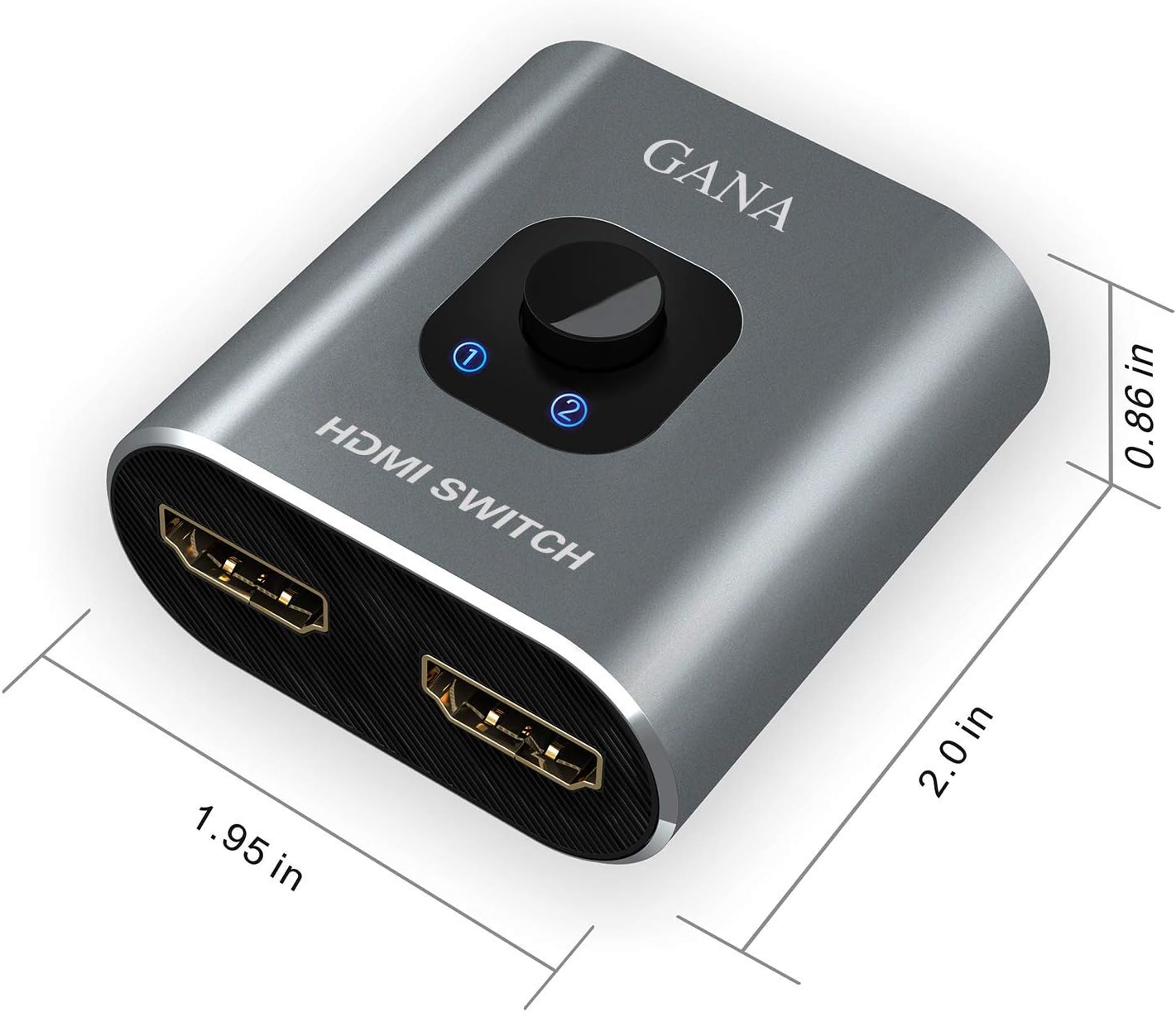
Image: Diagram showing the compact dimensions of the GANA HDMI Switch: approximately 1.95 inches (width), 2.0 inches (depth), and 0.86 inches (height).
3. Setup and Connection
The GANA Bi-Directional HDMI Switch is designed for simple plug-and-play operation. No external power supply is typically needed as it draws power from the connected HDMI devices. For optimal performance, ensure you use high-quality HDMI 2.0 cables.

Image: Illustration showing the GANA HDMI Switch connected without an external power adapter, emphasizing its plug-and-play nature.
3.1. Mode 1: 2 Inputs to 1 Output (HDMI Switch)
In this mode, you can connect two HDMI source devices (e.g., a gaming console and a Blu-Ray player) to one HDMI display (e.g., a TV or monitor). Use the button on the switch to select which source is displayed.
- Connect HDMI cable from Source 1 (e.g., PS5) to one input port on the GANA HDMI Switch.
- Connect HDMI cable from Source 2 (e.g., Laptop) to the other input port on the GANA HDMI Switch.
- Connect an HDMI cable from the output port of the GANA HDMI Switch to your display (e.g., TV or Monitor).

Image: Diagram illustrating the 2-input, 1-output configuration, showing two input devices (laptop and PS4) connected to the GANA HDMI Switch, which then connects to a single monitor.

Image: A detailed connection diagram for Mode 1 (2 IN 1 OUT), showing a laptop and a computer connected to the HDMI switch, which outputs to a single display.
3.2. Mode 2: 1 Input to 2 Outputs (HDMI Splitter)
In this mode, you can connect one HDMI source device (e.g., a Blu-Ray player) to two HDMI displays (e.g., two TVs). Important: Only one display will work at a time in this mode. You must manually switch between the displays using the button on the device.
- Connect an HDMI cable from your source device (e.g., Laptop) to the input port on the GANA HDMI Switch.
- Connect HDMI cables from the two output ports of the GANA HDMI Switch to your two displays (e.g., Monitor 1 and Monitor 2).

Image: Diagram illustrating the 1-input, 2-output configuration, showing a laptop connected to the GANA HDMI Switch, which then connects to two monitors. A note indicates that only one display can be active at a time.

Image: A detailed connection diagram for Mode 2 (1 IN 2 OUT), showing a computer connected to the HDMI switch, which outputs to two displays. A clear warning states that only one monitor is displayed at a time and both monitors cannot be displayed together.

Image: The back of the product packaging displaying simplified connection diagrams for both 2 Host to 1 Device (Switch) and 1 Host to 2 Device (Splitter) modes, along with basic operating instructions.
4. Operating Instructions
Once all HDMI cables are connected, the GANA Bi-Directional HDMI Switch is ready for use. The device operates with a simple push-button mechanism.
- Switching Signal: Press the central button on the top of the switch to toggle between the connected HDMI sources (in 2-in-1-out mode) or between the connected displays (in 1-in-2-out mode).
- LED Indicators: The blue LED light(s) next to the button will illuminate to indicate which port is currently active. This provides real-time monitoring of your active connection.
5. Compatibility and Performance
The GANA Bi-Directional HDMI Switch is designed for broad compatibility and high-performance video and audio transmission.
5.1. Supported Devices
This switch works with most devices equipped with an HDMI port, including but not limited to:
- Input Devices: Nintendo Switch, PlayStation (PS3, PS4, PS5), Xbox (Xbox One, Xbox 360), Blu-Ray Players, DVD Players, Roku, TV Boxes/Sticks, Laptops, Desktop Computers.
- Output Devices: HDTVs, HD-Ready TVs, DVB Receivers, Monitors, Projectors.

Image: Visual representation of the broad compatibility of the GANA HDMI Switch, showing various input devices like laptops, HD players, gaming consoles, and output devices such as monitors, TVs, and projectors.

Image: Another illustration of wide compatibility, featuring modern gaming consoles (PS5, Xbox, Switch), PCs, laptops, and TV boxes as input devices, connecting to the HDMI switch which outputs to monitors, TVs, and projectors.
5.2. Resolution and Display Quality
The switch supports high-definition video and audio, ensuring a quality viewing experience.
- Resolutions: Supports 4K@60Hz, 2K@144Hz, and 1080P@240Hz.
- 3D Support: Compatible with 3D display formats.
- HDR Support: Enhances dynamic range for more realistic visuals.
- HDCP Compliance: Supports HDCP 2.2 and 2.3 for protected content.

Image: A family watching a sports game on a large screen, demonstrating the clear 4K@60Hz video quality supported by the GANA HDMI Switch.

Image: An illustration highlighting the supported resolutions: 4K@60Hz, 2K@144Hz, and 1080P@240Hz, with a high-definition image of a sports car on a large display.

Image: A side-by-side comparison of Standard Dynamic Range (SDR) and High Dynamic Range (HDR) displays, showing how HDR provides more lifelike visuals, supported by the HDMI switch.

Image: An illustration showing the GANA HDMI Switch's compatibility with various streaming services like YouTube, Disney+, Netflix, HBO Max, Hulu, and Prime Video, indicating seamless content playback.
6. Care and Maintenance
To ensure the longevity and optimal performance of your GANA Bi-Directional HDMI Switch, follow these simple care guidelines:
- Cleaning: Use a soft, dry cloth to clean the exterior of the device. Do not use liquid cleaners or aerosols.
- Storage: Store the device in a cool, dry place away from direct sunlight and extreme temperatures.
- Handling: Avoid dropping the device or subjecting it to strong impacts. Do not attempt to disassemble the unit.
- Cable Management: Ensure HDMI cables are not excessively bent or strained at the connection points to prevent damage to the ports.
7. Troubleshooting
If you encounter issues with your GANA Bi-Directional HDMI Switch, please refer to the following common problems and solutions:
| Problem | Possible Cause | Solution |
|---|---|---|
| No signal or flickering display. | Loose cable connections, incompatible resolution/refresh rate, faulty HDMI cable, insufficient power from source. |
|
| Only one display works in 1-in-2-out mode. | This is expected behavior for this bi-directional switch. | The GANA Bi-Directional HDMI Switch is designed to output to only one display at a time in splitter mode. Use the button to switch between the two connected displays. It is not a simultaneous splitter. |
| Switch button unresponsive or LED not changing. | Temporary glitch, power issue. |
|
| Audio issues (no sound or distorted audio). | Audio settings on source/display, cable issue. |
|
| Unstable connection / signal drops. | Loose physical connection, cable quality, interference. |
|
8. Technical Specifications
| Feature | Specification |
|---|---|
| Model Number | grey001 |
| Product Dimensions | 1.57 x 6.2 x 7.49 cm (0.62 x 2.44 x 2.95 inches) |
| Weight | 41 g (1.45 oz) |
| Number of Ports | 3 (2 HDMI In / 1 HDMI Out OR 1 HDMI In / 2 HDMI Out) |
| Supported Resolutions | 4K@60Hz, 2K@144Hz, 1080P@240Hz, and lower resolutions |
| 3D Support | Yes |
| HDR Support | Yes |
| HDCP Compliance | HDCP 2.2 & 2.3 |
| Data Transmission Bandwidth | 3.4Gbps |
| Power Source | No external power needed (powered via HDMI) |
| Housing Material | Aluminum |
| Connector Type | HDMI |
9. Warranty Information
GANA products are manufactured to high-quality standards. For specific warranty terms and conditions, please refer to the documentation included with your purchase or contact GANA customer support. Keep your purchase receipt as proof of purchase for warranty claims.
10. Customer Support
If you require further assistance or have questions not covered in this manual, please contact GANA customer support through the following channels:
- Online: Visit the official GANA website for FAQs and support resources.
- Email: Refer to your product packaging or purchase confirmation for support email addresses.
When contacting support, please provide your product model number (grey001) and a detailed description of the issue.
Ask a question about this manual
Ask about setup, troubleshooting, compatibility, parts, safety, or missing instructions. Manuals+ will review the question and use this page’s manual context to help answer it.