
1. Introduction
This manual provides essential information for the setup, operation, and maintenance of your Easytry123 replacement remote control. This remote is designed to be compatible with a range of Sony LCD LED HDTV TV models, including RM-ED012, RM-014, RM-ED013, RM-Y167, RM-Y169, RM-890, RM-891, RM-892, and RM-893. Please note that as a replacement unit, some advanced or specific functions of your original remote may not be fully supported.
2. Package Contents
- 1 x Easytry123 Replacement Remote Control
Note: Batteries are not included and must be purchased separately.
3. Setup
3.1 Battery Installation
The remote control requires two (2) AAA batteries for operation. Follow these steps to install them:
- Locate the battery compartment on the back of the remote control.
- Slide the battery compartment cover downwards or outwards to open it.
- Insert two AAA batteries, ensuring the positive (+) and negative (-) terminals align correctly with the markings inside the compartment.
- Slide the battery compartment cover back into place until it clicks securely.
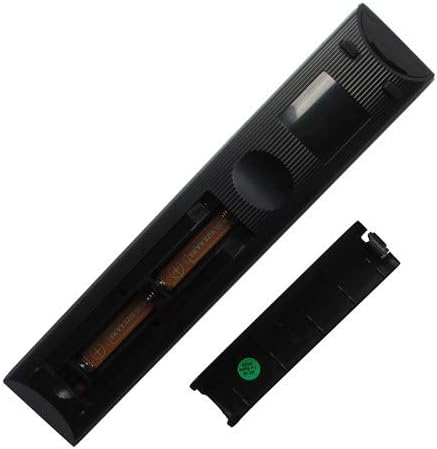
Figure 3.1: Battery compartment with batteries inserted.
4. Operating Instructions
4.1 Basic Operation
Once batteries are installed, the remote control is ready for use with compatible Sony LCD LED HDTV TV models. Point the remote directly at your television's infrared receiver.

Figure 4.1: Front view of the remote control.
4.2 Key Functions
The remote features standard television control buttons. While specific button layouts may vary slightly from your original remote, the primary functions are typically intuitive:
- Power Button: Turns the TV on or off.
- Number Buttons (0-9): For direct channel input.
- Channel Up/Down: Navigates through channels.
- Volume Up/Down: Adjusts the sound level.
- Mute: Silences the TV audio.
- Input/Source: Switches between video inputs (HDMI, AV, etc.).
- Navigation Pad (Up/Down/Left/Right/Enter): For menu navigation.
- Menu/Home: Accesses the TV's main menu or smart TV interface.
- Return/Back: Goes back to the previous screen or menu.
Compatibility Note: This is a replacement remote. While it supports core functions, some advanced features or specific smart TV functions present on your original remote may not be replicated. Ensure your TV model is listed in the product title for optimal compatibility.
5. Maintenance and Care
To ensure the longevity and proper functioning of your remote control, follow these care guidelines:
- Cleaning: Use a soft, dry cloth to wipe the remote. For stubborn dirt, slightly dampen the cloth with water or a mild cleaning solution, then wipe dry immediately. Do not use abrasive cleaners or immerse the remote in liquid.
- Storage: Store the remote in a cool, dry place away from direct sunlight and extreme temperatures.
- Battery Replacement: Replace batteries when the remote's responsiveness decreases. If the remote will not be used for an extended period, remove the batteries to prevent leakage.
- Avoid Drops: Protect the remote from physical impact, as drops can damage internal components.
6. Troubleshooting
If you experience issues with your remote control, try the following solutions:
- Remote not responding:
- Check if the batteries are inserted correctly with the correct polarity (+/-).
- Replace old batteries with new ones.
- Ensure there are no obstructions between the remote and the TV's infrared receiver.
- Make sure you are within the effective range of the TV's IR receiver.
- Some functions do not work:
- As a replacement remote, it may not support all functions of your original TV remote. Verify if the specific function is a standard TV control or a unique smart TV feature.
- Confirm that your TV model is explicitly listed as compatible with this remote.
- Buttons are sticky or unresponsive:
- Clean the remote control as described in the Maintenance section.
7. Specifications
| Model Number | Easytry4033 |
| Brand | Easytry123 |
| Compatible Devices | Sony LCD LED HDTV Televisions (Specific models: RM-ED012, RM-014, RM-ED013, RM-Y167, RM-Y169, RM-890, RM-891, RM-892, RM-893) |
| Connectivity Technology | Infrared (IR) |
| Controller Type | Button Control |
| Special Feature | Universal (for specified Sony models) |
| Batteries Required | 2 x AAA (not included) |
8. Warranty and Support
For any questions regarding the compatibility or functionality of your Easytry123 replacement remote control, please contact the seller or manufacturer directly through the platform where the purchase was made. Specific warranty details, if any, are typically provided at the point of purchase or by the seller.