
EdgeStar IB250SS
Contents
EdgeStar IB250SS Ice Maker User Manual
Model: IB250SS
Brand: EdgeStar
1. Introduction
Thank you for choosing the EdgeStar IB250SS 15 Inch Wide Built-In Ice Maker. This appliance is designed to provide a continuous supply of crescent-shaped ice for your convenience. With a daily ice production of up to 25 lbs and a storage capacity of 20 lbs, this unit is ideal for various settings. Its compact 15-inch width allows for seamless integration into undercounter spaces, and its no-drain-required design simplifies installation.
This manual contains important information regarding the installation, operation, and maintenance of your ice maker. Please read it thoroughly before using the appliance to ensure safe and efficient operation.
2. Safety Information
Always follow basic safety precautions when using electrical appliances to reduce the risk of fire, electric shock, or injury. Keep this manual for future reference.
- Ensure the appliance is properly grounded.
- Do not operate the ice maker with a damaged power cord or plug.
- Do not allow children to operate or play with the appliance.
- Disconnect power before cleaning or performing any maintenance.
- This unit is not a traditional freezer and is not meant for long-term food storage.
- Do not block ventilation openings on the appliance.
3. Included Components
Your EdgeStar IB250SS Ice Maker comes with the following items:
- Ice Scoop
- Water Line
- Removable Ice Bin

Image: Ice scoop and water line, essential accessories for the ice maker.
4. Setup
The EdgeStar IB250SS is designed for built-in, undercounter installation. Its compact dimensions (14.9" W x 20.06" D x 33.31" H) allow for flexible placement.
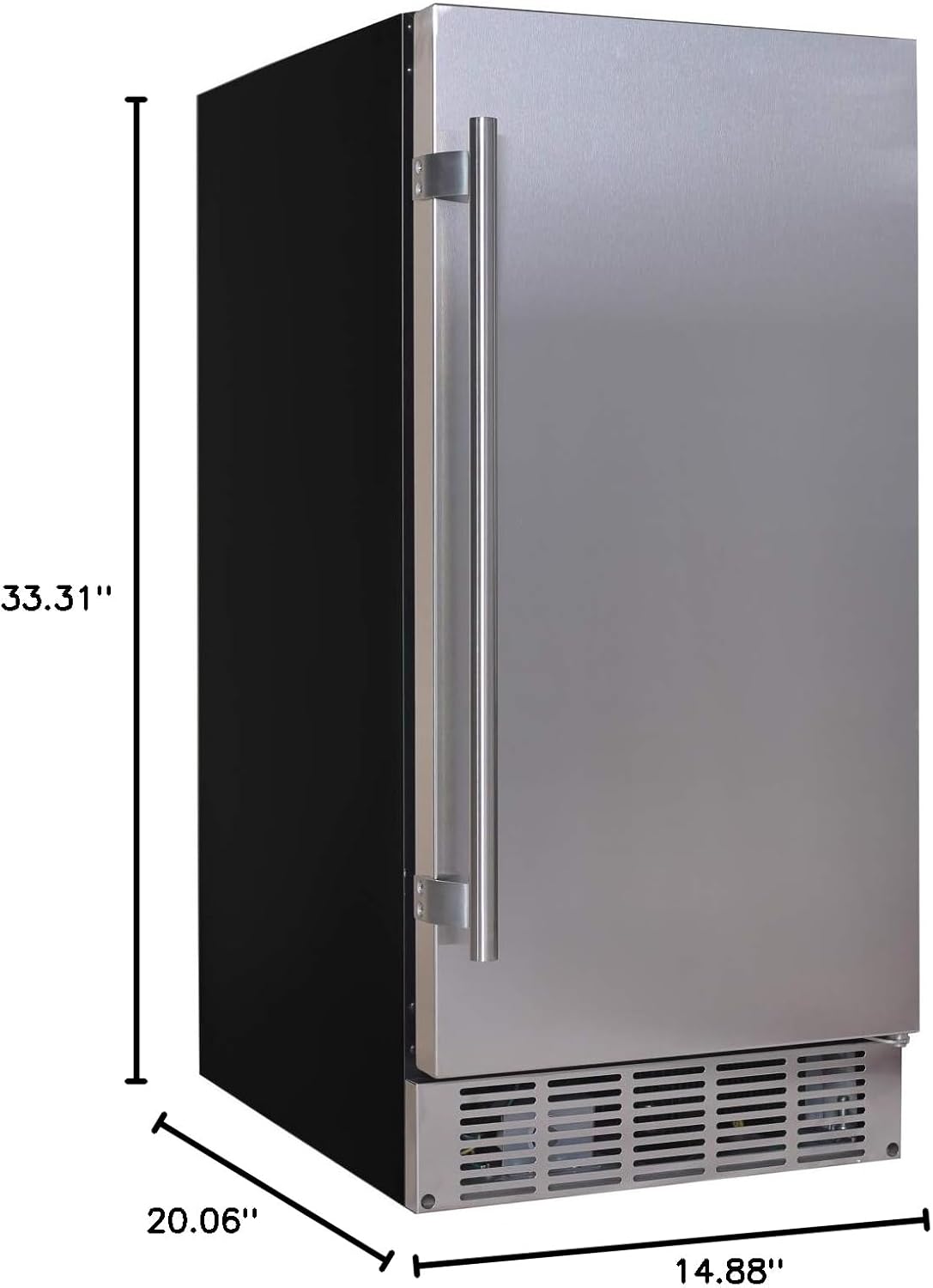
Image: Detailed dimensions of the ice maker for proper installation planning.
4.1 Placement
Ensure adequate ventilation around the unit. The front ventilation grille should not be obstructed. This unit does not require a drain line, simplifying installation.


Images: Examples of the ice maker seamlessly integrated into kitchen and bar counter spaces.
4.2 Door Reversal
The door hinging is reversible, allowing you to change the door swing to best fit your application. Refer to the detailed instructions in the full user manual for this procedure.
4.3 Water Connection
Connect the provided water line to a potable water supply. Ensure all connections are secure to prevent leaks.
4.4 Power Connection
Plug the ice maker into a grounded 115 Volt electrical outlet. Ensure the power cord is not pinched or damaged.


Images: The power plug and a full front view of the ice maker.
4.5 Product Overview Video
Video: A 360-degree view of the EdgeStar IB250SS ice maker, showcasing its design and features from various angles. This video is provided by the seller.
5. Operating Instructions
Operating your EdgeStar ice maker is straightforward with its simple switch control.
5.1 Powering On/Off
The unit is easy to use with just one flip of a switch, typically located at the back or side of the unit.

Image: The simple on/off switch for controlling the ice maker's operation.
5.2 Ice Production
The ice maker produces crescent-shaped ice, which is known for being harder and longer-lasting. It can produce up to 25 lbs of ice per day and has a storage capacity of 20 lbs.


Images: The ice bin showing crescent-shaped ice with the included scoop, and the empty ice bin.
5.3 Ice Storage
This unit also operates as a freezer and will keep your ice frozen, unlike some ice makers that simply produce ice into a non-refrigerated bin.
6. Maintenance
Regular maintenance ensures the longevity and optimal performance of your ice maker.
6.1 Cleaning
- Periodically clean the interior of the ice bin with a mild detergent and warm water. Rinse thoroughly.
- Wipe down the exterior with a soft cloth and mild cleaner. Avoid abrasive cleaners.
- Clean the condenser coils (located behind the front grille) regularly to ensure efficient operation. Use a vacuum cleaner or a soft brush.
6.2 Defrosting
While the unit keeps ice frozen, frost buildup can occur over time. If you notice significant frost or ice forming outside the ice bin, it may be necessary to defrost the unit. Turn off the ice maker, remove all ice, and allow the frost to melt naturally. Clean and dry the interior before restarting.
7. Troubleshooting
If your ice maker is not functioning correctly, consult the following common issues before contacting customer service.
| Problem | Possible Cause | Solution |
|---|---|---|
| Unit does not turn on | No power; Power switch off | Check power outlet and circuit breaker; Ensure power switch is in the 'On' position. |
| No ice production | No water supply; Water line kinked; Low water pressure | Check water supply valve; Inspect water line for kinks; Verify water pressure. |
| Ice production is slow | High ambient temperature; Dirty condenser coils | Ensure proper ventilation; Clean condenser coils. |
| Unusual noise | Unit not level; Loose components | Adjust leveling feet; Contact customer support if noise persists. |
8. Specifications
| Feature | Detail |
|---|---|
| Brand | EdgeStar |
| Model Name | IB250SS |
| Product Dimensions (D x W x H) | 20.06" x 14.88" x 33.31" |
| Capacity | 20 Pounds (Ice Storage) |
| Daily Ice Production | Up to 25 lbs |
| Voltage | 115 Volts |
| Refrigerant | R134a |
| Material | Metal (Stainless Steel) |
| Item Weight | 71 pounds |
| Installation Type | Undercounter, Built-In |
| Color | Stainless Steel |
| Country of Origin | China |
9. Warranty and Support
Specific warranty details are typically provided with your purchase documentation or can be found on the manufacturer's official website. For technical support, parts, or service inquiries, please contact EdgeStar customer service directly. Have your model number (IB250SS) and serial number ready when contacting support.
For additional resources, you may refer to the official EdgeStar website or the PDF user manual available at: EdgeStar IB250SS User Manual (PDF)
Ask a question about this manual
Ask about setup, troubleshooting, compatibility, parts, safety, or missing instructions. Manuals+ will review the question and use this page’s manual context to help answer it.