
1. Introduction
This manual provides comprehensive instructions for assembling the JEKCA Fox 04S Plastic Building Blocks set. Designed for individuals aged 14 and above, this set allows you to construct a detailed fox model using JEKCA's unique interlocking brick system. Please read all instructions carefully before beginning assembly.

Image 1.1: The completed JEKCA Fox 04S model, showcasing the intricate design and vibrant colors of the fox sculpture.
2. What's in the Box
Before you begin, please verify that all components are present:
- Instruction Manual
- Building Bricks (various colors and shapes)
- Connecting Pins
- Pin Driver Tool
- Quick Guide
3. Assembly Instructions
Follow these steps to assemble your JEKCA Fox 04S model. Refer to the included detailed instruction manual for specific brick placement.
3.1 Understanding the JEKCA Interlocking System
JEKCA models utilize a unique interlocking system where bricks are secured together using pins and a pin driver. This method ensures a sturdy and durable construction.

Image 3.1: Visual guide to the JEKCA interlocking brick system, demonstrating how bricks are connected and secured using pins and a driver.
3.2 Basic Connection Steps
- Align Bricks: Place the bricks you wish to connect directly on top of each other, ensuring the holes align.
- Insert Pins: Insert the connecting pins into the aligned holes. Push them firmly until they are fully seated.
- Secure Connection: Use the provided pin driver tool to turn each pin 90 degrees. This action expands the pin within the bricks, creating a strong, secure connection.

Image 3.2: Detailed illustration of the pin insertion and turning process, highlighting the simplicity and strength of the JEKCA connection.
3.3 Following the Manual
The included instruction manual provides a step-by-step guide for building the Fox 04S model. Each step will show which bricks to use and where to place them, along with the necessary pin connections. Pay close attention to the orientation of the bricks and the direction of the pins.
- Sort your bricks by color and shape to make the assembly process easier.
- Work on a clean, flat surface to prevent losing small pieces.
- If a connection feels loose, ensure the pin is fully inserted and turned 90 degrees.
4. Operating and Display
Once fully assembled, the JEKCA Fox 04S model is a static display piece. It is designed to be sturdy and maintain its form without easily breaking apart.
- Place your finished model on a stable surface.
- Avoid excessive force or dropping the model, as this may dislodge bricks or pins.
5. Maintenance
To keep your JEKCA Fox 04S model in optimal condition:
- Cleaning: Dust the model regularly with a soft, dry cloth or a soft brush. For more stubborn dirt, a slightly damp cloth can be used, but avoid excessive moisture.
- Storage: If disassembling for storage, keep all bricks and pins organized to prevent loss. Store in a cool, dry place away from direct sunlight to prevent material degradation or color fading.
6. Troubleshooting
- Missing Pieces: If you find any pieces are missing upon opening the box, please contact JEKCA customer support with your product model number and details of the missing components.
- Difficulty Connecting Bricks: Ensure the pins are correctly aligned and fully inserted before turning them 90 degrees with the pin driver. Do not force connections; if a pin does not turn, re-check alignment.
- Model Instability: Double-check all pin connections, especially in the base and structural areas, to ensure they are securely turned and locked.
7. Specifications
| Product Dimensions | 16.26 x 3.94 x 11.97 inches |
| Item Weight | 4.4 pounds |
| Model Number | ST19FX04 |
| Recommended Age | 14 years and up |
| Number of Pieces | >2150 pieces |
| Manufacturer | JEKCA Limited |
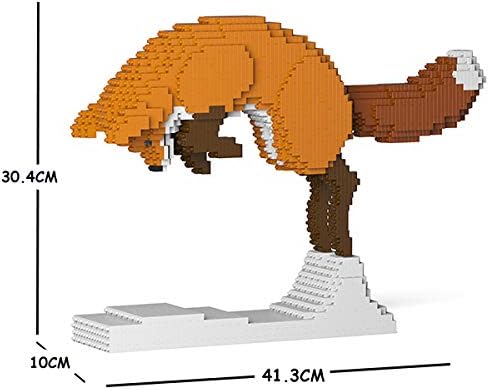
Image 7.1: Dimensions of the assembled JEKCA Fox 04S model.
8. Warranty and Support
For information regarding product warranty or to obtain support for your JEKCA Fox 04S building set, please refer to the contact information provided in the Quick Guide or visit the official JEKCA website. Ensure you have your model number (ST19FX04) ready when contacting support.

