
Introduction
Thank you for choosing the JEKCA Blue-and-Gold Macaw 01S building block set. This manual provides essential information for the assembly, care, and maintenance of your model. JEKCA building blocks utilize a unique interlocking brick-through system, ensuring a sturdy and detailed final product. This set is designed for individuals aged 14 years and above, offering an engaging and rewarding building experience.
Please read these instructions carefully before beginning assembly to ensure proper construction and enjoyment of your JEKCA model.
Safety Information
- Small Parts Warning: This product contains small parts which may pose a choking hazard. Keep out of reach of children under 3 years of age.
- Recommended for ages 14 and above. Adult supervision is advised for younger builders within the recommended age range.
- Do not ingest any components.
- Handle the pin driver and pins with care to avoid injury.
What's in the Box
Verify that all components are present before starting assembly:
- JEKCA Bricks (over 730 pieces)
- Instruction Manual (detailed, model-specific)
- Pin Driver
- Pins (various sizes)
- Quick Guide

Image: Assortment of JEKCA building bricks, representing the components included in the set.
Setup and Assembly Instructions
The JEKCA Blue-and-Gold Macaw 01S model is assembled using a patented interlocking brick-through system. This method involves securing each brick with small pins and a pin driver, creating a highly stable and durable structure. Follow the detailed, step-by-step instructions provided in the included model-specific instruction manual.
General Assembly Steps:
- Identify Bricks and Pins: Refer to your model's instruction manual to identify the correct bricks and corresponding pin sizes for each step. Pins are typically color-coded or numbered to match specific brick types.
- Position Bricks: Place the bricks according to the manual's diagrams, ensuring they align correctly.
- Insert Pins: Use the provided pin driver to insert the appropriate pin through the designated holes in the bricks. The pin should pass through both bricks to secure them together.
- Secure Connection: Once the pin is inserted, turn the pin driver 90 degrees to lock the pin in place, creating a strong, interlocking connection.
- Repeat: Continue this process for all subsequent layers and sections of the model, following the manual's sequence.
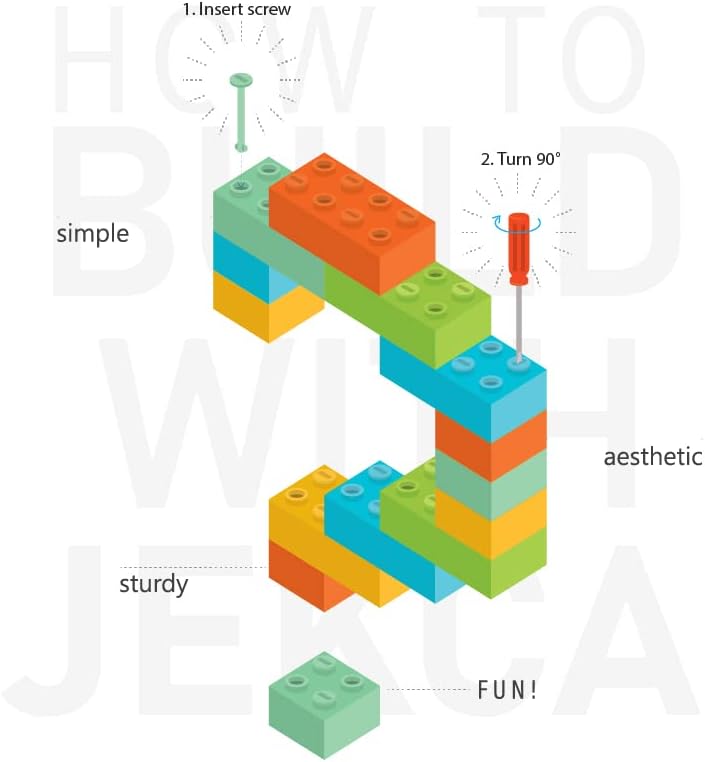
Image: Basic diagram showing how to insert and secure a pin using the JEKCA interlocking system.

Image: Visual representation of the patented interlocking brick-through technology, highlighting the secure connection.
Operating Instructions
For JEKCA building block sets, 'operating' refers to the assembly process itself. The primary instruction is to meticulously follow the included model-specific instruction manual. Each step in the manual is crucial for the structural integrity and accurate appearance of the Blue-and-Gold Macaw model.
- Patience is Key: Building intricate models requires patience and attention to detail. Do not rush the assembly process.
- Verify Each Step: Before proceeding, ensure that the current section is correctly assembled and all pins are securely fastened.
- Use Correct Pins: The instruction manual will specify which size and type of pin to use for different connections. Using the wrong pin can compromise the model's stability.
- Enjoy the Process: The joy of JEKCA comes from the detailed and satisfying construction. Take your time to appreciate each stage of building your Blue-and-Gold Macaw.
Maintenance
Once assembled, your JEKCA Blue-and-Gold Macaw 01S model requires minimal maintenance to preserve its appearance and structural integrity.
- Cleaning: To remove dust, gently wipe the model with a soft, dry cloth. For more stubborn dirt, a slightly damp cloth can be used, followed by immediate drying. Avoid harsh chemicals or abrasive cleaners.
- Storage: Store the assembled model in a stable location away from direct sunlight, extreme temperatures, and high humidity to prevent material degradation or discoloration.
- Handling: While the interlocking system provides excellent stability, avoid dropping or applying excessive force to the model, as this could dislodge bricks or pins.
Troubleshooting
If you encounter issues during assembly or with your completed model, consider the following:
- Bricks Not Holding: Ensure the correct pins are used for the specific bricks and that the pin driver has been turned 90 degrees to fully lock the connection. Re-check the instruction manual for the correct pin type and placement.
- Missing Parts: Carefully check all packaging materials. If parts are genuinely missing, contact JEKCA customer support with your product model number and details of the missing components.
- Difficulty Understanding Instructions: The included instruction manual is highly visual. Review the diagrams carefully. If you still face difficulties, consider searching for online community forums or video tutorials related to JEKCA assembly for additional visual guidance.
Specifications
| Feature | Detail |
|---|---|
| Model Name | Blue-and-Gold Macaw 01S |
| Model Number | ST19MA03 |
| Number of Pieces | 730+ |
| Assembled Dimensions (L x W x H) | 7.4 x 3.19 x 12.48 inches (approx. 18.8 x 8.1 x 31.7 cm) |
| Item Weight | 0.71 Kilograms |
| Material Type | Plastic |
| Age Range Description | Recommended for 14 or above |
| Assembly Required | Yes |
| Educational Objective | Concentration, Construction Skills |
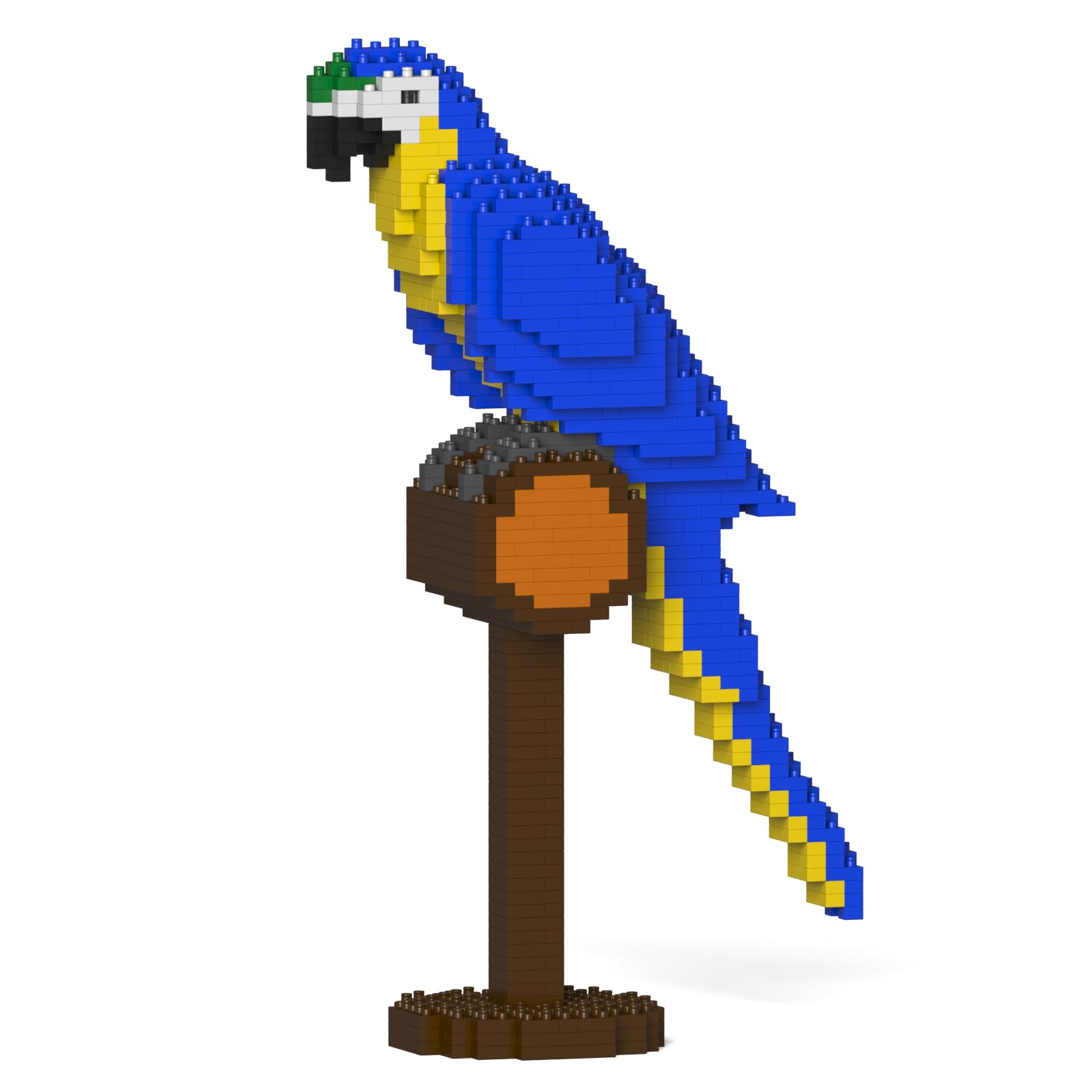
Image: The completed JEKCA Blue-and-Gold Macaw 01S model, showcasing its dimensions.
Warranty Information
Specific warranty details for JEKCA products may vary. For information regarding product warranty, returns, or replacements, please refer to the purchase documentation or contact the retailer where the product was acquired. Alternatively, you may reach out to JEKCA customer support directly for assistance.
Support
For further assistance, inquiries about parts, or detailed product support, please visit the official JEKCA store or contact their customer service department.
JEKCA Store: https://www.amazon.com/stores/JEKCA/page/D9AB5696-E11C-4CA6-8DBD-11FAA3EE3A14
When contacting support, please have your model number (ST19MA03) and purchase details readily available.