
1. Safety Information
This product contains small parts and is recommended for individuals aged 14 years and above. Keep small parts away from young children to prevent choking hazards. Adult supervision is advised for younger users within the recommended age range.
2. Package Contents
Your JEKCA Horse ST19HS03-M01 building block set includes:
- Over 1500 individual plastic building pieces.
- Detailed building manual with step-by-step instructions.
- Special interlocking pins and tools for assembly.
3. Assembly Instructions
The JEKCA building system utilizes a unique interlocking brick-through mechanism to create sturdy and durable models. Please follow the included detailed building manual for precise assembly steps.
3.1. Understanding the Interlocking System
The JEKCA system involves connecting blocks using small pins that pass through the blocks, securing them firmly. This method ensures the completed model is robust and less prone to accidental disassembly.

Figure 1: Illustration of the JEKCA interlocking assembly process. Blocks are aligned, pins are inserted, and then rotated 90 degrees to secure the connection.

Figure 2: A specialized tool (screwdriver) is used to insert and rotate the interlocking pins, ensuring a tight fit.
3.2. General Assembly Steps
- Unpack and Organize: Carefully unpack all pieces. It is recommended to sort the blocks by color and shape to facilitate easier assembly.
- Refer to Manual: Follow the step-by-step instructions provided in the included building manual. Each step will illustrate which blocks to use and where to place them.
- Interlock Blocks: As shown in Figure 1 and Figure 2, align the blocks, insert the pins through the designated holes, and rotate the pins 90 degrees using the provided tool to lock them securely.
- Verify Connections: Ensure each connection is firm before proceeding to the next step. The sturdy interlocking system prevents the model from easily breaking apart.
- Complete the Model: Continue following the manual until all sections are assembled and the Horse model is complete.
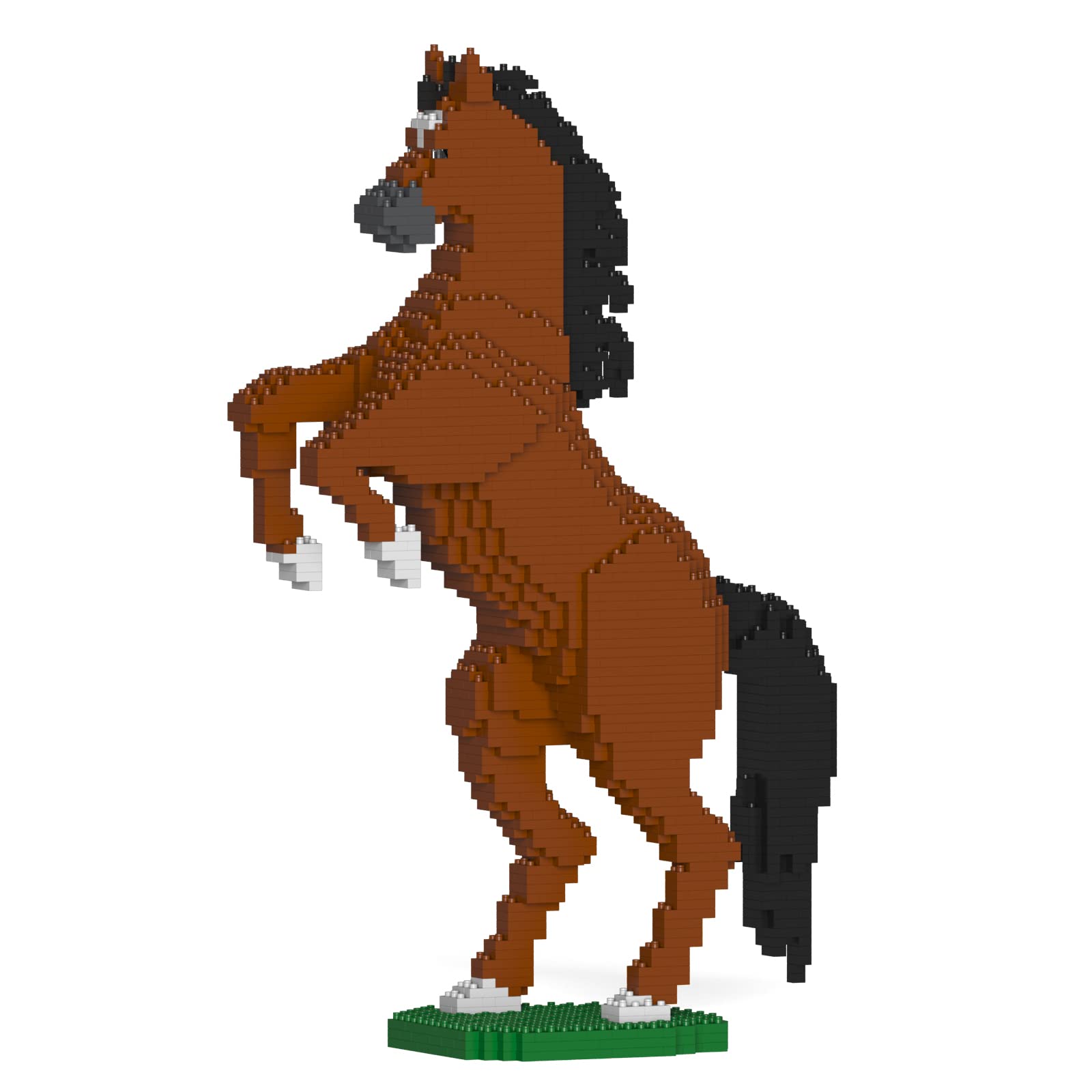
Figure 3: The fully assembled JEKCA Horse ST19HS03-M01 model.
4. Maintenance
To maintain the appearance and integrity of your JEKCA model:
- Cleaning: Dust the model regularly with a soft, dry cloth. For deeper cleaning, gently wipe with a damp cloth and mild soap, then dry thoroughly. Avoid harsh chemicals.
- Storage: Store the model in a cool, dry place away from direct sunlight to prevent discoloration or material degradation.
- Handling: While sturdy, avoid dropping or applying excessive force to the model to prevent damage to the interlocking connections.
5. Troubleshooting
If you encounter issues during assembly:
- Missing Pieces: Double-check all packaging and sorting areas. If pieces are genuinely missing, contact JEKCA customer support with details of the missing parts.
- Difficulty Connecting Blocks: Ensure the pins are correctly aligned and fully inserted before rotating. Apply gentle, even pressure. If a pin is bent, try using a spare or contact support.
- Model Instability: Re-examine the most recently assembled sections to ensure all pins are properly locked and blocks are firmly connected as per the manual.
6. Specifications
| Model Number | ST19HS03-M01 |
| Product Identifier | 03S-M01 |
| Product Dimensions | 10.8 x 5.16 x 17.4 inches (27.4 x 13.1 x 44.2 cm) |
| Item Weight | 2.66 pounds (1.21 kg) |
| Recommended Age | 14 years and up |
| Number of Pieces | Greater than 1500 |
| Manufacturer | L10 Srl |
7. Warranty and Support
For warranty information, missing parts, or further assistance, please contact JEKCA customer support directly. Refer to the contact details provided in your product packaging or visit the official JEKCA website.
JEKCA Official Store: Visit JEKCA Store on Amazon