
1. Introduction
This manual provides essential information for the proper installation, operation, and maintenance of your Shellbox YOGRE IP68 Waterproof Watch Case. Designed specifically for Apple Watch 42mm Series 2 and 3, this case offers robust protection against water, drops, and scratches, ensuring your device remains functional in various environments.
2. Package Contents
Please verify that all items listed below are included in your package:
- 1 x Shellbox YOGRE 42mm Waterproof Watch Case
- 2 x Soft Silicone Watch Bands (different sizes)
- 1 x Installation Tool Kit
- 1 x User Manual
3. Compatibility
This Shellbox YOGRE Waterproof Watch Case is exclusively designed for Apple Watch 42mm Series 2 and Series 3. It is not compatible with 38mm models or other Apple Watch series.

4. Installation
Follow these steps to properly install your Apple Watch into the Shellbox YOGRE case:
- Prepare the Watch: Ensure your Apple Watch is clean and free of any dust, debris, or moisture. Remove any existing screen protectors or cases.
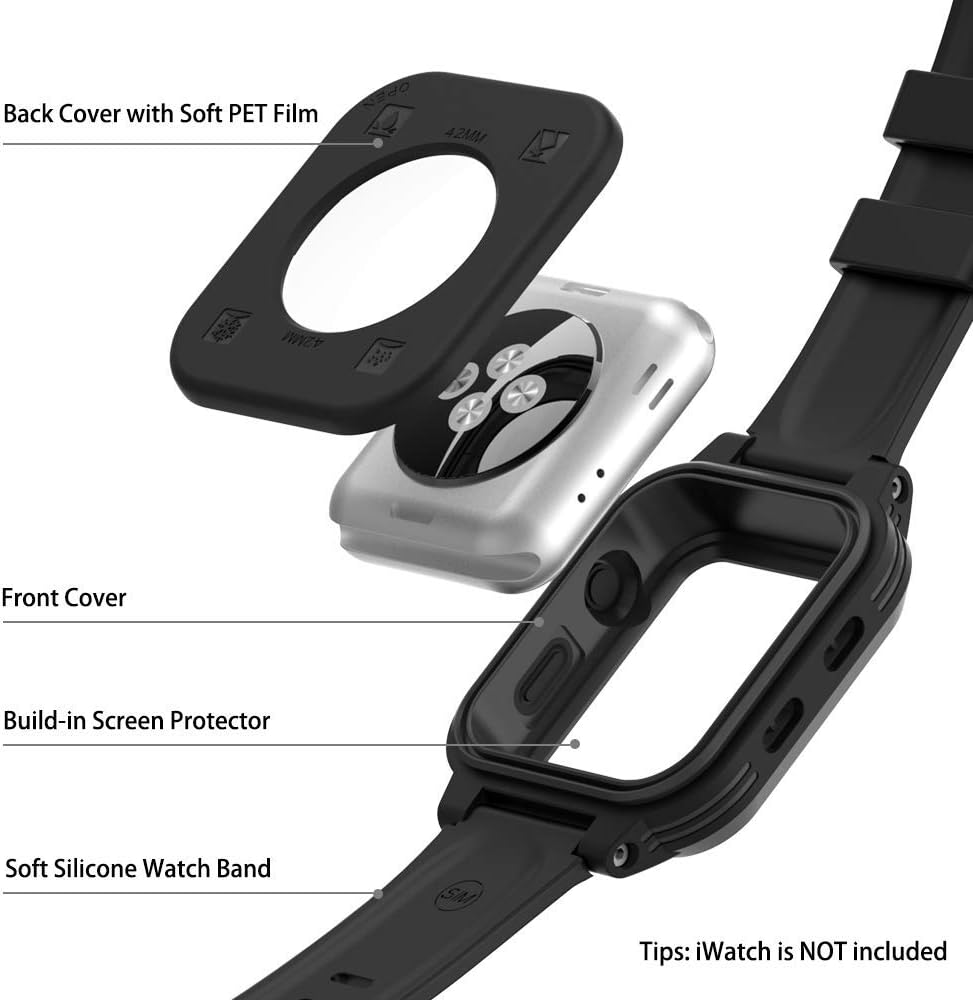
- Open the Case: Use the provided plastic pry tool to carefully separate the front and back covers of the waterproof case. Gently run the tool around the seam until the case opens. Avoid excessive force to prevent damage to the rubber seal.
- Insert the Watch: Place your Apple Watch into the front cover of the case, ensuring the Digital Crown and side button align correctly with the case's openings. Insert the watch with the crown side first.
- Close the Case: Align the back cover with the front cover and press firmly around the edges until it snaps securely into place. Ensure the rubber seal is evenly seated around the entire perimeter of the case to maintain its waterproof integrity.
- Attach Watch Bands: Use the provided installation tool to attach the silicone watch bands to the case.
Important Note:
- Before initial use, and after any reassembly, perform a waterproof test with the empty case to ensure the seals are intact.
- Make sure your Apple Watch screen is clear before installation.
5. Operating Instructions
The Shellbox YOGRE case is designed to allow full functionality of your Apple Watch while providing protection. All buttons, the Digital Crown, and the touchscreen remain accessible and responsive.
- Digital Crown & Side Button: The case features integrated buttons that allow seamless operation of the Digital Crown and side button.
- Touchscreen: The built-in screen protector ensures sensitive touch response for all screen interactions.
- Sensors & Charging: The case is designed to allow wireless charging and proper function of the heart rate monitor and other sensors.


6. Waterproof Testing
The Shellbox YOGRE case is IP68 certified, meaning it can withstand submersion up to 6.6 feet (2 meters) for 1 hour. To ensure the integrity of your case, perform a waterproof test before each use, especially after opening or reassembling the case.
- Empty Case Test: Before installing your Apple Watch, place the empty case (without the watch inside) into water for at least 30 minutes.
- Inspect: After 30 minutes, remove the case and thoroughly dry its exterior. Open the case and inspect the interior for any signs of water ingress.
- Proceed with Caution: If any water is found, do not use the case with your Apple Watch. Re-check all seals and ensure the case is properly closed. Repeat the test if necessary. If the issue persists, contact customer support.
7. Shockproof Features
The Shellbox YOGRE case provides 360-degree full body protection using PC, TPU, and PET materials, along with a rubber edge for enhanced shock absorption. It is designed to withstand drops from up to 6.6 feet (2 meters).

8. Maintenance
To ensure the longevity and performance of your Shellbox YOGRE case, follow these maintenance guidelines:
- Cleaning: Rinse the case with fresh water after exposure to saltwater, chlorine, or dirt. Use a soft cloth to wipe it dry. Avoid harsh chemicals or abrasive materials.
- Seal Inspection: Regularly inspect the rubber seals for any signs of wear, tears, or deformation. Damaged seals can compromise the waterproof integrity.
- Storage: Store the case in a cool, dry place away from direct sunlight and extreme temperatures when not in use.
9. Troubleshooting
If you encounter any issues with your Shellbox YOGRE case, refer to the following common solutions:
- Water Leakage: If water enters the case during a test, immediately remove the case from water. Re-open the case, carefully inspect the rubber seals for proper seating and any damage. Ensure the case is closed tightly and evenly. Repeat the waterproof test with the empty case.
- Unresponsive Touchscreen: Ensure the Apple Watch is properly seated within the case and that there is no debris between the screen and the built-in screen protector. Clean the screen protector if smudges are present.
- Buttons Not Working: Verify that the Apple Watch is correctly aligned within the case, allowing the case's buttons to make proper contact with the watch's controls.
For persistent issues, please contact customer support.
10. Specifications
| Product Brand | SHELLBOX |
| Material | TPU + PC |
| Compatibility | Apple Watch 42mm Series 2 & 3 |
| Waterproof Rating | IP68 (6.6 ft / 2 meters for 1 hour) |
| Shockproof Rating | Withstands drops from 6.6 ft |
| Special Features | Durable, Screen Protector, Shock Absorbent |
| Wireless Charging | Supported |
| Product Dimensions | 15.99 x 8.99 x 1 inches |
| Item Weight | 1.2 ounces |

11. Warranty and Support
Your Shellbox YOGRE Waterproof Watch Case comes with a 12-month guarantee and lifetime technical support. For any inquiries, assistance, or warranty claims, please contact our customer support team through the retailer where you purchased the product.