
Introduction
This manual provides detailed instructions for the proper setup, operation, and maintenance of your EMB Professional Wireless Microphone System. This system includes two handheld microphones and one cordless FM receiver, designed for reliable audio transmission. Please read this manual thoroughly before using the product to ensure optimal performance and longevity.
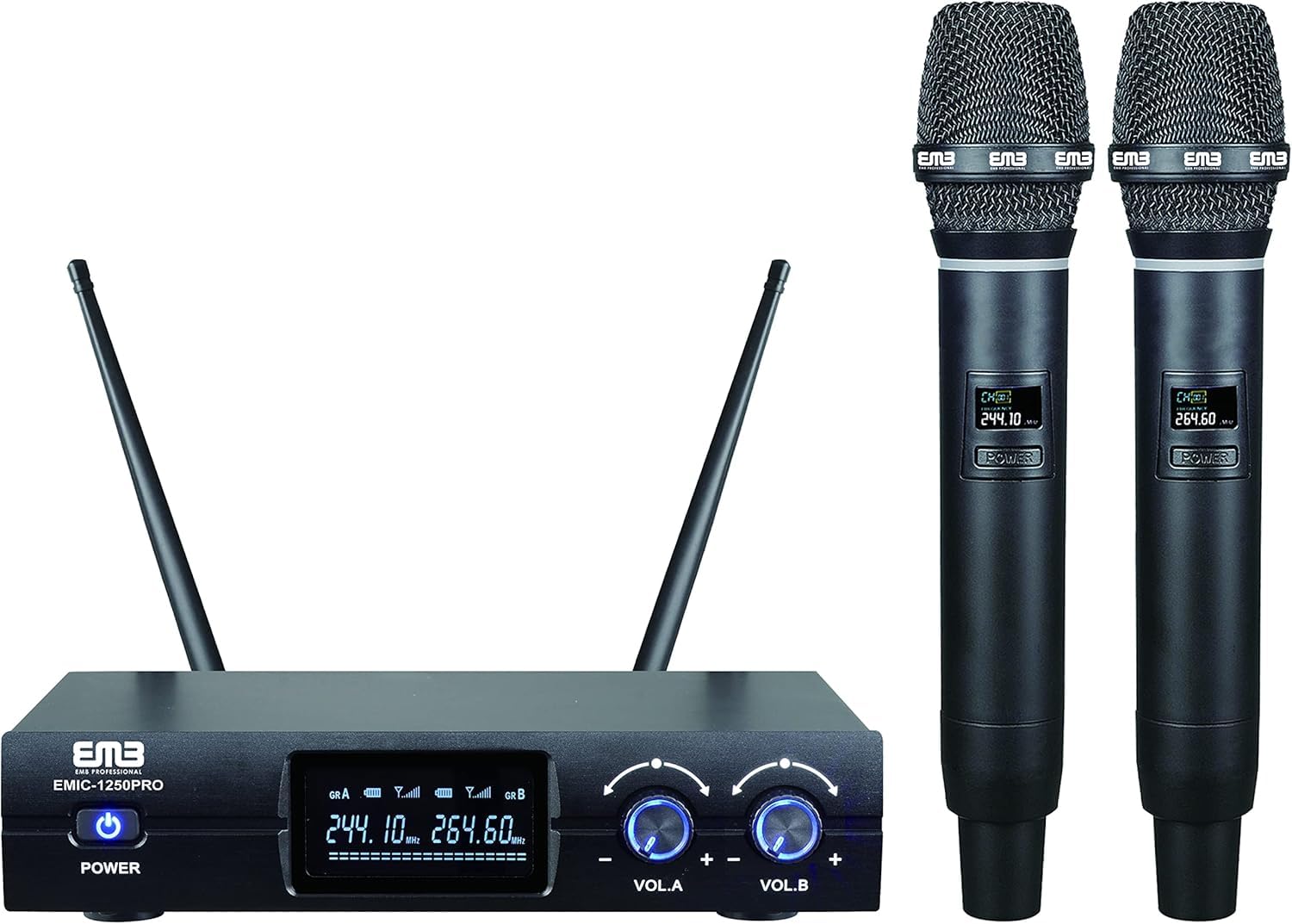
Figure 1: Overview of the EMB Professional Wireless Microphone System, showing the receiver and two handheld microphones.
Setup Instructions
- Unpacking: Carefully remove all components from the packaging. Verify that all items are present: one receiver unit, two handheld microphones, and one 1/4" jack cable.
- Receiver Placement: Place the receiver unit on a stable, flat surface, away from potential sources of interference such as other wireless devices, large metal objects, or strong electromagnetic fields. Ensure adequate ventilation around the unit.
- Connect the Receiver: Connect the included 1/4" jack cable from the receiver's audio output to the input of your audio mixer, amplifier, or speaker system.
- Power the Receiver: Connect the provided power adapter to the receiver's DC input and then to a standard electrical outlet.
- Microphone Battery Installation: Each handheld microphone requires two 9V batteries (included). Unscrew the bottom part of the microphone handle to reveal the battery compartment. Insert the batteries, observing the correct polarity (+/-). Securely reattach the bottom part of the microphone.
- Power On: Turn on the receiver unit using its power button. Then, turn on each handheld microphone using its respective power button. The receiver display should indicate a connection to the microphones.
- Frequency Synchronization: The system operates within the FM121.7-128.7MHz frequency range. The microphones and receiver are typically pre-synchronized. If a connection issue occurs, refer to the troubleshooting section or consult the manufacturer for specific frequency adjustment procedures if available for your model.

Figure 2: The EMB Professional Wireless Microphone System receiver unit with antenna extended.

Figure 3: Close-up view of an EMB handheld microphone, showing the display and power button.
Operating Instructions
- Microphone Usage: Hold the microphone approximately 2-6 inches from your mouth for optimal sound capture. Avoid covering the microphone grille with your hand, as this can affect sound quality and signal strength.
- Volume Adjustment: Adjust the volume levels on your connected audio mixer, amplifier, or speaker system. Start with low volume and gradually increase to a comfortable listening level to prevent feedback.
- Range: The wireless system has an effective operating range. Maintain a clear line of sight between the microphones and the receiver for best performance. Obstacles such as walls or large crowds can reduce the effective range.
- Battery Life: Monitor the battery indicator on the microphone (if available) or replace batteries regularly to avoid unexpected power loss during use.

Figure 4: Example of using the EMB wireless microphone system in a social setting.
Maintenance
- Cleaning: Use a soft, dry cloth to clean the exterior of the receiver and microphones. Do not use liquid cleaners or solvents, as these can damage the components.
- Battery Replacement: Replace microphone batteries when the low battery indicator appears or when sound quality degrades. Always use fresh 9V batteries. Remove batteries if the microphones will not be used for an extended period to prevent leakage.
- Storage: Store the system in a cool, dry place, away from direct sunlight, extreme temperatures, and high humidity.
- Cable Care: Avoid bending or twisting cables excessively. Store cables neatly to prevent damage.
Troubleshooting
| Problem | Possible Cause | Solution |
|---|---|---|
| No sound from microphone | Microphone or receiver not powered on; dead batteries; incorrect cable connection; receiver not connected to audio system; microphone out of range. | Ensure all units are powered on. Replace microphone batteries. Check all cable connections. Verify receiver is connected to an active audio input. Move microphone closer to receiver. |
| Poor sound quality or interference | Low microphone battery; interference from other wireless devices; microphone too far from receiver; obstructions; incorrect frequency. | Replace microphone batteries. Move receiver away from other electronic devices. Reduce distance between microphone and receiver. Ensure clear line of sight. |
| Microphone cuts out intermittently | Weak signal due to distance or obstruction; low battery; strong interference. | Reduce distance to receiver. Clear obstructions. Replace batteries. Identify and mitigate sources of interference. |
Specifications
| Feature | Detail |
|---|---|
| Brand | EMB |
| Model Name | PK1LCW413 / EM1250 |
| Connectivity Technology | XLR (Receiver output) |
| Connector Type | XLR (Receiver output) |
| Special Feature | Wireless |
| Compatible Devices | Speaker, Mixer, Amplifier |
| Included Components | 2 Microphones, 1 Receiver, 1X 1/4" Jack Cable |
| Polar Pattern | Unidirectional |
| Audio Sensitivity | 50 Decibels |
| Microphone Form Factor | Microphone System (Handheld) |
| Power Source (Microphone) | Battery Powered |
| Number of Batteries (Microphone) | 2 x 9V batteries required per microphone (included) |
| Signal-to-Noise Ratio | 80 dB |
| Number of Channels | 2 |
| Frequency Response | 128.7 MHz |
| Frequency Range | FM121.7-128.7MHz (100 Hz - 10 kHz) |
| Audible Noise | 80 Decibels |
| Item Weight | 1 Pound (total system) |
| Item Dimensions | 9 x 12 x 8 inches (packaging/system) |
Warranty Information
EMB products are manufactured to high-quality standards. For specific warranty terms and conditions, please refer to the warranty card included with your product or visit the official EMB website. Keep your purchase receipt as proof of purchase for any warranty claims.
Customer Support
If you encounter any issues not covered in this manual or require further assistance, please contact EMB customer support. Contact information can typically be found on the product packaging, the official EMB website, or through your retailer.