
1. Introduction
This manual provides instructions for the proper use and maintenance of the Wagner Meters Orion 940 Pinless Wood Moisture Meter. The Orion 940 is designed for accurate, non-damaging measurement of moisture content in wood and other materials, featuring dual-depth measurement, data collection, and on-site calibration capabilities.

Image 1.1: The Orion 940 Pinless Wood Moisture Meter.
2. Safety Information
Please read and understand all safety instructions before operating the Orion 940 moisture meter. Failure to follow these instructions may result in damage to the device or inaccurate readings.
- Keep the device dry. Do not expose it to moisture or extreme temperatures.
- Avoid dropping the device or subjecting it to severe impacts.
- Use only the specified battery type (9V).
- Do not attempt to open or repair the device. Refer servicing to qualified personnel.
- Keep out of reach of children.
3. Package Contents
The Orion 940 Data Collection Moisture Meter Kit includes the following items:
- Orion 940 Wood Moisture Meter
- Paired On-Demand Calibrator
- Rubber Protective Boot
- Foam-lined ABS Plastic Carrying Case
- 9V Battery (included)
- Species Settings Booklet
- Instruction Manual (this document)
- Common Flooring Materials Settings Reference Card

Image 3.1: Contents of the Orion 940 kit.
4. Product Overview
The Orion 940 meter is a pinless moisture meter designed for precise and non-invasive moisture content measurement. Key features include:
- Dual Depth Measurement: Measures moisture at 0.25 inches (6.4mm) and 0.75 inches (19mm) depths.
- Data Collection and Storage: Stores up to 100 readings with high-low-average analysis.
- On-site Calibration: Allows for field calibration using the included On-Demand Calibrator.
- Intellisense Technology: Ensures accurate readings largely unaffected by surface temperature.
- Relative Measurement Mode: For non-solid wood materials like engineered wood or drywall.
- Adjustable Backlit Screen: Improves visibility in various lighting conditions.

Image 4.1: Front view of the Orion 940 with labeled controls.
The meter features an LCD display, control buttons for power, audio, depth, data, species/material selection, and navigation (up/down).
5. Setup
5.1. Battery Installation
- Locate the battery compartment on the back of the meter.
- Open the compartment cover.
- Insert the 9V battery, ensuring correct polarity.
- Close the battery compartment cover securely.
5.2. Initial Calibration
The Orion 940 comes factory calibrated. For optimal accuracy, perform an on-site calibration using the provided calibrator before first use and periodically thereafter.
- Turn on the meter by pressing the ON/HOLD button.
- Place the meter flat on the On-Demand Calibrator.
- Follow the on-screen prompts to initiate and complete the calibration process. This typically takes about 30 seconds.

Image 5.1: Performing on-site calibration with the calibrator.
6. Operating Instructions
6.1. Basic Moisture Measurement
- Turn on the meter.
- Select the appropriate wood species setting using the SPECIES/MATERIAL button and UP/DOWN arrows. Refer to the Species Settings Booklet.
- Place the sensor pad on the surface of the wood to be measured. Ensure full contact.
- The moisture content percentage will display on the screen.

Image 6.1: Measuring moisture content in wood.
6.2. Dual Depth Measurement
The Orion 940 can measure at two depths: 0.25 inches (shallow) and 0.75 inches (deep).
- After turning on the meter, press the DEPTH button to toggle between the shallow and deep measurement modes.
- The selected depth will be indicated on the display.
- Proceed with measurement as described in Section 6.1.

Image 6.2: Illustration of dual depth measurement capability.
6.3. Relative Measurement Mode
This mode is suitable for comparing moisture levels in non-solid wood materials such as engineered wood, drywall, or other building materials.
- Press the SPECIES/MATERIAL button repeatedly until "Relative" mode is selected.
- Place the meter on the material to be measured. The display will show a relative moisture value.
- Use this value for comparative analysis across different areas of the same material.
6.4. Data Collection and Storage
The Orion 940 can store up to 100 readings and perform basic statistical analysis.
- To save a reading, press the DATA button after a stable measurement is displayed.
- The meter supports both manual and automatic data collection modes. Consult the full instruction manual for detailed setup of automatic data logging.
- To view stored data and statistics (high, low, average), navigate through the data menu using the DATA button and UP/DOWN arrows.
6.5. Audio Alarm
The meter features an adjustable audio alarm to alert users when moisture readings exceed a set threshold.
- Press the AUDIO button to activate or deactivate the alarm.
- To adjust the alarm threshold, enter the settings menu (refer to the full manual) and use the UP/DOWN arrows.
7. Maintenance
7.1. Cleaning
Wipe the meter with a soft, dry cloth. Do not use abrasive cleaners or solvents. Ensure the sensor pad is clean and free of debris for accurate readings.
7.2. Storage
When not in use, store the Orion 940 in its protective carrying case in a dry, temperature-controlled environment. Remove the battery if storing for extended periods to prevent leakage.
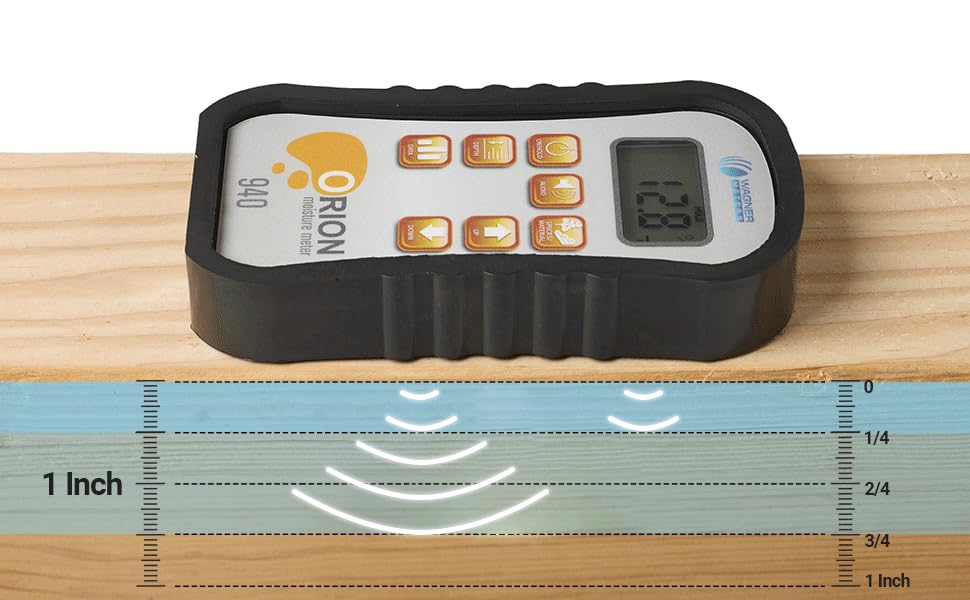
Image 7.1: Orion 940 stored in its protective case.
8. Troubleshooting
| Problem | Possible Cause | Solution |
|---|---|---|
| Meter does not turn on | Dead or incorrectly installed battery | Replace battery or check polarity |
| Inaccurate readings | Not calibrated; improper contact with material; incorrect species setting | Perform on-site calibration; ensure full sensor contact; verify species setting |
| Display is dim or unreadable | Low battery; backlight setting | Replace battery; adjust backlight intensity |
| Data not saving | Memory full; incorrect data collection mode | Clear memory (refer to manual); check data collection settings |
9. Specifications
- Model Number: ORION940
- Product Dimensions: 5.75 x 3 x 1 inches
- Weight: 1.52 Pounds
- Battery: 1 x 9V battery (included)
- Upper Temperature Rating: 110 Degrees Fahrenheit
- Temperature Accuracy: 0.5 degrees
- Measurement Depth: 0.25 inches and 0.75 inches
- Data Storage: Up to 100 readings
10. Warranty and Support
10.1. Warranty Information
The Wagner Meters Orion 940 Pinless Wood Moisture Meter comes with an industry-leading 7-year warranty. This warranty covers defects in materials and workmanship under normal use. For full details and terms, please refer to the warranty card included with your product or visit the official Wagner Meters website.
10.2. Customer Support
For technical assistance, troubleshooting, or warranty claims, please contact Wagner Meters customer service. Knowledgeable moisture experts are available to assist with any inquiries.
Visit the Wagner Meters Store on Amazon for more information or to contact support.