
Easytry123 Easytry3739
Instruction Manual for Easytry123 Remote Control
Model: Easytry3739 for COMFORTSTAR AC Air Conditioners
Introduction
This manual provides essential information for the proper setup, operation, and maintenance of your Easytry123 replacement remote control. This remote is designed to be compatible with specific COMFORTSTAR AC Air Conditioner models, including CCH018CD-410, CCH024CD, CCH024CD-410, and CCH018CD.
Important Note: As a replacement unit, this remote control may not support all functions of your original air conditioner remote. Please verify compatibility with your specific AC model before use.
Setup
Battery Installation
The remote control requires two (2) AAA batteries for operation. Batteries are not included with the remote and must be purchased separately.
- Locate the battery compartment on the back of the remote control.
- Slide the battery compartment cover downwards or press the release tab (if present) to open it.
- Insert two AAA batteries, ensuring the positive (+) and negative (-) terminals align correctly with the markings inside the compartment. Incorrect insertion can prevent the remote from functioning.
- Slide the battery compartment cover back into place until it clicks securely.

Figure 1: Rear view of the remote control with the battery cover removed, illustrating the battery insertion area.

Figure 2: Rear view of the remote control with the battery cover securely closed.
Operating Instructions
This remote control operates using infrared (IR) technology. For proper function, ensure there is a clear line of sight between the remote's IR emitter and the air conditioner's receiver. Point the remote directly at the AC unit when pressing buttons.
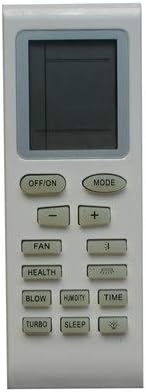
Figure 3: Front view of the Easytry123 remote control with its various function buttons.
Button Functions
- OFF/ON: Powers the air conditioner on or off.
- MODE: Cycles through available operating modes (e.g., Cool, Heat, Fan, Dry, Auto).
- - / +: Adjusts temperature settings, fan speed, or time values.
- FAN: Controls the fan speed (e.g., Low, Medium, High, Auto).
- HEALTH: Activates or deactivates the health/purification function (if supported by AC unit).
- BLOW: Initiates or stops the blow function, often used to dry the indoor coil.
- HUMIDITY: Controls humidity-related functions (if supported by AC unit).
- TIME: Used for setting timer functions (e.g., auto-on/off).
- TURBO: Activates a rapid cooling or heating mode for quick temperature changes.
- SLEEP: Engages the sleep mode, which adjusts temperature and fan speed for comfortable sleep.
Note: The functionality of certain buttons (e.g., HEALTH, HUMIDITY, BLOW) depends on the features present in your specific COMFORTSTAR AC unit. If your AC unit does not support a particular function, the corresponding button on the remote may not elicit a response.
Maintenance
Cleaning the Remote
To maintain the remote control's appearance and functionality, wipe it regularly with a soft, dry cloth. Do not use liquid cleaners, abrasive cleaners, or chemical solvents, as these can damage the remote's surface or internal components.
Battery Care
- If the remote control will not be used for an extended period (e.g., several weeks or months), remove the batteries to prevent leakage and potential damage to the remote.
- Replace batteries when the remote's performance degrades or the display becomes dim.
- Dispose of used batteries responsibly according to local regulations.
Troubleshooting
- Remote not responding:
- Check if the batteries are inserted correctly with the correct polarity (+/-).
- Replace old or depleted batteries with new AAA batteries.
- Ensure there are no obstructions between the remote and the air conditioner's receiver.
- Confirm you are pointing the remote directly at the AC unit.
- Certain functions do not work:
- This replacement remote may not support all advanced or specific functions of your original AC unit. Refer to your air conditioner's original manual for its full capabilities.
- Ensure your AC model is listed as compatible with this remote (CCH018CD-410, CCH024CD, CCH024CD-410, CCH018CD).
- Remote display is dim or blank:
- Replace the batteries.
Specifications
| Brand | Easytry123 |
| Model Number | Easytry3739 |
| Compatible Devices | COMFORTSTAR CCH018CD-410, CCH024CD, CCH024CD-410, CCH018CD AC Air Conditioners |
| Battery Type | 2 x AAA batteries (not included) |
| Connectivity Technology | Infrared (IR) |
| Special Feature | Ergonomic design |
| Max Number of Supported Devices | 1 |
Warranty and Support
Information regarding specific warranty terms or direct customer support for this Easytry123 remote control is not available in the provided product data. For any issues or inquiries, please refer to the seller or retailer from whom the product was purchased.
Ask a question about this manual
Ask about setup, troubleshooting, compatibility, parts, safety, or missing instructions. Manuals+ will review the question and use this page’s manual context to help answer it.