
1. Introduction
This document provides essential instructions for the Easytry123 replacement remote control, model Easytry3756. This remote is designed to operate specific Sanyo AC air conditioner units. It is a direct replacement and does not require programming or setup. Please ensure your Sanyo AC model is listed in the compatibility section before use.

Figure 1: Front view of the Easytry123 Replacement Remote Control.
2. Setup and Battery Installation
The Easytry123 remote control requires two AAA batteries (not included). No additional setup or coding is necessary for operation.
- Locate the battery compartment on the back of the remote control.
- Slide the battery compartment cover downwards to open it.
- Insert two AAA batteries, ensuring correct polarity (+ and - terminals match the markings inside the compartment).
- Slide the battery compartment cover back into place until it clicks securely.
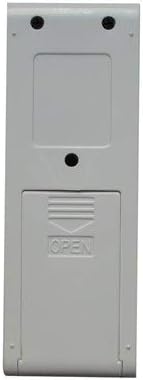
Figure 2: Back view of the remote control with the battery compartment.
3. Operating Instructions
Once batteries are installed, the remote is ready for use. Point the remote control directly at the Sanyo AC unit's receiver. Note that while this is a functional replacement, some advanced or specific functions of your original remote may not be available on this replacement unit.
Button Functions:
- OFF/ON: Powers the AC unit on or off.
- FAN: Adjusts the fan speed (e.g., Low, Medium, High, Auto).
- MODE: Cycles through operating modes (e.g., Cool, Heat, Fan, Dry, Auto).
- + / -: Increases or decreases the temperature setting.
- TURBO: Activates rapid cooling or heating for a short period.
- HEALTH: Activates air purification or health-related functions (if supported by AC unit).
- BLOW: Controls the air direction or swing function.
- HUMIDITY: Adjusts humidity settings or activates dehumidification mode.
- SLEEP: Activates sleep mode, which often adjusts temperature and fan speed for comfort during sleep.
- TIME: Used for setting timers (e.g., auto-on/off timer).
4. Compatibility Information
This Easytry123 replacement remote control is specifically designed for the following Sanyo AC air conditioner models:
- SAP-KRV9AEH
- SAP-KRV12AEH
- SAP-KRV9AG
- SAP-KRV12AG
- SAP-KRV18AG
- SAP-KRV22AG
Important: This remote is not a universal remote control. It is crucial to verify that your Sanyo AC unit's model number is listed above to ensure proper functionality.
5. Troubleshooting
- Remote not responding:
- Ensure fresh AAA batteries are correctly installed with proper polarity.
- Check if there are any obstructions between the remote control and the AC unit's receiver.
- Verify that you are within the effective operating range of the AC unit.
- Certain functions do not work:
- As a replacement remote, it may not support all functions present on the original remote control. Refer to your AC unit's original manual for specific feature availability.
6. Specifications
| Model Number: | Easytry3756 |
| Brand: | Easytry123 |
| Connectivity Technology: | Infrared |
| Controller Type: | Button Control |
| Batteries Required: | 2 x AAA (not included) |
| Special Feature: | Ergonomic design |
7. Warranty and Support
Specific warranty information for this replacement remote control is not provided in the product details. For any support inquiries or warranty claims, please contact the manufacturer, Easytry123, directly through their official channels or the retailer from whom the product was purchased.