Introduction
The ASUS ROG Ryujin 360 is an advanced all-in-one liquid CPU cooler designed to provide exceptional thermal performance for high-end gaming and professional workstations. It features a color OLED display for real-time system statistics and personalization, high-quality Noctua Industrial PPC PWM fans for efficient cooling with minimal noise, and ASUS Aura Sync RGB lighting for synchronized aesthetics. This manual provides detailed instructions for installation, operation, and maintenance to ensure optimal performance and longevity of your CPU cooler.
Package Contents
Verify that all components are present in the package before proceeding with installation:
- 1 x ROG Ryujin 360 Liquid Cooler (integrated pump with OLED display and micro fan)
- 3 x Noctua NF-F12 iPPC 2000 PWM 120mm Radiator Fans
- Accessory Pack of Screws and Brackets (for Intel and AMD sockets)
- Thermal Compound (pre-applied on cold plate)
- Quick Start Guide
- Required Motherboard Connectors:
- SATA Power Connector
- 4-pin Connector for AIO Cooler
- USB 2.0 Connector (for software control)

Image: The ASUS ROG Ryujin 360 AIO Liquid CPU Cooler, showing the pump block, tubing, and three 120mm radiator fans.

Image: A detailed view of one of the included Noctua NF-F12 iPPC 2000 PWM 120mm fans, highlighting its industrial design.
Compatibility
The ROG Ryujin 360 Liquid CPU Cooler is compatible with a wide range of Intel and AMD CPU sockets:
- Intel Sockets: LGA 1150, 1151, 1152, 1155, 1156, 1200, 1366, 2011, 2011-3, 2066
- AMD Sockets: AM4, TR4
Ensure your motherboard socket type matches the supported list for proper installation.
Key Features
- 1.77-inch Color OLED Display: Monitor real-time system statistics such as CPU temperature, frequency, voltage, and AIO pump RPM.
- Embedded Micro Fan: A small fan integrated into the pump housing actively cools the VRM (Voltage Regulator Module) and M.2 SSD areas, reducing temperatures by up to 20°C for enhanced system stability.
- Noctua Industrial PPC PWM Fans: Equipped with three 120mm Noctua NF-F12 iPPC 2000 PWM fans, known for their high airflow (122 Cubic Feet Per Minute) and static pressure (3.92 mmH2O) while maintaining low noise levels (36 dB(A)).
- Asetek 8th Generation Pump: Features an advanced pump design for improved cooling efficiency, higher flow rates, and quieter operation compared to previous generations.
- ASUS Aura Sync RGB: Individually addressable RGB lighting on the pump cover and fans allows for extensive customization and synchronization with other Aura Sync-compatible components.
- Durable Tubing and Radiator: Reinforced tubing and a robust radiator design ensure long-term reliability and minimal maintenance.
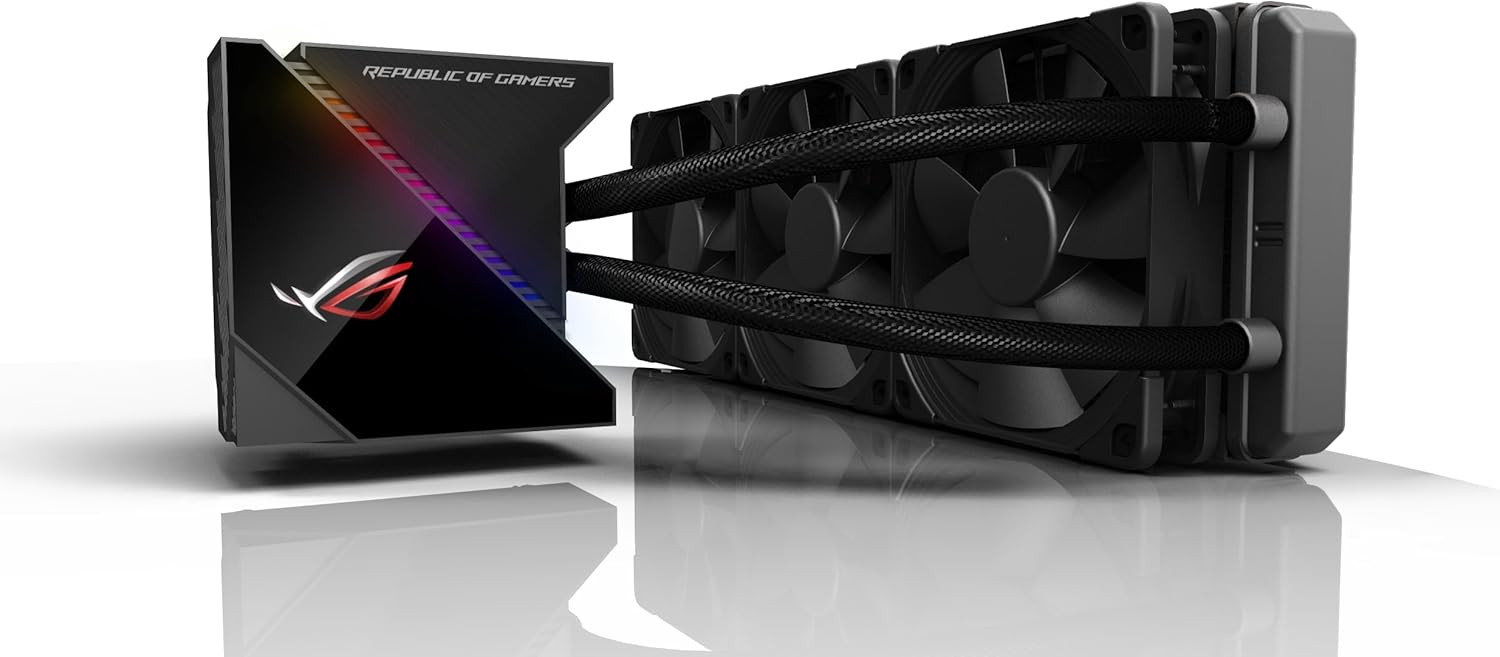
Image: Close-up of the pump block, showcasing the integrated OLED display and RGB lighting.
Setup and Installation
Before beginning installation, ensure your system is powered off and unplugged. Refer to the included Quick Start Guide for detailed, step-by-step instructions specific to your CPU socket type.
- Prepare the Radiator: Attach the three Noctua 120mm fans to the radiator using the provided screws. Ensure the fans are oriented to push or pull air in the desired direction for optimal airflow within your PC case.
- Install Mounting Brackets: Select the appropriate mounting brackets for your Intel or AMD CPU socket from the accessory pack. Secure them to the pump block according to the Quick Start Guide.
- Mount the Radiator: Install the radiator and fan assembly into your PC case. The 360mm radiator typically mounts to the top or front of the case.
- Position the Pump Block: Carefully place the pump block onto your CPU. The thermal compound is pre-applied, so no additional application is needed unless you are re-installing.
- Secure the Pump Block: Use the provided screws and backplate (if required for your socket) to firmly secure the pump block to the motherboard. Do not overtighten.
- Connect Cables:
- Connect the 4-pin pump cable to the designated AIO_PUMP or CPU_FAN header on your motherboard.
- Connect the fan cables to available fan headers on your motherboard or a fan controller.
- Connect the SATA power connector to your power supply.
- Connect the USB 2.0 header cable from the pump block to an available USB 2.0 header on your motherboard. This is crucial for controlling the OLED display and RGB lighting via ASUS software.
- Cable Management: Route all cables neatly to ensure proper airflow and a clean build aesthetic.
Video: An unboxing and overview of the ASUS ROG Ryujin RGB Liquid CPU Cooler, demonstrating the components and initial setup considerations. This video is provided by an influencer and offers visual guidance on the cooler's parts.
Operation
Once the cooler is installed and your system is powered on, you can customize its functionality and aesthetics using ASUS software.
OLED Display Customization
The 1.77-inch color OLED display on the pump block can be configured to show various information or custom content:
- System Stats: Display real-time CPU temperature, frequency, voltage, and AIO pump RPM.
- Custom Images/Animations: Upload personalized images or GIF animations to showcase your unique style.
- Live Dash Software: Use the ASUS Live Dash software (downloadable from the ASUS support website) to manage and customize the OLED display settings.
Aura Sync RGB Lighting
The integrated RGB lighting can be synchronized with other ASUS Aura Sync compatible components in your system:
- Aura Sync Software: Download and install the ASUS Aura Sync software to control lighting effects, colors, and synchronization across your entire system.
- Customization: Choose from a variety of preset lighting effects or create your own custom lighting profiles.
Maintenance
Regular maintenance helps ensure the longevity and optimal performance of your liquid CPU cooler.
- Dust Cleaning: Periodically clean dust from the radiator fins and fan blades using compressed air. Ensure fans are not spinning during cleaning.
- Check Tubing: Inspect the tubing for any signs of kinks, leaks, or damage.
- Software Updates: Keep your ASUS Live Dash and Aura Sync software updated to the latest versions for new features and bug fixes.
- Thermal Paste: While thermal paste is pre-applied, if you remove the pump block for any reason, it is recommended to clean off the old thermal paste and apply new high-quality thermal paste before re-installation.
Troubleshooting
If you encounter issues with your ROG Ryujin 360 cooler, refer to the following common troubleshooting tips:
- High CPU Temperatures:
- Ensure the pump block is securely mounted to the CPU.
- Verify that the fans are spinning and correctly oriented for airflow.
- Check if the pump is running (listen for a faint hum or check RPM in software).
- Clean any dust accumulation on the radiator fins.
- OLED Display Not Working/Flickering:
- Ensure the USB 2.0 header cable is securely connected to both the pump block and the motherboard.
- Update or reinstall ASUS Live Dash software.
- Some OLED displays may have an anti-burn-in feature that causes slight flickering or dimming; this is normal behavior.
- RGB Lighting Issues:
- Verify all RGB cables are properly connected.
- Ensure ASUS Aura Sync software is installed and updated.
- Check for conflicts with other RGB control software.
- Unusual Noises:
- A slight gurgling sound upon initial startup is normal as air bubbles clear. If persistent, gently tilt the PC case to help dislodge air.
- Ensure fans are not obstructed or touching any cables.
For further assistance, contact ASUS customer support.
Specifications
| Model Name | ROG Ryujin 360 |
| Item Model Number | 90RC0020-M0UAY0 |
| Product Dimensions (L x W x H) | 15.51" x 1.97" x 4.76" (394 x 50 x 121 mm) |
| Item Weight | 5.06 pounds (2.3 kg) |
| Cooling Method | Liquid |
| Fan Dimension | 3 x 120mm |
| Maximum Rotational Speed | 2000 RPM |
| Air Flow Capacity | 122 Cubic Feet Per Minute |
| Noise Level | 36 dB(A) |
| Power Connector Type | 4-Pin |
| Wattage | 1.2 watts |
| Material | Metal (Radiator: Aluminum, Block: Copper) |
| Color | Black |
| UPC | 767531801215 |
Warranty and Support
ASUS provides comprehensive support for its products. For the most up-to-date warranty information, please refer to the official ASUS product page or contact ASUS customer service directly. Keep your proof of purchase for warranty claims.
Online Support: Visit the ASUS Support Website for drivers, manuals, FAQs, and troubleshooting resources.
Contact Information: Refer to your region's ASUS website for specific contact details for technical support.