
BN-LINK BNC-60/U130T
BN-LINK Smart WiFi Heavy Duty Outdoor Outlet User Manual
Model: BNC-60/U130T | Brand: BN-LINK
Introduction
The BN-LINK Smart WiFi Heavy Duty Outdoor Outlet is designed to provide convenient and intelligent control over your outdoor electronic devices. This robust smart plug allows you to manage up to three devices simultaneously through a smartphone application or voice commands, offering features such as scheduling and countdown timers. Its IP44 weatherproof rating ensures reliable performance in various outdoor conditions.
Safety Information
- This device is intended for outdoor use only. Ensure it is installed in a location protected from direct water immersion.
- The product has an IP44 international protection rating, indicating resistance to splashing water and solid objects larger than 1mm.
- Always ensure the product is properly grounded before use.
- Do not exceed the maximum load capacity of 15 Amps or 1875 Watts. Overloading can cause damage to the device and pose a fire hazard.
- For optimal performance and safety, install the outlet vertically at least 2 feet (0.6 meters) above the ground.
- This device operates only on a 2.4 GHz Wi-Fi network. It is not compatible with 5 GHz networks.
Package Contents
- 1 x BN-LINK Smart WiFi Heavy Duty Outdoor Outlet
- 1 x User Manual (this document)
Product Overview
Familiarize yourself with the components of your BN-LINK Smart Outdoor Outlet:

Front view of the BN-LINK Smart WiFi Heavy Duty Outdoor Outlet, showcasing its design and the accompanying app interface.

This diagram illustrates the physical features of the smart outdoor outlet. It highlights the sensitive 3-prong plug, the mounting bracket for secure installation, and the three grounded outlets. Dimensions are provided as approximately 5.9 inches for the cord length and 4.84 inches by 4.33 inches for the main body.
Setup
Follow these steps to set up your BN-LINK Smart Outdoor Outlet:
- Download the App: Search for "BN-LINK Smart" in your smartphone's app store (Google Play Store or Apple App Store). Alternatively, you can use "Smart Life" or "Tuya Smart" apps, as they are compatible.
- Plug In the Device: Connect the smart outdoor outlet to a power source. The indicator light on the device should begin to blink, indicating it is in pairing mode.
- Add Device in App: Open the downloaded app. Tap on "Add Device" or the "+" icon. Select "Socket" from the device categories, then choose "Smart Plug" or a similar option.
- Connect to Wi-Fi: Ensure your smartphone is connected to a 2.4 GHz Wi-Fi network. Enter your Wi-Fi password in the app. The app will then attempt to discover and connect to the smart outlet.
- Confirm Connection: Once connected, the indicator light on the smart outlet will stop blinking and remain solid. You can then rename your device within the app for easier identification.
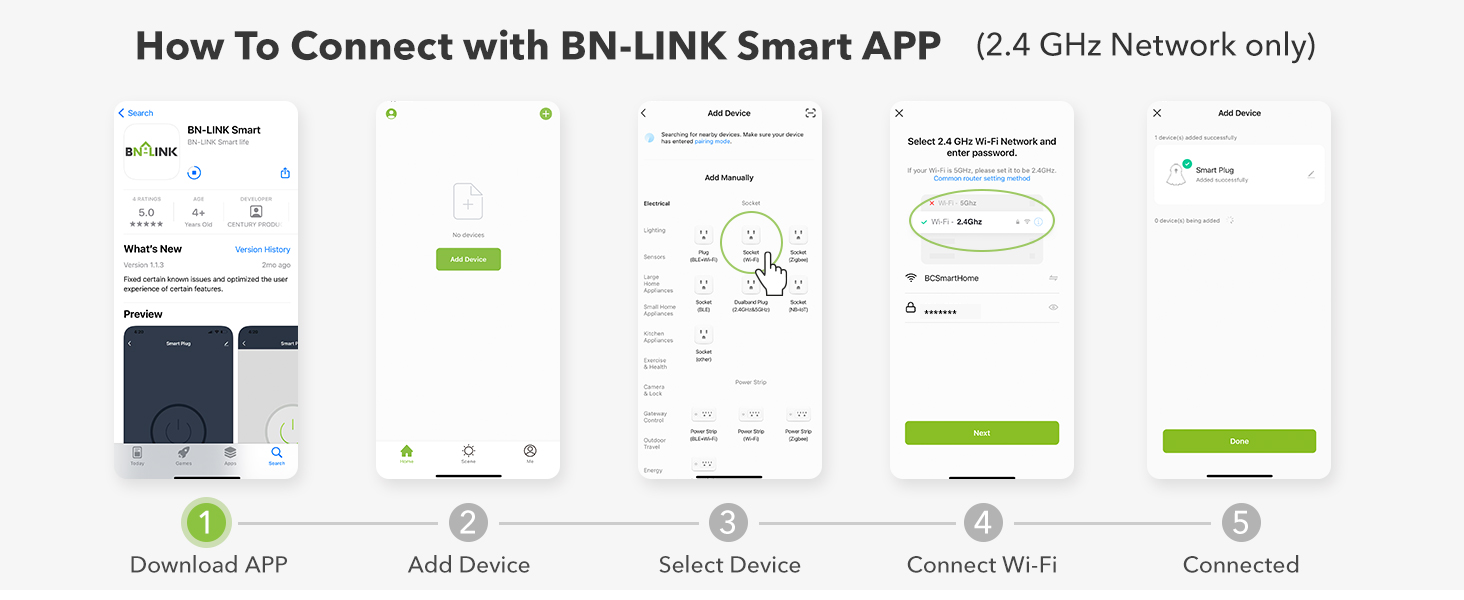
This visual guide outlines the process for connecting your smart outdoor outlet to the BN-LINK Smart App. It details five steps: 1. Download the app, 2. Add a device, 3. Select 'Socket' then 'Smart Plug', 4. Connect to your 2.4 GHz Wi-Fi network, and 5. Confirm successful connection.
Operating Instructions
App Remote Control
Control your outdoor electronics from anywhere using the BN-LINK Smart app on your smartphone. Simply open the app, select your device, and toggle the power on or off.

This image illustrates the convenience of app remote control. A user's hand holds a smartphone displaying the BN-LINK Smart app, which is used to manage outdoor string lights. The scene depicts a backyard with illuminated string lights, emphasizing the ability to control devices from anywhere.
Voice Control
The smart outdoor outlet is compatible with Amazon Alexa and Google Assistant. Once integrated, you can control connected devices with simple voice commands, such as "Alexa, turn on the string lights" or "Hey Google, turn off the patio fan."

This image shows a group of people gathered for an outdoor dinner, with string lights illuminating the scene. The BN-LINK Smart Outdoor Outlet is visible, symbolizing its integration with voice assistants like Amazon Alexa and Google Assistant for hands-free control of outdoor lighting.
Smart Scheduling
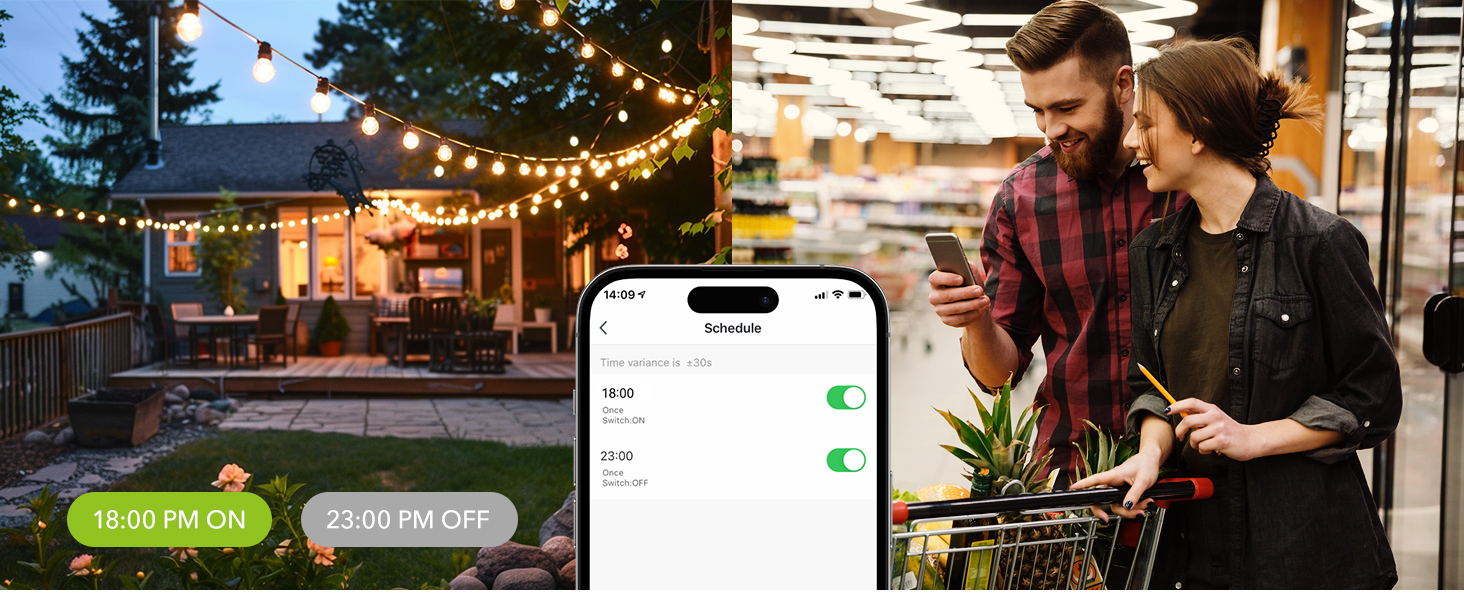
Set custom schedules for your devices to turn on and off automatically. This feature is ideal for automating outdoor lighting, holiday decorations, or other electronics to save energy and enhance convenience.

This image illustrates the smart scheduling feature, where outdoor lights are set to turn on at 6:00 PM and off at 11:00 PM. A smartphone displays the scheduling interface within the app, highlighting the ease of automating outdoor lighting.
Countdown Timer
Utilize the countdown timer function to set a specific duration for your devices to operate. This is useful for temporary tasks like watering the garden or charging outdoor tools, ensuring they turn off automatically after the set time.
This image highlights the countdown function, allowing users to set a specific duration for device operation. It shows a garden sprinkler in action and a person relaxing on a beach, using their smartphone to remotely turn off the sprinkler after a set time, such as 10 minutes.
Simultaneous Control
The BN-LINK Smart Outdoor Outlet controls all three outlets simultaneously. This means that any schedule or manual on/off command will apply to all devices plugged into the unit.
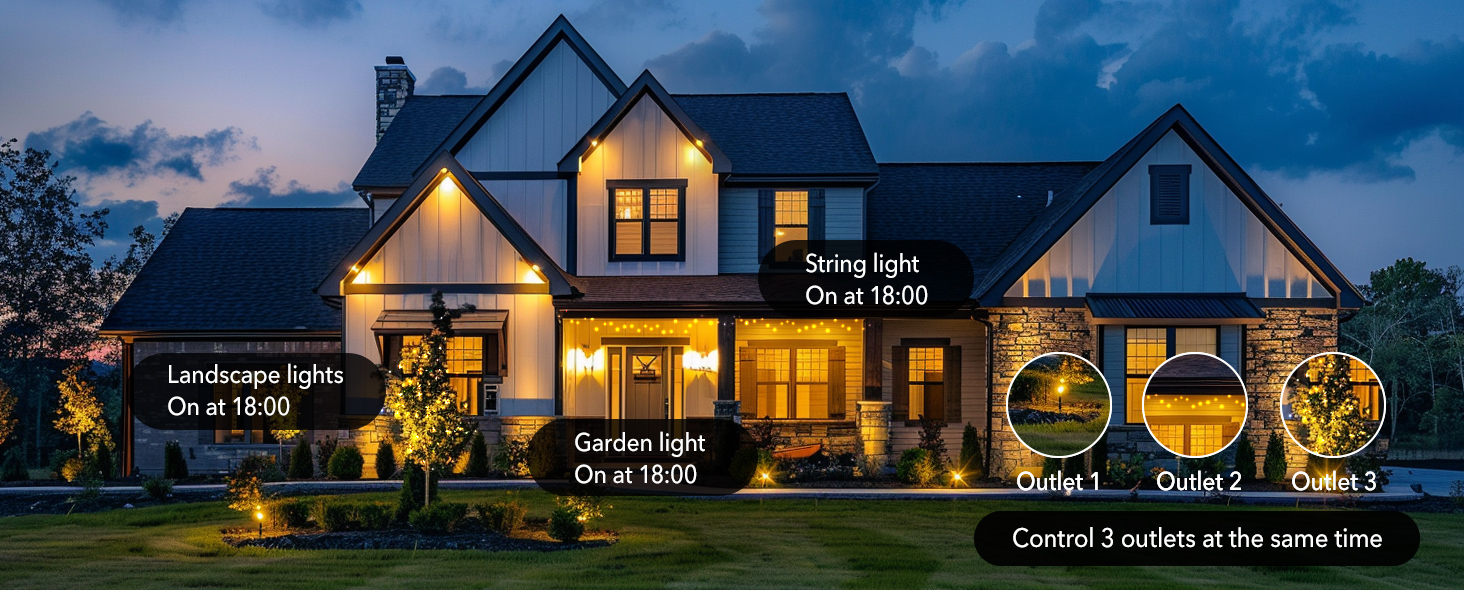
This image displays a house at night with different types of outdoor lighting, including landscape lights, garden lights, and string lights, all connected to the smart outdoor outlet. It illustrates how the device can control all three outlets simultaneously, turning on all connected lights at a set time, such as 6:00 PM.
Maintenance
To ensure the longevity and proper functioning of your smart outdoor outlet, follow these maintenance guidelines:
- Cleaning: Periodically wipe the exterior of the device with a soft, damp cloth to remove dirt and debris. Do not use harsh chemicals or abrasive cleaners.
- Storage: When not in use for extended periods, store the device in a cool, dry place away from direct sunlight and extreme temperatures.
- Inspection: Regularly inspect the power cord and the device for any signs of damage, such as frayed wires, cracks, or corrosion. Discontinue use if any damage is found.

This image shows the BN-LINK Smart Outdoor Outlet installed on a brick wall, plugged into an outdoor electrical box. Water droplets are visible on its surface, emphasizing its IP44 weatherproof rating and suitability for outdoor use. It is recommended to use the timer vertically at least 2 feet above the ground.
Troubleshooting
If you encounter issues with your BN-LINK Smart Outdoor Outlet, refer to the table below for common problems and their solutions:
| Issue | Possible Cause | Solution |
|---|---|---|
| Device won't connect to Wi-Fi. | Incorrect Wi-Fi band (5 GHz), weak signal, incorrect password. | Ensure your router is broadcasting a 2.4 GHz network and your phone is connected to it. Check Wi-Fi signal strength at the outlet's location. Verify Wi-Fi password. Try the AP mode setup method in the app if standard mode fails. |
| App crashes or doesn't work properly. | App compatibility issues, corrupted data. | Try using alternative compatible apps like "Smart Life" or "Tuya Smart". Clear the app's cache and data, then reinstall the app. Ensure your phone's operating system is up to date. |
| Device not responding to app/voice commands. | No power, Wi-Fi disconnected, app/voice assistant integration issue. | Check if the outlet has power. Verify the device's Wi-Fi indicator light is solid. Re-link the device with your voice assistant (Alexa/Google Assistant) if necessary. Restart the smart outlet by unplugging and re-plugging it. |
| Connected lights/devices not turning on/off as scheduled. | Incorrect schedule settings, power outage, device malfunction. | Double-check your schedules and countdown timers in the app for accuracy. Ensure the connected devices are functioning correctly when plugged directly into a standard outlet. Verify the smart outlet has continuous power. |
Specifications
| Feature | Detail |
|---|---|
| Brand | BN-LINK |
| Model Number | BNC-60/U130T |
| Operation Mode | Automatically, Off |
| Current Rating | 15 Amps |
| Operating Voltage | 125 Volts |
| Wattage | 1875 watts |
| Connectivity Protocol | Wi-Fi (2.4 GHz only) |
| Control Method | Voice, App |
| Controller Type | Google Assistant, Amazon Alexa |
| International Protection Rating | IP44 |
| Number of Outlets | 3 |
| Item Dimensions (L x W x H) | 5 x 4 x 1.5 inches |
| Item Weight | 8.4 ounces |
Warranty and Support
BN-LINK products typically come with a limited warranty. For specific warranty terms and conditions, please refer to the product packaging or the official BN-LINK website. Keep your purchase receipt as proof of purchase.
If you require technical assistance, troubleshooting beyond this manual, or have questions regarding your product, please contact BN-LINK customer support. Contact information can usually be found on the product packaging or the official BN-LINK website.
Official Product Videos
No official seller videos are available for this product at this time.
Related documentsBNC-60/U130T


Ask a question about this manual
Ask about setup, troubleshooting, compatibility, parts, safety, or missing instructions. Manuals+ will review the question and use this page’s manual context to help answer it.